# Anyone know of a way to re-create a clipping mask in Aseprite?
**URL:** https://community.aseprite.org/t/anyone-know-of-a-way-to-re-create-a-clipping-mask-in-aseprite/20922
**Category:** Help
**Created:** [December 14, 2023, 3:31am UTC](https://community.aseprite.org/t/anyone-know-of-a-way-to-re-create-a-clipping-mask-in-aseprite/20922 "2023-12-14T03:31:25Z")
**Posts on this page:** 3
**Page:** 1
### Author:  [@fawndering](https://community.aseprite.org/u/fawndering)
#### Post date: [December 14, 2023, 3:31am UTC](https://community.aseprite.org/t/anyone-know-of-a-way-to-re-create-a-clipping-mask-in-aseprite/20922/1 "2023-12-14T03:31:25Z")
I’m currently making a tileset for the flooring of a game, and I come from a CLIPSTUDIO/Photoshop background so I’m quite used to using clipping masks for drawing on layers while preserving the original shape of the layer underneath it.
Currently, I have a layout done in a black layer for the actual ground path, but I need to take my already made dirt tiles and clip them down to the black layer.
I couldn’t find it while searching online and ripping my eyeballs out looking through documentation, so I was wondering if there is a similar tool to the one in Photoshop for clipping masks? It would make my workflow 500000% faster if anyone could point me in the right direction :')
---
### Author:  [@dacap](https://community.aseprite.org/u/dacap)
#### Post date: [December 14, 2023, 3:38pm UTC](https://community.aseprite.org/t/anyone-know-of-a-way-to-re-create-a-clipping-mask-in-aseprite/20922/2 "2023-12-14T15:38:28Z")
Hi @fawndering, currently Aseprite doesn’t have mask layers, but you might find useful the “Lock Alpha” ink:
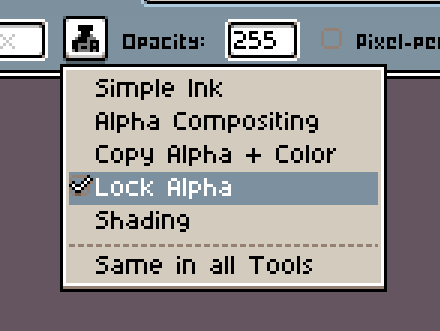
In this way you can paint but only on non-transparent pixels.
---
### Author:  [@fawndering](https://community.aseprite.org/u/fawndering)
#### Post date: [January 27, 2024, 6:16pm UTC](https://community.aseprite.org/t/anyone-know-of-a-way-to-re-create-a-clipping-mask-in-aseprite/20922/3 "2024-01-27T18:16:00Z")
That’s unfortunate, but thank you for the reply! Hoping there’s the possibility of mask layers being added in the future, since my normal workflow outside of this program involves using a fair amount of mask layers before reducing everything down.
Lock Alpha is just what we’ve had to use since we couldn’t find anything else yet 🙂