# Aseprite v1.3.15.3 & v1.3.16-beta1
**URL:** https://community.aseprite.org/t/aseprite-v1-3-15-3-v1-3-16-beta1/27469
**Category:** News
**Created:** [September 23, 2025, 7:01pm UTC](https://community.aseprite.org/t/aseprite-v1-3-15-3-v1-3-16-beta1/27469 "2025-09-23T19:01:21Z")
**Posts on this page:** 16
**Page:** 1
### Author:  [@martincapello](https://community.aseprite.org/u/martincapello)
#### Post date: [September 23, 2025, 7:01pm UTC](https://community.aseprite.org/t/aseprite-v1-3-15-3-v1-3-16-beta1/27469/1 "2025-09-23T19:01:21Z")
Hi pixel lovers! Today we’ve released Aseprite v1.3.15.3 including some fixes and v1.3.16-beta1 with a few nice features.
Remember, beta versions are available only [through Steam](https://www.aseprite.org/beta/).
## What’s new
**Aseprite v1.3.16.beta1** (art by [DrSmey](https://linktr.ee/drsmey))
- Added “Run Command” window (press Ctrl+Space to try it!) [#5393](https://github.com/aseprite/aseprite/pull/5393) featuring:
- Added UI customization by making all elements on screen dockable/movable/resizable [#518](https://github.com/aseprite/aseprite/issues/518) [#3485](https://github.com/aseprite/aseprite/pull/3485)
- Lua API:
**Aseprite v1.3.15.3**
- Fix UI theme colors to match theme color space [commit c444b56](https://github.com/aseprite/aseprite/commit/c444b566e11eb8415cdeee92d37469d557455d8e)
- Context matching and prioritization using keyboard shortcuts [#5390](https://github.com/aseprite/aseprite/issues/5390)
- Fixed Color Management issues ([t/15751](https://community.aseprite.org/t/15751)), ([t/21945](https://community.aseprite.org/t/21945))
- Lua API:
- [lua] Update scripting API version to 36
- [lua] Enclose key names for plugin preferences with [“…”] when it’s required [#5412](https://github.com/aseprite/aseprite/issues/5412)
**Aseprite v1.3.15.4 & v1.3.16-beta2**
- Fixed random crashes applying filters (Replace Color, Outline, etc.) [#4991](https://github.com/aseprite/aseprite/issues/4991)
- Fixed crash with certain scripts pasting images with an empty selection [#5361](https://github.com/aseprite/aseprite/issues/5361)
- Fixed crash dropping certain images [#5447](https://github.com/aseprite/aseprite/issues/5447)[https://github.com/aseprite/aseprite/issues/4388](https://github.com/aseprite/aseprite/issues/4388)
- Fixed mouse gestures not working after switching tabs [#4388](https://github.com/aseprite/aseprite/issues/4388) (thanks to [@JoshuaL03](https://github.com/aseprite/aseprite/pull/5425))
**Aseprite v1.3.15.5**
- Added _Ignore empty frames_ toggle to _File \> Export \> Export As_ [#5452](https://github.com/aseprite/aseprite/issues/5452) (thanks to [@JoshuaL03](https://github.com/aseprite/aseprite/pull/5491))
- Improved rotated rectangles and square brushes [#5459](https://github.com/aseprite/aseprite/issues/5459)
- Fixed small graphical bug when dragging cels [#5216](https://github.com/aseprite/aseprite/issues/5216)
- Fixed creating a copy rotating selection (CW/CCW) when we associate these commands with a shortcut including Ctrl modifier [#1330](https://github.com/aseprite/aseprite/issues/1330) (thanks to [@JoshuaL03](https://github.com/aseprite/aseprite/pull/5461))
- Fixed export file window not starting out centered [#5480](https://github.com/aseprite/aseprite/pull/5480)
- Fixed some Brush Preview visual traces when canvas is zoomed out [#5005](https://github.com/aseprite/aseprite/issues/5005)
- Fixed Move tool with Auto Select Layer when the composition of groups is enabled [#4812](https://github.com/aseprite/aseprite/issues/4812)
- Steam: `-batch` arg should have the same effect as `-noinapp` [#5482](https://github.com/aseprite/aseprite/issues/5482)
- macOS: Fixed thumbnails for macOS Sequoia [#5009](https://github.com/aseprite/aseprite/issues/5009)
- Windows: Fixed regression pasting DIB bitmaps from old Windows programs, e.g. Photoshop v7.0 [#5458](https://github.com/aseprite/aseprite/issues/5458)
- Windows: Added compatibility to paste 1bpp and 4bpp bitmaps from clipboard
- Lua API:
- Update [API version](https://www.aseprite.org/api/app#appapiversion) to 37
- Avoid setting window bounds when the app is closing [#5384](https://github.com/aseprite/aseprite/issues/5384)
- Fixed centering a dialog with `autoscrollbars` behavior [#5485](https://github.com/aseprite/aseprite/pull/5485)
- `WebSocket`: Added `error` param to `onreceive` handler
- Fixed `app.clipboard.content.selection` property
**Aseprite v1.3.16-beta3**
- Windows: Added IME support on text fields [#1767](https://github.com/aseprite/laf/issues/1767) [#2841](https://github.com/aseprite/laf/issues/2841) (thanks to [@Cerallin](https://github.com/aseprite/laf/pull/147))
- Windows: New external process to show Open/Save File dialog, in case of crash the dialog is restarted without crashing Aseprite. This is the most common crash at the moment on Windows [#4412](https://github.com/aseprite/aseprite/issues/4412)
* * *
[📦 How to update Aseprite](https://www.aseprite.org/faq/#how-do-i-update-my-current-version)
[⚡ How to get the beta version](https://www.aseprite.org/beta/)
---
### Author:  [@pakowacz](https://community.aseprite.org/u/pakowacz)
#### Post date: [September 25, 2025, 1:55pm UTC](https://community.aseprite.org/t/aseprite-v1-3-15-3-v1-3-16-beta1/27469/4 "2025-09-25T13:55:47Z")
Hi there.
Can’t update to 1.3.15 and further at Steam - always corrupt download after 2%
So I stuck on 1.3.14 beta1 Do you kno guys any solution for this issue? Thanks in advance!
---
### Author:  [@martincapello](https://community.aseprite.org/u/martincapello)
#### Post date: [September 25, 2025, 2:14pm UTC](https://community.aseprite.org/t/aseprite-v1-3-15-3-v1-3-16-beta1/27469/5 "2025-09-25T14:14:44Z")
Hi there,
It seems like you are having some issues with the Steam client. Do you have the latest Steam client installed? Unfortunately we don’t have any control on how Steam handles the updates 😞…so I would recommend to contact Steam support if the issue persist.
Which OS are you using?
---
### Author:  [@pakowacz](https://community.aseprite.org/u/pakowacz)
#### Post date: [September 25, 2025, 2:16pm UTC](https://community.aseprite.org/t/aseprite-v1-3-15-3-v1-3-16-beta1/27469/6 "2025-09-25T14:16:44Z")
It’s only with Aseprite. Other games and soft I can download and install-reinstall with no problems. Quite old one Mac OS 10.14.6 but it works for me
---
### Author:  [@martincapello](https://community.aseprite.org/u/martincapello)
#### Post date: [September 25, 2025, 2:21pm UTC](https://community.aseprite.org/t/aseprite-v1-3-15-3-v1-3-16-beta1/27469/7 "2025-09-25T14:21:27Z")
That is weird…definitively something to ask to the Steam team…for the moment this is the first report about not being able to update Aseprite in Steam.
@dacap do you have any clue?
---
### Author:  [@dacap](https://community.aseprite.org/u/dacap)
#### Post date: [September 25, 2025, 3:52pm UTC](https://community.aseprite.org/t/aseprite-v1-3-15-3-v1-3-16-beta1/27469/8 "2025-09-25T15:52:31Z")
Did you opt-out of all betas from Aseprite properties? What specific Steam client version are you using?
---
### Author:  [@pakowacz](https://community.aseprite.org/u/pakowacz)
#### Post date: [September 25, 2025, 5:12pm UTC](https://community.aseprite.org/t/aseprite-v1-3-15-3-v1-3-16-beta1/27469/9 "2025-09-25T17:12:14Z")
Hey David
Yep. There is “none” in my props. Steam 4.0
PS I wrote to Steam support about this issue too and will let you know what they reply
---
### Author:  [@pakowacz](https://community.aseprite.org/u/pakowacz)
#### Post date: [September 26, 2025, 4:50am UTC](https://community.aseprite.org/t/aseprite-v1-3-15-3-v1-3-16-beta1/27469/10 "2025-09-26T04:50:13Z")
Here is a reply from Steam:
Hi there,
It looks like you were able to install and play Aseprite.
If you encounter same issue in the future, kindly follow the steps below:
This error indicates that Steam failed to find data required for the game on any content server.
This can be caused by incorrect or old app configuration on your Steam Client.
Our Update & Installation Issues article has steps for resolving installation issues. You will want to make sure that you perform the following ones, as they pertain directly to the error you are experiencing:
- Clear download cache
- Change download region
If you’ve tried all of these and are still encountering the error, please let us know. If anything changed after performing the troubleshooting steps from the article above, make sure to include that info as well.
Steam Support
Kat
---
### Author:  [@pakowacz](https://community.aseprite.org/u/pakowacz)
#### Post date: [September 26, 2025, 9:06am UTC](https://community.aseprite.org/t/aseprite-v1-3-15-3-v1-3-16-beta1/27469/11 "2025-09-26T09:06:22Z")
and one more update from Steam
Hello,
Thank you for replying.
We understand your situation.
Per our official [announcement](https://help.steampowered.com/en/faqs/view/743F-2E0E-C9A5-C375), Steam officially stopped supporting the macOS 10.14 operating system. However, Steam support does not have any further details outside of what is included in the announcement at this time.
Additionally, your computer does not meet the minimum system requirements to play this title. As you can see [here](https://store.steampowered.com/app/431730/Aseprite/), Aseprite 's minimun system requirements is Mac OS X 10.15.
Our recommendation would be to upgrade your operating system to avoid any disruption in service.
If you have any further questions, please let us know - we will be happy to assist you.
Steam Support
Vivian
---
### Author:  [@SynthED](https://community.aseprite.org/u/SynthED)
#### Post date: [October 12, 2025, 7:43am UTC](https://community.aseprite.org/t/aseprite-v1-3-15-3-v1-3-16-beta1/27469/12 "2025-10-12T07:43:59Z")
Hi, I’ve downloaded the beta version and enabled the “UI with multiple windows” option, but the undocked panels (for example, the animation timeline) don’t appear on another monitor. The only thing that can be displayed on another monitor is the preview window.
I mean, I moved the timeline panel, but it doesn’t show up on another monitor.
---
### Author:  [@SeinRuhe](https://community.aseprite.org/u/SeinRuhe)
#### Post date: [October 14, 2025, 3:27am UTC](https://community.aseprite.org/t/aseprite-v1-3-15-3-v1-3-16-beta1/27469/13 "2025-10-14T03:27:34Z")
Hey Guys!
First of all, and as always… Amazing update! Congratulations! Aseprite is the best tool for making pixel art by far, far, far, far, far, far.
Far.
I just love it!
After using and enjoying this update for a while I’m here to provide a bit of feedback!
What I think could be improved regarding the workspace layout:
- It would _probably_ be nice if the Workspace Layout dropdown is always visible. And clicking the Workspace Layout button can enable editing the Workspace Layout profiles. Not a lot of people change of layouts regularly, but I change the layout a ton depending of if I’m working doing animations or illustration. Animation = Horizontal Timeline to see more frams, Illustration = Vertical Timeline to see more layers! TL:DR It just feels a tiny tad strange to have to click a button to enable the Workspace Layout dropdown.
- On the same topic, it would be a bless to add shortcuts to change Workspace Layouts, even if it’s just cycling them up/down.
---
### Author:  [@maanemann](https://community.aseprite.org/u/maanemann)
#### Post date: [October 18, 2025, 10:40am UTC](https://community.aseprite.org/t/aseprite-v1-3-15-3-v1-3-16-beta1/27469/14 "2025-10-18T10:40:08Z")
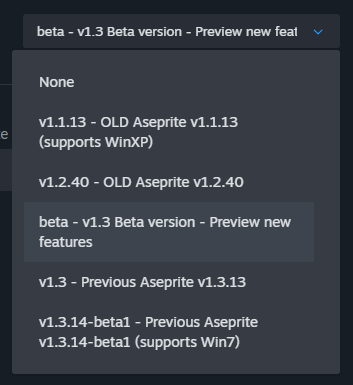
I would love to try out these cool new beta features, but through the Steam beta settings for Aseprite the latest version I’m able to opt into is 1.3.14-beta1. I’m on Linux, can that explain something maybe?
---
### Author:  [@CrashTestJava](https://community.aseprite.org/u/CrashTestJava)
#### Post date: [October 18, 2025, 4:46pm UTC](https://community.aseprite.org/t/aseprite-v1-3-15-3-v1-3-16-beta1/27469/15 "2025-10-18T16:46:58Z")
There should be this option on the dropdown (highlighted in the image):
`beta - v1.3 Beta version - Preview new features`
Is this not showing?
---
### Author:  [@maanemann](https://community.aseprite.org/u/maanemann)
#### Post date: [October 20, 2025, 1:11pm UTC](https://community.aseprite.org/t/aseprite-v1-3-15-3-v1-3-16-beta1/27469/16 "2025-10-20T13:11:39Z")
Oh yes, thank you very much! I expected `v1.3` to be older than `v1.3.x`, such as `v1.3.14`.
---
### Author:  [@Monsieur\_Limpet](https://community.aseprite.org/u/Monsieur_Limpet)
#### Post date: [October 26, 2025, 10:42pm UTC](https://community.aseprite.org/t/aseprite-v1-3-15-3-v1-3-16-beta1/27469/17 "2025-10-26T22:42:10Z")
I’m using the Beta, and don’t seem to be able to dock the Undo History. Is this intended, or an oversight? I’d very much like to be able to dock the Undo History.
---
### Author:  [@dacap](https://community.aseprite.org/u/dacap)
#### Post date: [December 10, 2025, 8:48pm UTC](https://community.aseprite.org/t/aseprite-v1-3-15-3-v1-3-16-beta1/27469/18 "2025-12-10T20:48:03Z")