Hi asepriters! Today we’re releasing Aseprite v1.3.16 as the new stable version. It includes all the new features from the previous v1.3.16-betas and a lot of bug fixes. On the other hand, in the Steam beta channel you’ll find the new Aseprite v1.3.17-beta1 with new features
This update is amazing! I love the new selection tool with the corners option, and the cornered square is great!! The Solo Layer is AMAZING and I’ve been looking for it for ages, it is REALLY helpful! A suggestion to make it better is to make it similar to ToonBoom Harmony:
Like the icon to view/hide the layer, the Solo icon does the opposite and allows the user to solo more than 1 layer at a time. I tested it on Aseprite now and selecting multiple layers and hitting the Solo Layer shortcut works and hide all the others! Which is great! However, there is no visual clue that the Solo Layer is active. Or have I missed it? Ctrl+Z do not undo it so you have to hit the keyboard shortcut again.
Oh, and unfortunately, double-click still do not work with a stylus on the native Linux version. I am using Linux Mint 22.1 Cinammon and Aseprite v1.3.17-beta1 with a Wacom Cintiq 16. Is there a workaround? I’ve been using it in compatibility mode since I moved to Linux.
Thank you so much for all the hard work! I love Aseprite and have been using it professionally for the past 5 years. It’s amazing how far it improved and it’s great to watch it grow!
I suspect something about keyboard shortcuts is broken because when holding space to change to hand (quick) it just changes to hand (not quick) aka. when I release space it does not go back to the previous tool like it should.
Thanks for your kind words @GabrianneArts! Going to answer below
Yes, actually only the eye icons are switched (just as it happens when we Alt+click an eye to soloing a layer from the timeline). But it’s a nice idea to have some extra clue (not sure about adding a new column, but probably an alternative eye icon).
Hi @Space_Sandwich, are you sure that the selected tool changed? I tried to reproduce it in v1.3.16 and only the hand icon persists, but after clicking the Pencil starts drawing (so basically it looks like the Hand icon is not updated until we click).
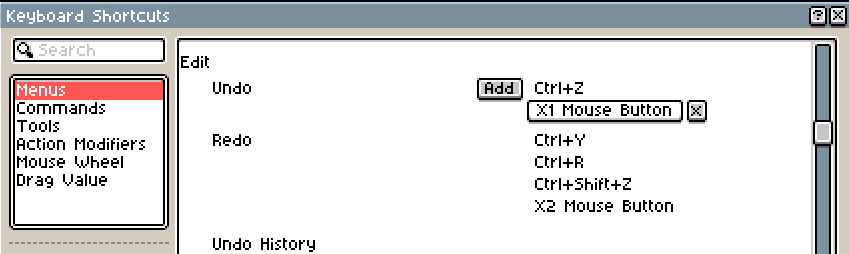
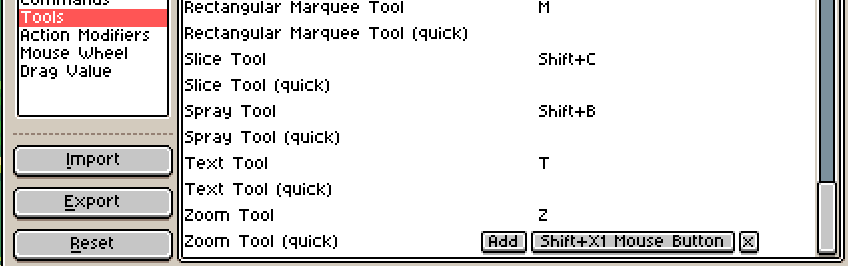
Amazing update as always! Being able to bind extra keys from the mouse is extremely helpful!
However, I have found that dragging an active selection while keeping CTRL pressed no longer duplicates the selection, but instead moves the entire layer. Is this new behaviour intended? And if so, is there a way to turn back to the way it was?
Hi @SeinRuhe, it’s not an intended behavior, it’s a regression, we’re trying to fix it ASAP and release a new version soon. Anyway it looks like a problem in the beta version only. More info here: Cannot copy selection (regression) · Issue #5585 · aseprite/aseprite · GitHub
One possible workaround is to click the selection first, and then Ctrl+drag it.
Hi you are right sorry, the hand stays visually but when clicking it doesn’t work as the hand. The fact I was seeing the hand after releasing tho was messing with me and assumed it was the real hand. the tool icons on the right also don’t update properly, while the hand is being wrongly shown the icon tab acts as if you have no tool selected at all visually
Correction: I said no tool selected because I had the magnifying glass visible there instead of the hand, the tab acts as if the hand is still selected and the options bar at the top does as well.
Oh, thanks for pointing that the eye icons turn off! I totally missed it. Glad you liked my suggestion ^^ I’m very fond of Aseprite for animation so it’s exciting to see more tools to help that. And thanks for taking a look at the double-click issue! It will really be better to use the Linux version for Aseprite!
Hey Dacap! I found a weird behavior on the new Beta.
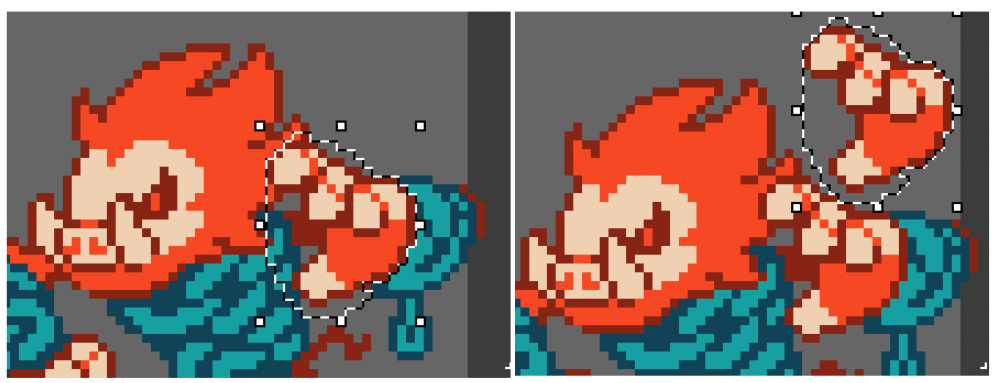
Previously, when selecting an area, holding CTRL and moving the selection would duplicate it. Now, when trying to do this, it will move the whole layer instead. Is there a new preference settings that changed that? At first, I thought it was an issue with my keyboard, but tested it in the retail version of Aseprite (not beta) and it worked perfectly.
Below is an example, I’m using Aseprite v1.3.16 there. Selected the hand, held CTRL and moved the selection to duplicate the hand. In the Beta, this moves the whole layer instead.
Hello, Idk if I’m doing something wrong but on the humble bundle link to download the update it leads to a dead link and I tried the torrent link but when I downloaded it the zip folder was corrupted/empty. Is there something I’m missing?
Hi @delly, sorry for the inconvenience, I’m personally trying to reupload the files right now and fix this issue. Humble Bundle is quite troublesome in this aspect (I’ve lost hours trying to reupload files in the past). When the files are fully uploaded to Humble Bundle I’ll write a new comment here.
Oh, that was fast, thank you! I downloaded the updated and the feature now works as intended.
By the way, do you have a Patreon so I can support Aseprite further? I always admired the software and would love to be a supporter.
For various reasons I’ve ended up buying Aseprite 3 times over the years, and it continues to be one of the best software purchases I’ve ever made. Thanks dacap, you’re a real one!


 How to update Aseprite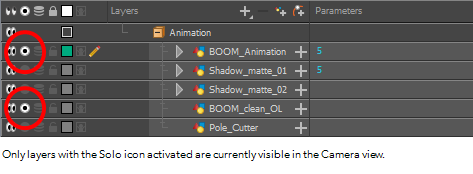
 Though that