# Auto-outline, layer setting
**URL:** https://community.aseprite.org/t/auto-outline-layer-setting/11427
**Category:** Features
**Created:** [October 22, 2021, 10:05pm UTC](https://community.aseprite.org/t/auto-outline-layer-setting/11427 "2021-10-22T22:05:13Z")
**Posts on this page:** 13
**Page:** 1
### Author:  [@Kyrieru](https://community.aseprite.org/u/Kyrieru)
#### Post date: [October 22, 2021, 10:05pm UTC](https://community.aseprite.org/t/auto-outline-layer-setting/11427/1 "2021-10-22T22:05:13Z")
This one is pretty simple to explain, since it exists in other software as an example,
[https://i.gyazo.com/2299131ab0611f7e7953b9fefeac5b9e.mp4](https://i.gyazo.com/2299131ab0611f7e7953b9fefeac5b9e.mp4)
Basically a layer setting that automatically adds an outline as a post-effect. (single pixel, unlike above). It is a post effect, so erasing also automatically adjusts in a non destructive way.
---
### Author:  [@eishiya](https://community.aseprite.org/u/eishiya)
#### Post date: [October 22, 2021, 11:35pm UTC](https://community.aseprite.org/t/auto-outline-layer-setting/11427/2 "2021-10-22T23:35:17Z")
I’d love to see an outline setting that lets you set the thickness.
The current outline option isn’t often useful because it’s destructive. Automatic, non-destructive outlines like this enable some cool time-saving techniques too.
Really, layer styles and modes in general would be great to have. Outlines, alpha locking as a layer property so it can be mixed with other inks, glows, drop shadows…
---
### Author:  [@Kyrieru](https://community.aseprite.org/u/Kyrieru)
#### Post date: [October 23, 2021, 12:15am UTC](https://community.aseprite.org/t/auto-outline-layer-setting/11427/3 "2021-10-23T00:15:13Z")
To me, the big thing with auto outlines is that it would remove the guesswork when drawing flats, since it would show you exactly how “thick” the sprite is with outlines rather than guessing. Since drawing with lines is usually a bit messy or requires cleanup.
---
### Author:  [@BraidAcer](https://community.aseprite.org/u/BraidAcer)
#### Post date: [October 27, 2021, 11:51am UTC](https://community.aseprite.org/t/auto-outline-layer-setting/11427/4 "2021-10-27T11:51:14Z")
Currently you can press Shift+O to preview outline. But it is not really friendly as you will have to switch to right color each time.
---
### Author:  [@iNightfall](https://community.aseprite.org/u/iNightfall)
#### Post date: [February 14, 2023, 9:17pm UTC](https://community.aseprite.org/t/auto-outline-layer-setting/11427/5 "2023-02-14T21:17:10Z")
I know it’s not the most ideal, and may not fully address this, but while I too was trying to find a nice solution, I couldn’t find anything, so I made scripts to create these outlines on demand:
[https://github.com/iNightfaller/aseprite-ez-outline](https://github.com/iNightfaller/aseprite-ez-outline)
---
### Author:  [@Kyrieru](https://community.aseprite.org/u/Kyrieru)
#### Post date: [April 18, 2024, 4:10pm UTC](https://community.aseprite.org/t/auto-outline-layer-setting/11427/6 "2024-04-18T16:10:59Z")
(Sorry to respond to this a million years later, just chiming in since I still hope this gets added eventually)
Unfortunately it doesn’t accomplish the main goal, which is that being able to see the outlines as you draw. The problem is that people tend to draw the sprite as it looks good with flats, and so when outline are added after, it can result in the sprite being too “thick”, and the lines and sprite need to be adjusted. (for example head is all wrong, here.)
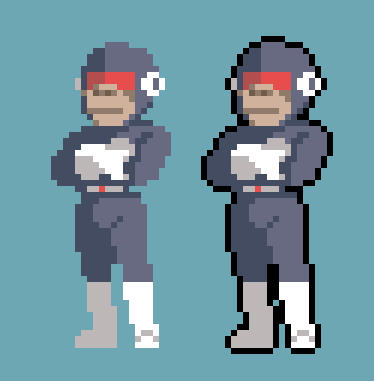
By having real-time outlines, it would allow you to see the result of the outlines as you are drawing, which would allow you to fix these issues as they come. Since probably 50% of the pixel art out there has outlines in one way or another, real time outlines would be a pretty big deal in terms of efficiency.
---
### Author:  [@ProfessorQ](https://community.aseprite.org/u/ProfessorQ)
#### Post date: [June 15, 2025, 8:39am UTC](https://community.aseprite.org/t/auto-outline-layer-setting/11427/7 "2025-06-15T08:39:29Z")
Pretty sure it’s similar to this one, right?
[https://x.com/pixquare\_app/status/1933813853886022070](https://x.com/pixquare_app/status/1933813853886022070)
---
### Author:  [@drawer1234](https://community.aseprite.org/u/drawer1234)
#### Post date: [September 19, 2025, 7:57am UTC](https://community.aseprite.org/t/auto-outline-layer-setting/11427/8 "2025-09-19T07:57:33Z")
Hey, this is cool but one issue with it is that it will create an outline for all the layers and not just the selected layer. Wish you could fix that. Thanks for the script though.
---
### Author:  [@Kyrieru](https://community.aseprite.org/u/Kyrieru)
#### Post date: [September 19, 2025, 9:23pm UTC](https://community.aseprite.org/t/auto-outline-layer-setting/11427/9 "2025-09-19T21:23:45Z")
I made a few different outline tools, so one of them might be useful.
[[Script] Multiple Drawing, outline, fill workflow tools - Scripts & Extensions - Aseprite Community](https://community.aseprite.org/t/script-multiple-drawing-outline-fill-workflow-tools/27163)
---
### Author:  [@Korimi](https://community.aseprite.org/u/Korimi)
#### Post date: [September 22, 2025, 9:51am UTC](https://community.aseprite.org/t/auto-outline-layer-setting/11427/10 "2025-09-22T09:51:12Z")

```auto
wrong pointy colored
```
yeah that a good idea but we need to add a button to stop the auto outline and convert to normal pixels so we can make ajustements to the colors and to make the outline pointy where it needs to be (in red).
---
### Author:  [@drawer1234](https://community.aseprite.org/u/drawer1234)
#### Post date: [February 20, 2026, 4:54am UTC](https://community.aseprite.org/t/auto-outline-layer-setting/11427/11 "2026-02-20T04:54:22Z")
The head looks fine. But I understand you want the outline to be auto-drawn in real-time.
---
### Author:  [@radnom](https://community.aseprite.org/u/radnom)
#### Post date: [February 24, 2026, 5:28am UTC](https://community.aseprite.org/t/auto-outline-layer-setting/11427/12 "2026-02-24T05:28:12Z")
Hello! I have worked on an auto outline layer script that has support for this (manual placement of outline pixels that get ignored by the outline tool) -
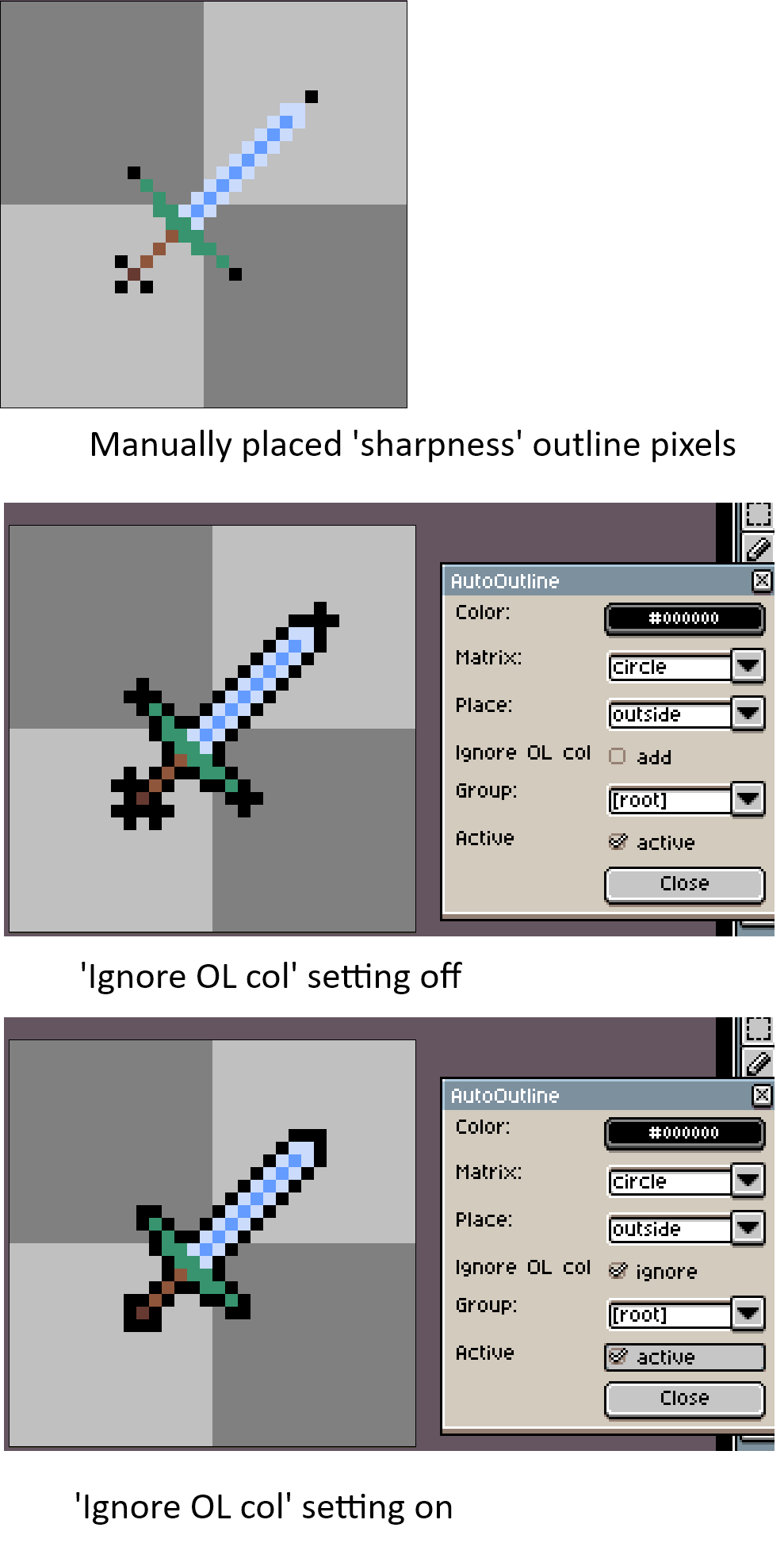
the script is in this topic [Automatic outline generation - #4 by radnom](https://community.aseprite.org/t/automatic-outline-generation/24423/4) if you’re curious! Hope it helps
---
### Author:  [@Kyrieru](https://community.aseprite.org/u/Kyrieru)
#### Post date: [August 11, 2026, 6:37am UTC](https://community.aseprite.org/t/auto-outline-layer-setting/11427/13 "2026-08-11T06:37:09Z")
Managed to get true realtime outlines working, but it required modifying aseprite itself, so unfortunately not much I can post here aside from “hey here’s what it looks like”, for now.
[Example of it working.](https://gyazo.com/255ff8b1fa2a6907dbf83edb7e56d750)