# Blue noise dithering script not working
**URL:** https://community.aseprite.org/t/blue-noise-dithering-script-not-working/28847
**Category:** Help
**Created:** [September 27, 2026, 6:50am UTC](https://community.aseprite.org/t/blue-noise-dithering-script-not-working/28847 "2026-09-27T06:50:55Z")
**Posts on this page:** 3
**Page:** 1
### Author:  [@Trumpet-Weasel](https://community.aseprite.org/u/Trumpet-Weasel)
#### Post date: [September 27, 2026, 6:50am UTC](https://community.aseprite.org/t/blue-noise-dithering-script-not-working/28847/1 "2026-09-27T06:50:55Z")
Hi. I have been trying to teach myself how to use the Aseprite API by creating a variety of dithering algorithms. One of these algorithms is a blue noise algorithm, which uses a sheet of blue noise (evenly distributed white noise) as a threshold texture for dithering an image. I try to generate blue noise using the void and cluster algorithm described [here](https://blog.demofox.org/2019/06/25/generating-blue-noise-textures-with-void-and-cluster/):
1. Randomly place white pixels over a black grid
2. Evenly distribute those white pixels by repeatedly moving a pixel from the densest cluster to the largest void until they both become the same thing.
3. Assign each pixel in the grid a rank from “void-iest” to “cluster-iest”, and use that to generate an rgb value for the blue noise texture.
Below is my implementation of this algorithm.
```lua
local dlg = Dialog{title = "Blue Noise Tester"}
local function GetImageFromLayer (layer)
local img = Image(app.activeSprite.width, app.activeSprite.height)
local cel = layer:cel(app.activeFrame)
if cel then
img:drawImage(cel.image, cel.position)
end
return img
end
dlg:newrow()
dlg:button
{
id = "BlueNoiseButton",
text = "Blue Noise",
label = "Blue Noise - Organic and Natural",
onclick = function ()
GenerateBlueNoise()
app.refresh()
end
}
dlg:entry
{
id="BNSeed",
label = "Blue Noise Seed",
text = "0"
}
--Torodial (wrapping) distance implementation.
local function GetDistance (x1, y1, x2, y2)
local dx = math.abs(x2 - x1)
local dy = math.abs(y2 - y1)
if dx >= app.activeSprite.width / 2 then
dx = app.activeSprite.width - dx
end
if dy >= app.activeSprite.height / 2 then
dy = app.activeSprite.height - dy
end
return math.sqrt(dx ^ 2 + dy ^ 2)
end
--Calculates how much energy two pixels exert on each other.
local function GetPixelEnergy(x1, y1, x2, y2)
return 2.71828 ^ (-GetDistance(x1, y1, x2, y2) / 7.22)
end
--Recalculating an entire lookup table worth of energy values is expensive.
--So I generate a lookup table containing all of the energy values at the start and adjust it as pixels get added and removed.
local function InitializeLookupTable(bl, wpl)
local lookupTable = {}
for y = 1, #bl do
lookupTable[y] = {}
for x = 1, #bl[y] do
local totalBrightness = 0.0
for k = 1, #wpl do
totalBrightness = totalBrightness + GetPixelEnergy(x, y, wpl[k][1], wpl[k][2])
end
lookupTable[y][x] = totalBrightness
end
end
return lookupTable
end
--Adds a pixel to the binary layout and adjusts all energy values in the lookup table accordingly.
function AddPixelToTable (lt, bl, x, y)
if bl[y][x] == true then
return app.alert("ERROR - ATTEMPTED TO ADD PIXEL TO A LOCATION THAT ALREADY HAS ONE.")
end
bl[y][x] = true
for i = 1, #lt do
for j = 1, #lt[i] do
lt[i][j] = lt[i][j] + GetPixelEnergy(j, i, x, y)
end
end
end
--Removes a pixel from the binary layout and adjusts all energy values accordingly.
function RemovePixelFromTable (lt, bl, x, y)
if bl[y][x] == false then
return app.alert("ERROR - ATTEMPTED TO REMOVE PIXEL FROM AN ALREADY EMPTY SPACE.")
end
bl[y][x] = false
local brightness = lt[y][x]
for i = 1, #lt do
for j = 1, #lt[i] do
lt[i][j] = lt[i][j] - GetPixelEnergy(j, i, x, y)
end
end
end
--Checks if a value at a specific coordinate in a binary layout is valid given the circumstances (searchmode)
local function isValidWithSearchMode(bl, x, y, searchMode) --Searchmode indicates what pixels the algorithm will search. 0 = Search both dark and light, 1 = Search only light, 2 (or anything else) = Search only dark.
if searchMode == 0 then
return true
elseif searchMode == 1 then
return bl[y][x]
end
return bl[y][x] == false
end
--Gets the coordinates of the pixel with the lowest energy value.
local function GetDensestVoid(lt, bl, searchmode)
local densestVoidLocation = Point(0,0)
local densestVoidValue = math.huge
for i = 1, #lt do
for j = 1, #lt[i] do
local valid = isValidWithSearchMode(bl, j, i, searchmode)
if(lt[i][j] < densestVoidValue and valid)then
densestVoidValue = lt[i][j]
densestVoidLocation.x = j
densestVoidLocation.y = i
end
end
end
return densestVoidLocation
end
--Gets the coordinates of the pixel with the highest energy value.
local function GetDensestCluster(lt, bl, searchmode)
local densestClusterLocation = Point(0,0)
local densestClusterValue = -1.0
for i = 1, #lt do
for j = 1, #lt[i] do
local valid = isValidWithSearchMode(bl, j, i, searchmode)
if(lt[i][j] > densestClusterValue and valid)then
densestClusterValue = lt[i][j]
densestClusterLocation.x = j
densestClusterLocation.y = i
end
end
end
return densestClusterLocation
end
--Gets the number of pixels of a given type.
local function getPixelCount(bl, searchMode)
local returner = 0
for i = 1, #bl do
for j = 1, #bl[i] do
if isValidWithSearchMode(bl, j, i, searchMode) then
returner = returner + 1
end
end
end
return returner
end
--(Attempts to) generate and display a blue noise texture.
function GenerateBlueNoise()
--Store the location of white and black pixels in a bool matrix (true = white, false = black)
local binaryLayout = {}
--Use this to initialize the lookup table
local allWhitePixelLocations = {}
--Initialize the seed.
math.randomseed(tonumber(dlg.data.BNSeed))
--1 - Generate a white noise pattern where (about) 10% of pixels are white (true), and the rest are black (false)
for i = 1, app.activeSprite.height do
binaryLayout[i] = {}
for j = 1, app.activeSprite.width do
local rand = math.random()
if rand > 0.1 then
binaryLayout[i][j] = false
else
allWhitePixelLocations[#allWhitePixelLocations + 1] = {j, i}
binaryLayout[i][j] = true
end
end
end
--Debugging function used to print initial white noise
--PrintBinaryLayout(binaryLayout, "Before")
--1.5 - Generate a lookup table containing all energy values so we don't have to redraw it every single time.
local lookupTable = InitializeLookupTable(binaryLayout, allWhitePixelLocations)
--2 - Keep swapping the largest cluster and the largest void until they both become the same thing.
while true do
local densestCluster = GetDensestCluster(lookupTable, binaryLayout, 1)
RemovePixelFromTable(lookupTable, binaryLayout, densestCluster.x, densestCluster.y)
local densestVoid = GetDensestVoid(lookupTable, binaryLayout, 2)
AddPixelToTable(lookupTable, binaryLayout, densestVoid.x, densestVoid.y)
if densestCluster.x == densestVoid.x and densestCluster.y == densestVoid.y then
break
end
end
--3 - Rank each pixel from voidiest to clusteriest, and use that rank to generate an RGB value.
--Make copies of the distributed grid so we can remove/add extra ones without effect.
--The ones we remove pixels from
local removalBinaryLayout = {}
local removalLookupTable = {}
--The one we add pixels to.
local additiveBinaryLayout = {}
local additiveLookupTable = {}
for i = 1, #binaryLayout do
removalBinaryLayout[i] = {}
removalLookupTable[i] = {}
additiveBinaryLayout[i] = {}
additiveLookupTable[i] = {}
for j = 1, #binaryLayout[i] do
removalBinaryLayout[i][j] = binaryLayout[i][j]
removalLookupTable[i][j] = lookupTable[i][j]
additiveBinaryLayout[i][j] = binaryLayout[i][j]
additiveLookupTable[i][j] = lookupTable[i][j]
end
end
--Create new layer for the blue noise.
local newLayer = app.activeSprite:newLayer()
newLayer.name = "Blue Noise"
local bnImage = GetImageFromLayer(newLayer)
--Cycle through every white pixel in the distributed grid.
for i = 1, getPixelCount(removalBinaryLayout, 1) do
--Get the densest white pixel
local densestCluster = GetDensestCluster(removalLookupTable, removalBinaryLayout, 1)
--Get the ranking of the pixel, convert it into a normalized value where 0 = clusteriest and 1 = voidiest, and convert it into an rgb value by multiplying it by 255.
local pixelRanking = getPixelCount(removalBinaryLayout, 1) - 1
local pixelValue = ((pixelRanking - 0.0) / (app.activeSprite.width * app.activeSprite.height)) * 255.0
local pixelCol = Color{r = pixelValue, g = pixelValue, b = pixelValue}
bnImage:drawPixel(densestCluster.x - 1, densestCluster.y - 1, pixelCol);
--Remove that pixel from the table for the next cycle.
RemovePixelFromTable(removalLookupTable, removalBinaryLayout, densestCluster.x, densestCluster.y)
end
--Do the same thing with the void pixels, except get the densest void and add a pixel every time.
for i = 1, getPixelCount(additiveBinaryLayout, 2) do
local densestVoid = GetDensestVoid(additiveLookupTable, additiveBinaryLayout, 2)
local pixelRanking = getPixelCount(additiveBinaryLayout, 1)
local pixelValue = ((pixelRanking - 0.0) / (app.activeSprite.width * app.activeSprite.height)) * 255.0
local pixelCol = Color{r = pixelValue, g = pixelValue, b = pixelValue}
bnImage:drawPixel(densestVoid.x - 1, densestVoid.y - 1, pixelCol);
AddPixelToTable(additiveLookupTable, additiveBinaryLayout, densestVoid.x, densestVoid.y)
end
--Print the final image to the new layer.
app.activeSprite:newCel(newLayer, 1, bnImage)
end
--Debugging function used to print a binary layout.
function PrintBinaryLayout (bl, n)
local newLayer = app.activeSprite:newLayer()
newLayer.name = n
local blImage = GetImageFromLayer(newLayer)
for i = 1, #bl do
for j = 1, #bl[i] do
if(bl[j][i]) then
blImage:drawPixel(j - 1, i - 1, Color{r = 255, b = 255, g = 255})
else
blImage:drawPixel(j - 1, i - 1, Color{r = 0, b = 0, g = 0})
end
end
end
app.activeSprite:newCel(newLayer, 1, blImage)
end
dlg:show { wait = false }
```
\*Note - This algorithm gets slower with larger canvases. I recommend testing it in a 32x32 area.
This script is OK, but I have noticed that it results in these strange vertical line artifacts in the final image. (Comparison noise from [here](https://alister-chowdhury.github.io/posts/20240507-bluenoise-generator-for-big-textures/))
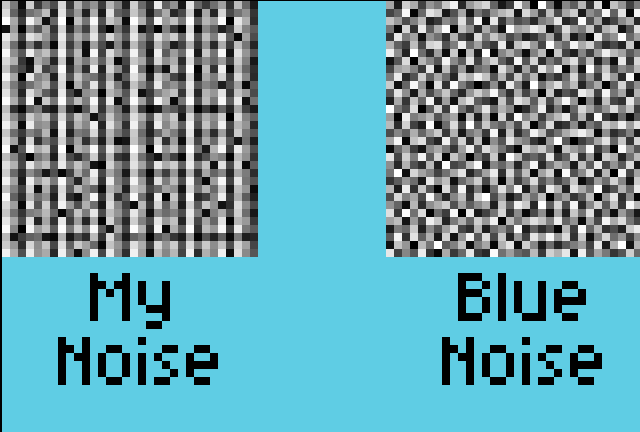
Does anybody know why this might be the case and how can I fix my code to get something like the image on the right?
(P.S. - I’m kinda new to this. Sorry if this is the wrong place to ask this.)
---
### Author:  [@Trumpet-Weasel](https://community.aseprite.org/u/Trumpet-Weasel)
#### Post date: [September 27, 2026, 7:59am UTC](https://community.aseprite.org/t/blue-noise-dithering-script-not-working/28847/2 "2026-09-27T07:59:43Z")
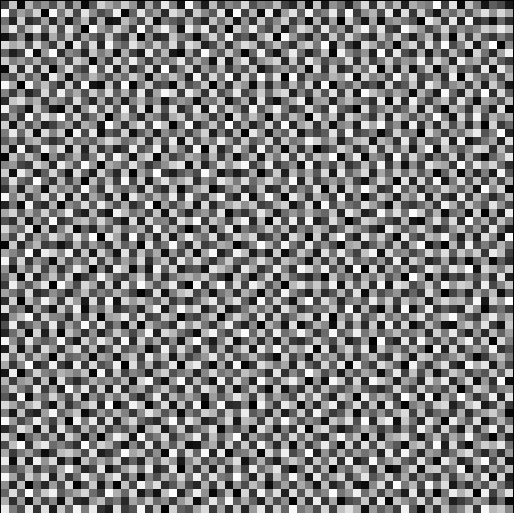
I just discovered that it might be an issue with the dimensions! I tried running it in a 64x64 canvas and it worked perfectly.
---
### Author:  [@Trumpet-Weasel](https://community.aseprite.org/u/Trumpet-Weasel)
#### Post date: [September 27, 2026, 8:41am UTC](https://community.aseprite.org/t/blue-noise-dithering-script-not-working/28847/3 "2026-09-27T08:41:31Z")
I resolved the issue. I began playing around with the standard deviation value of the energy calculation, and discovered that lower values do a fantastic job at mitigating noise. The below is a 32x32 grid with a sigma value of 1.0