# Buggy 90 degree rotation
**URL:** https://community.aseprite.org/t/buggy-90-degree-rotation/3793
**Category:** Help
**Created:** [August 28, 2019, 5:57pm UTC](https://community.aseprite.org/t/buggy-90-degree-rotation/3793 "2019-08-28T17:57:16Z")
**Posts on this page:** 4
**Page:** 1
### Author:  [@BoJustBo](https://community.aseprite.org/u/BoJustBo)
#### Post date: [August 28, 2019, 5:57pm UTC](https://community.aseprite.org/t/buggy-90-degree-rotation/3793/1 "2019-08-28T17:57:16Z")
Hey, first post on the forums, big fan of the program, it’s probably the best and most user friendly program I’ve used for pixel art.
I have however found one thing I consider a pretty major glitch.
When you mirror something horizontally or vertically you get a perfect copy of your art, but when you rotate it 90 degrees, which should also yield perfect symmetry, pixels move around, it’s really quite annoying. I tried it both with freehand rotation, freehand with shift held down. And the button for it in the menus.
Am I doing something wrong here? Because if this is just how it is, I really think it should be fixed.
---
### Author:  [@dacap](https://community.aseprite.org/u/dacap)
#### Post date: [August 28, 2019, 8:19pm UTC](https://community.aseprite.org/t/buggy-90-degree-rotation/3793/2 "2019-08-28T20:19:37Z")
Hi there @BoJustBo! Thanks for your kind words \<3
About the rotation issue, just in case, check if at the top bar it says “Fast Rotation”:
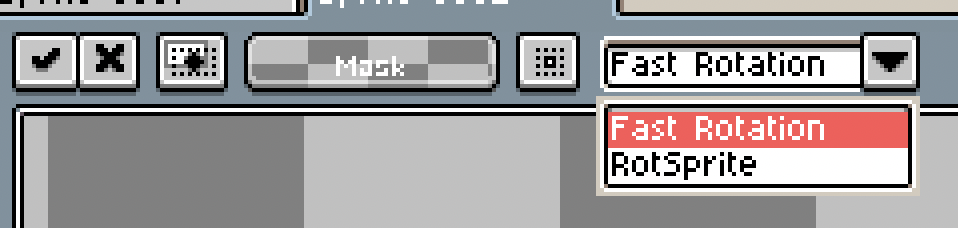
I think this is related to this bug:
> [@Rotate 90 should not use Rotsprite](https://community.aseprite.org/t/rotate-90-should-not-use-rotsprite/3267):
>
> If you use 90 degree rotation (from the menu) while Rotsprite is enabled, it will use it despite no filtering being needed. This means that if you rotate something it will be distorted. To me this is unintended behavior, as filtering is never needed when rotating at those angles. It can also be a little confusing if you don’t know what’s causing it, as the changes can be very subtle, and a user may not realize that it happened until it’s too late.
---
### Author:  [@BoJustBo](https://community.aseprite.org/u/BoJustBo)
#### Post date: [August 29, 2019, 6:35am UTC](https://community.aseprite.org/t/buggy-90-degree-rotation/3793/3 "2019-08-29T06:35:59Z")
Yes that did it, many thanks.
I had a look at rotsprites wikipedia article to figure out what it was and it does look really useful, but perfect 90 degree rotation really should be locked down.
---
### Author:  [@dacap](https://community.aseprite.org/u/dacap)
#### Post date: [September 7, 2019, 12:16am UTC](https://community.aseprite.org/t/buggy-90-degree-rotation/3793/4 "2019-09-07T00:16:03Z")