# Bulk Import Sprite Sheets
**URL:** https://community.aseprite.org/t/bulk-import-sprite-sheets/11770
**Category:** Scripts & Extensions
**Created:** [November 15, 2021, 2:43pm UTC](https://community.aseprite.org/t/bulk-import-sprite-sheets/11770 "2021-11-15T14:43:41Z")
**Posts on this page:** 1
**Page:** 1
### Author:  [@LuxTK](https://community.aseprite.org/u/LuxTK)
#### Post date: [November 15, 2021, 2:43pm UTC](https://community.aseprite.org/t/bulk-import-sprite-sheets/11770/1 "2021-11-15T14:43:41Z")
This script lets you import multiple sprites (saved as a strip or by rows x colums) without having to go to File → Import Sprite Sheet for each and every one of them. It’s mostly useful when importing .png or .gif sprite sheets already exported in some compatible row/column format. It basically calls [app.command.ImportSpriteSheet](https://github.com/aseprite/api/blob/main/api/command/ImportSpriteSheet.md#importspritesheet) for all open sprites.
### Usage
1. Open your sprite sheets in Aseprite.
2. Close any files that you do not wish to slice/import as sprite sheets (this process will be applied to all open files!)
3. Open the script
4. Enter your desired settings, some are optional (like padding)
5. Click Import
6. Wait until the process finishes
7. You’re done! You can now save them as `.ase` or `.aseprite` files or a gif.
### Limitations
- Use at your own risk!
- Cannot be run via CLI. Might add support for this if someone needs it (post in the comments!)
- It’s not an extension so it doesn’t save your previous settings. If you know the dimensions of your spritesheets, you could hard code them into the script by modifying it and changing the `text` values of the appropriate [dialog entries](https://github.com/aseprite/api/blob/main/api/dialog.md#dialog) if you know a little Lua.
- Not thoroughly tested with all sorts of sprite sheets but it should work.
- It would be nice if you could just open the sprites via the Dialog, but [Dialog:File()](https://github.com/aseprite/api/blob/main/api/dialog.md#dialogfile) only supports opening a single file at a time apparently.
### Changelog
- released [v0.1](https://gist.github.com/IgnacioLuxP/906842a3f3a0dc33e4dee772cc3cf4fa)
### Download
>
(Open the above link, click the **Raw** button on the top right and copy paste all the code into a text file or right-click and save the file. It needs to be a `.lua` file and have no weird/HTML characters or the script won’t run. Further script installation instructions can be found [here](https://community.aseprite.org/t/aseprite-scripts-collection/3599)).
### Demo
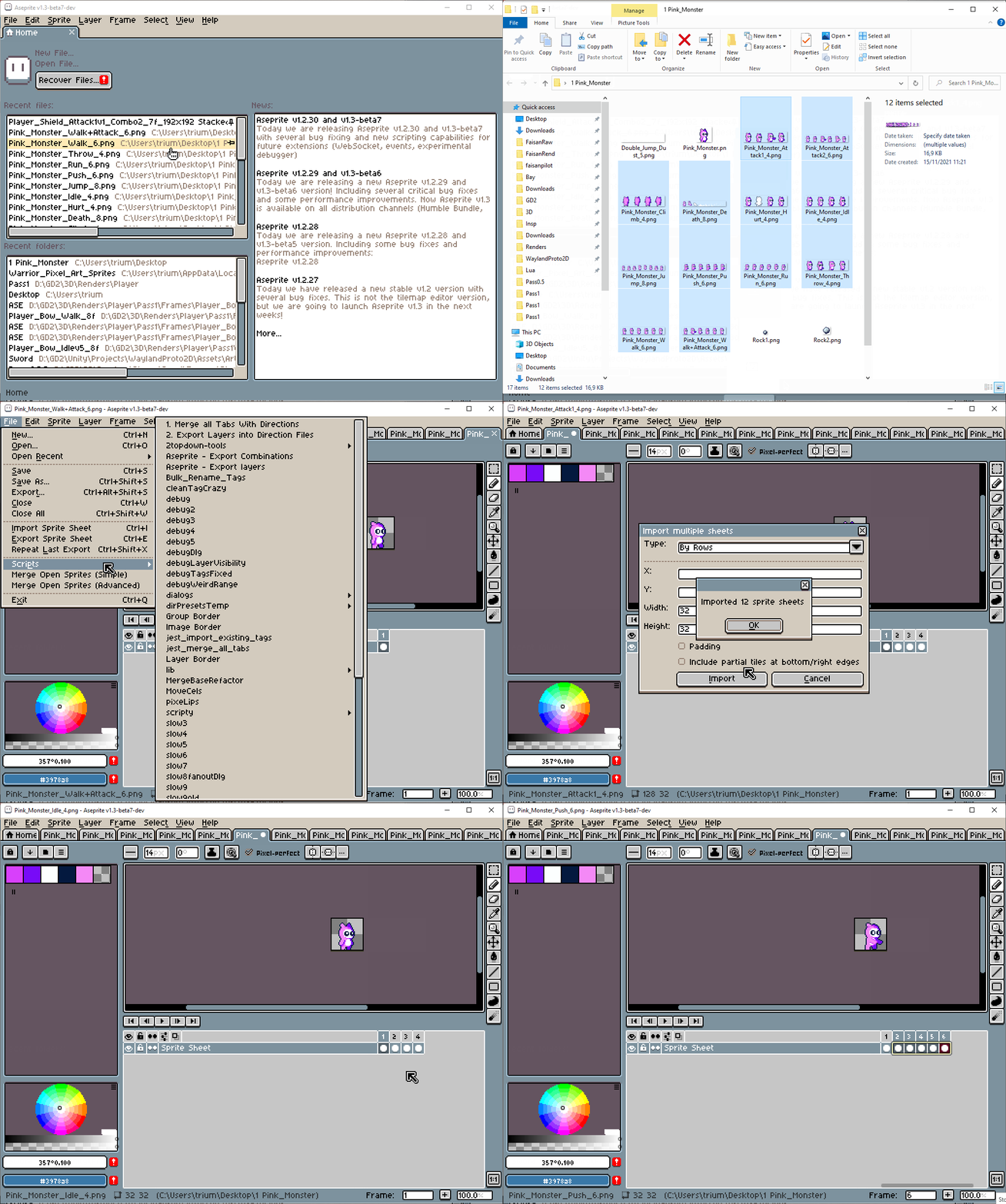
Assets in the demo taken from [Itch.io](https://free-game-assets.itch.io/free-tiny-hero-sprites-pixel-art?download)
Someone asked in the Discord why they couldn’t apply this process to all the sheets they opened so I made this. Feel free to ask questions or report any issues.