### Author:  [@DudleyWaffles](https://community.aseprite.org/u/DudleyWaffles)
#### Post date: [November 14, 2018, 8:29pm UTC](https://community.aseprite.org/t/converting-to-index-color-gives-incorrect-results/2200/6 "2018-11-14T20:29:48Z")
Thanks for posting here.
Can I make a suggestion, if there’s going to be a different system can there be an option for an exact mode? By that I mean the function would just be two loops where for each pixel of the document, it checks every pixel of the palette, and if an exact match is found then it’s accepted and if it isn’t then instead of choosing the next best color it actually stops the process and alerts the user?
Those of us who get really anal about colors would appreciate it.
---
### Author:  [@DudleyWaffles](https://community.aseprite.org/u/DudleyWaffles)
#### Post date: [September 13, 2019, 4:48pm UTC](https://community.aseprite.org/t/converting-to-index-color-gives-incorrect-results/2200/7 "2019-09-13T16:48:53Z")
So it’s been about a year since I posted this, although it’s been 2 and a half years since someone made this other thread…
>
>
> There is a problem with the way ASEprite 1.1.13 determines palette indices for very similar values when converting from RGB to...
I tried the latest patches and I’m glad to see all the other bug fixes and features but I’m still getting the issue here. Is this something that is on the radar at all or should I stop worrying about it?
I feel the need to ask because I still find myself having to double-check doodles that I might start in Photoshop or something when I want to turn them into something more orderly in Aseprite.
---
### Author:  [@2blackbar](https://community.aseprite.org/u/2blackbar)
#### Post date: [June 9, 2020, 9:07am UTC](https://community.aseprite.org/t/converting-to-index-color-gives-incorrect-results/2200/8 "2020-06-09T09:07:32Z")
I agree this is important step when creating sprites, it makes them unusable, this even shouldnt be in aseprite cause results are very random when converting from non indexed pngs, there should be some way to at least feed it some palette, JASC animation shop has this, and works better to convert 24 bit pngs to indexed.There is also program called PALAPPLY that can do this .Maybe it could be merged into aseprite ? Please fix this !
---
### Author:  [@dacap](https://community.aseprite.org/u/dacap)
#### Post date: [June 10, 2020, 12:33pm UTC](https://community.aseprite.org/t/converting-to-index-color-gives-incorrect-results/2200/9 "2020-06-10T12:33:21Z")
We have a patch ready to be released, but it needs some testing, we’ll try to include it in a beta version in the Steam branch. Today I would like to release a new version without big changes, and then other beta with those extra changes (this bug fix included).
---
### Author:  [@Dracobot](https://community.aseprite.org/u/Dracobot)
#### Post date: [September 1, 2020, 7:10pm UTC](https://community.aseprite.org/t/converting-to-index-color-gives-incorrect-results/2200/10 "2020-09-01T19:10:32Z")
is this bug fixed yet?
i seem to continue having that issue.
i’m currently on version v1.2.25
---
### Author:  [@ash3s](https://community.aseprite.org/u/ash3s)
#### Post date: [April 11, 2022, 6:27pm UTC](https://community.aseprite.org/t/converting-to-index-color-gives-incorrect-results/2200/11 "2022-04-11T18:27:34Z")
i’m still having this issue, with \<256 colors , even when I create new palette from the sprite project i’m working on, when I convert it to index, several colors change (with no option to remap). is this something to do with opacities?
---
### Author:  [@behreandtjeremy](https://community.aseprite.org/u/behreandtjeremy)
#### Post date: [April 11, 2022, 7:56pm UTC](https://community.aseprite.org/t/converting-to-index-color-gives-incorrect-results/2200/12 "2022-04-11T19:56:05Z")
Hi @ash3s,
If possible, please post a screen capture and say whether you’re using Octree or Table RGB 5 bits to convert.
For some posters on this thread, the issue is complicated by the fact that images created in Photoshop may have a different color profile than standard RGB. Go to `Sprite > Properties` to check. If the profile does not say `sRGB`, test if `Convert`ing to `SRGB` before creating a palette makes a difference.
If you want to try a [script](https://www.aseprite.org/docs/scripting) that creates a palette, see if this gives you different results:
```lua
-- Change these settings to preference.
local removeAlpha = false
local prependMask = true
local clampTo256 = true
local activeSprite = app.activeSprite
if not activeSprite then return end
-- Optional. Remove double hyphen to re-enable.
-- activeSprite:convertColorSpace(ColorSpace { sRGB = true })
local activeSpec = activeSprite.spec
if activeSpec.colorMode ~= ColorMode.RGB then
return
end
local alphaMask = 0x0
if removeAlpha then
alphaMask = 0xff000000
end
local dictionary = {}
local idx = 1
for _, activeFrame in ipairs(activeSprite.frames) do
local flatImage = Image(activeSpec)
flatImage:drawSprite(
activeSprite,
activeFrame,
Point(0, 0))
local itr = flatImage:pixels()
for elm in itr do
local hex = elm()
if ((hex >> 0x18) & 0xff) > 0 then
hex = alphaMask | hex
if not dictionary[hex] then
dictionary[hex] = idx
idx = idx + 1
end
end
end
end
local hexes = {}
for k, v in pairs(dictionary) do
hexes[v] = k
end
if prependMask then
local maskIdx = dictionary[0x0]
if maskIdx then
if maskIdx > 1 then
table.remove(hexes, maskIdx)
table.insert(hexes, 1, 0x0)
end
else
table.insert(hexes, 1, 0x0)
end
end
local hexesLen = #hexes
if hexesLen > 0 then
local palLen = hexesLen
if clampTo256 then
palLen = math.min(256, hexesLen)
end
local palette = Palette(palLen)
for i = 1, palLen, 1 do
local hex = hexes[i]
local aseColor = Color(
hex & 0xff,
(hex >> 0x08) & 0xff,
(hex >> 0x10) & 0xff,
(hex >> 0x18) & 0xff)
palette:setColor(i - 1, aseColor)
end
activeSprite:setPalette(palette)
end
app.refresh()
```
I don’t recommend using this script with a sprite that could generate a large palette (i.e., greater than 256). It could be slow and lock up Aseprite until it’s finished. It is not designed to work with any color mode other than RGB.
See also: [Octree Color Indexed Conversion Testing](https://community.aseprite.org/t/octree-color-indexed-conversion-testing/9682) ,
[New Script for perfect palette generation from RGB sprite](https://community.aseprite.org/t/new-script-for-perfect-palette-generation-from-rgb-sprite/9043) .
Cheers,
Jeremy
---
### Author:  [@ash3s](https://community.aseprite.org/u/ash3s)
#### Post date: [April 14, 2022, 1:59am UTC](https://community.aseprite.org/t/converting-to-index-color-gives-incorrect-results/2200/13 "2022-04-14T01:59:10Z")
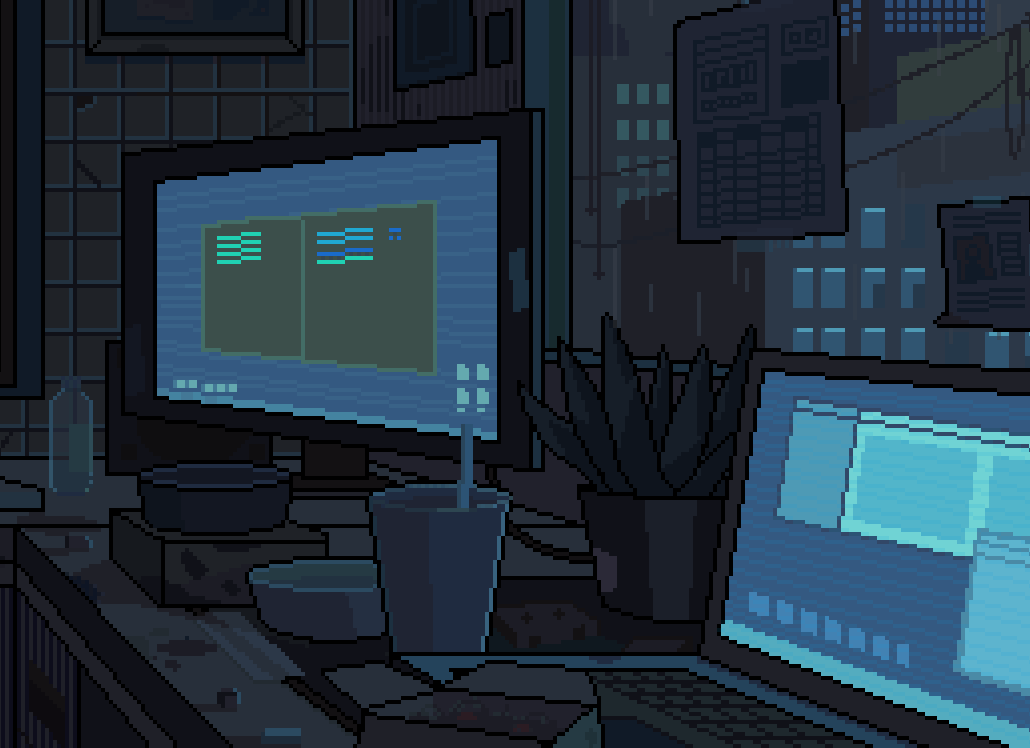
indexed:
rgb:
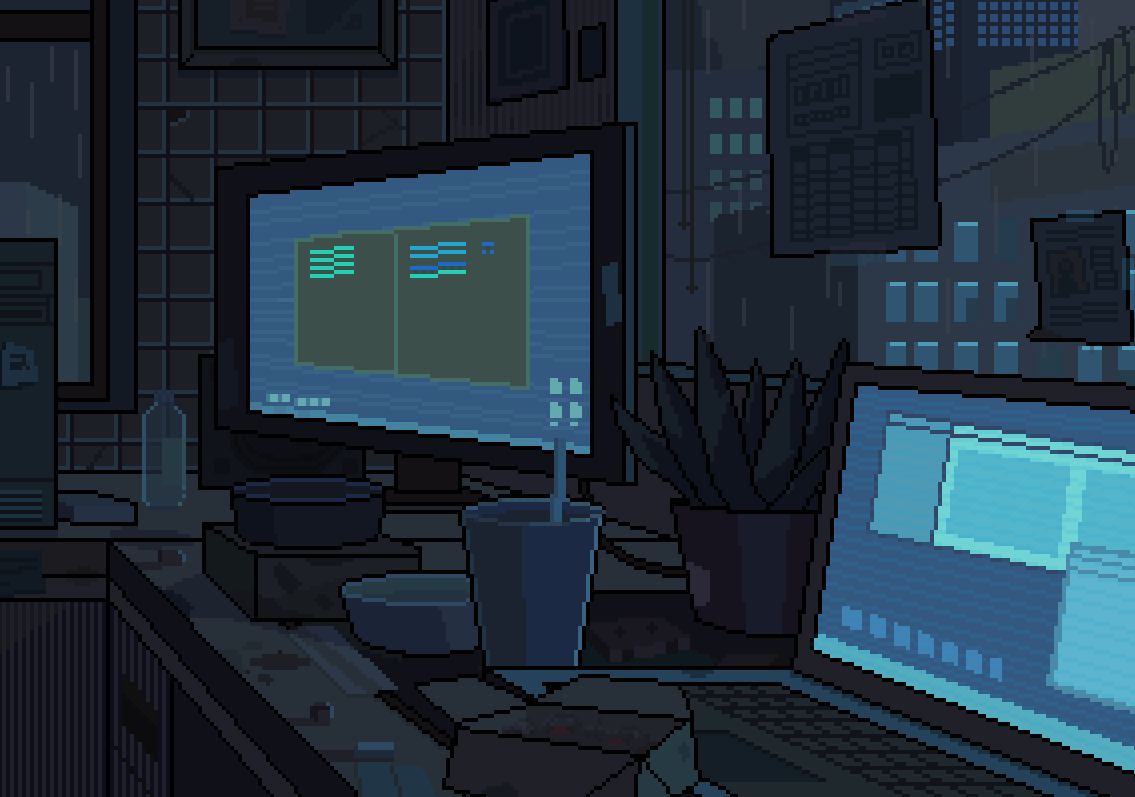
Hi thanks for the reply.
This is from a .gif animation with a 256 color table that I exported from PShop. When I open it in aseprite it looks fine. If I convert it to indexed, the colors slightly shift. This was using the default RGB conversion, not Octree.This is a single layer gif so no opacities or layer modes are being used.
I just upgraded to the beta, and tried the same file conversion and everything looks good!-- I dont see any differences, I think Octree has resolved this issue for me.
---
### Author:  [@ZechariahB](https://community.aseprite.org/u/ZechariahB)
#### Post date: [April 18, 2023, 9:13pm UTC](https://community.aseprite.org/t/converting-to-index-color-gives-incorrect-results/2200/14 "2023-04-18T21:13:17Z")
I do not like necro-bumping an old thread, but I believe mentioning this also has a place in this thread because this is very similar. Although conversion of an RGB color image to indexed seems to have been improved via Octree as depicted above, this still produces inaccurate results as of v1.3-rc2 particularly if you instead use a different palette than the colors of an image. No improvement with Table RGB 5 bits + Alpha 3 bits.
Neither can produce visually accurate results when converting an RGB color sprite to a different palette which often requires manual recoloring. A palette with a difference in hue, saturation, lightness than the source image can make it lighter/darker than it should be or ruin conversion and make the image unusable. Unfortunately as well, I found that conversion from a RGB color sprite to indexed with a limited grayscale palette results in an image darker than it otherwise should be including if the colors and the available grey colors have closely matching luminosity. If an image is converted to grayscale, it can still pick the wrong colors.
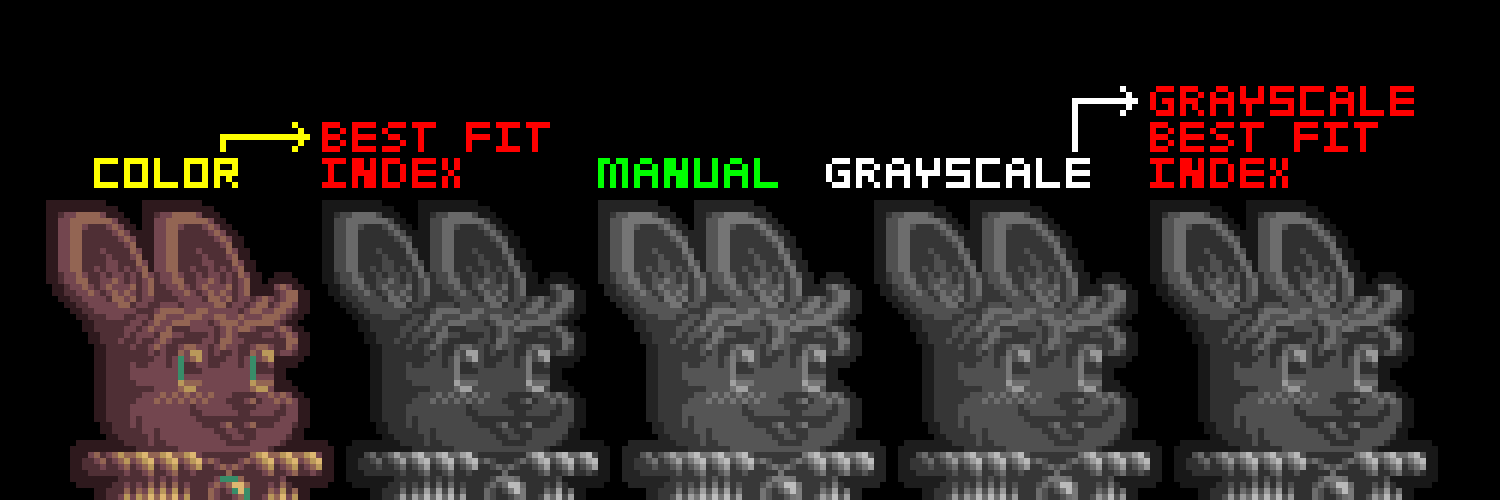
I used the eyedropper tool with best fit index on a sprite I made which is equivalent to converting an RGB color sprite to indexed with a palette. The sprite is made of 7 colors. The palette used is a generated gradient of 64 grayscale values between black and white. In the center is the sprite with best fitting values when using that grayscale palette according to the human eye. Depicted with red text is the sprites with the wrong colors. Converting an image to indexed should match pixels of an image to their closest perceptually equivalent color in a palette to match more closely to the manually recolored sprite, but that ideal behavior is not quite here yet.