# Creating custom skin - black area in lower right corner of editor
**URL:** https://community.aseprite.org/t/creating-custom-skin-black-area-in-lower-right-corner-of-editor/312
**Category:** Help
**Created:** [August 9, 2017, 2:32pm UTC](https://community.aseprite.org/t/creating-custom-skin-black-area-in-lower-right-corner-of-editor/312 "2017-08-09T14:32:13Z")
**Posts on this page:** 6
**Page:** 1
### Author:  [@Esparon](https://community.aseprite.org/u/Esparon)
#### Post date: [August 9, 2017, 2:32pm UTC](https://community.aseprite.org/t/creating-custom-skin-black-area-in-lower-right-corner-of-editor/312/1 "2017-08-09T14:32:14Z")
Hello!
I’m creating a couple of custom skins and ran into this corner piece that I cannot change (see below). It doesn’t seem to have a value in skin.xml or an image in sheet.png.
Any help is appreciated!
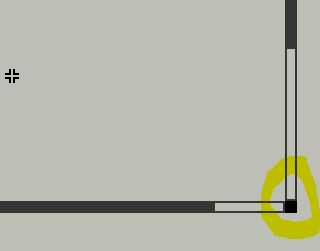
---
### Author:  [@dexxter24](https://community.aseprite.org/u/dexxter24)
#### Post date: [August 9, 2017, 9:35pm UTC](https://community.aseprite.org/t/creating-custom-skin-black-area-in-lower-right-corner-of-editor/312/2 "2017-08-09T21:35:46Z")
I don’t know which piece it is exactly but if you can’t find it easily it’s usually the same color like some generic color somewhere in the palette. Find the same one, try to change it and you will find it eventually.
---
### Author:  [@dacap](https://community.aseprite.org/u/dacap)
#### Post date: [August 10, 2017, 11:45am UTC](https://community.aseprite.org/t/creating-custom-skin-black-area-in-lower-right-corner-of-editor/312/3 "2017-08-10T11:45:20Z")
In `theme.xml`, that color is specified in the `editor_view_face` element:
```
```
---
### Author:  [@Esparon](https://community.aseprite.org/u/Esparon)
#### Post date: [August 12, 2017, 5:00pm UTC](https://community.aseprite.org/t/creating-custom-skin-black-area-in-lower-right-corner-of-editor/312/4 "2017-08-12T17:00:34Z")
dacap - Did you mean `skin.xml`? Searching did not come up with `theme.xml`. I did not see an entry for `editor_view_face` in `skin.xml`; tried adding your entry with a bright color value, saved (admin), restarted aseprite, and nothing. The entries for editor are all customized. All of the values in my `skin.xml` use one of the three colors of my theme.
---
### Author:  [@dacap](https://community.aseprite.org/u/dacap)
#### Post date: [August 12, 2017, 5:07pm UTC](https://community.aseprite.org/t/creating-custom-skin-black-area-in-lower-right-corner-of-editor/312/5 "2017-08-12T17:07:03Z")
> [@Esparon](#):
>
> Did you mean skin.xml?
Oh you are using v1.1.13, I recommend you to create a skin for the latest version, [v1.2-beta12](https://community.aseprite.org/t/get-aseprite-beta-version/22), you will find now that [themes are extensions](https://github.com/aseprite/aseprite/tree/master/data/extensions/aseprite-theme).
---
### Author:  [@Esparon](https://community.aseprite.org/u/Esparon)
#### Post date: [August 12, 2017, 5:15pm UTC](https://community.aseprite.org/t/creating-custom-skin-black-area-in-lower-right-corner-of-editor/312/6 "2017-08-12T17:15:54Z")
Ah I see. I’ll do that 🙂 Thanks!