# De-selecting a layer?
**URL:** https://community.aseprite.org/t/de-selecting-a-layer/5038
**Category:** Help
**Created:** [March 18, 2020, 5:54pm UTC](https://community.aseprite.org/t/de-selecting-a-layer/5038 "2020-03-18T17:54:37Z")
**Posts on this page:** 5
**Page:** 1
### Author:  [@Dr\_Nomz](https://community.aseprite.org/u/Dr_Nomz)
#### Post date: [March 18, 2020, 5:54pm UTC](https://community.aseprite.org/t/de-selecting-a-layer/5038/1 "2020-03-18T17:54:37Z")
A lot of times when I hit CTRL+C to copy a selection it copies the layer instead, and I can’t deselect it without copying it and then undoing it first. Any way to stop this from happening?
---
### Author:  [@KashouC](https://community.aseprite.org/u/KashouC)
#### Post date: [March 18, 2020, 5:58pm UTC](https://community.aseprite.org/t/de-selecting-a-layer/5038/2 "2020-03-18T17:58:52Z")
This is a UX issue that I think needs some further consideration tbh. Basically if you place the selection before you select the layer with the mouse, you will have the layer selected and that will get affected by the copy. So you’d have to either make sure you select the layer first, and then place the selection, or switch between layers using hotkeys.
Another work around is to click a palette entry or something and then middle click inside the canvas, as that deselects any timeline selections.
---
### Author:  [@Dr\_Nomz](https://community.aseprite.org/u/Dr_Nomz)
#### Post date: [March 18, 2020, 6:15pm UTC](https://community.aseprite.org/t/de-selecting-a-layer/5038/3 "2020-03-18T18:15:23Z")
Well thanks anyway, hopefully they add a way to de-select in the future.
---
### Author:  [@dacap](https://community.aseprite.org/u/dacap)
#### Post date: [April 1, 2020, 1:04am UTC](https://community.aseprite.org/t/de-selecting-a-layer/5038/4 "2020-04-01T01:04:59Z")
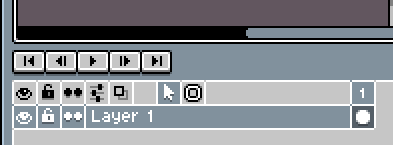
Hi everbody! Yeah, this is a [long-standing issue (#1498)](https://github.com/aseprite/aseprite/issues/1498) 😢 we should fix really soon. I think that a possible solution would be to have two modes in the timeline, like two little buttons:
1. an arrow to just select what is clicked (new default mode), and
2. a marquee tool (which should act like the current mode)
Mockup:
Related threads:
> [@Deselect layer - How?](https://community.aseprite.org/t/deselect-layer-how/3941):
>
> deselect layer Hi, I accidentally selected a layer and now I don’t know how to deselect it. How do you deselect a layer? Hola, accidentalmente seleccioné (no sé cómo) una capa y ahora no sé cómo se deselecciona. ¿Cómo se deselecciona una capa?
> [@How to disable the transformation of multiple cels?](https://community.aseprite.org/t/how-to-disable-the-transformation-of-multiple-cels/3870):
>
> In Aseprite v1.2.14 we’ve added the possibility to [transform the selection on multiple cels at the same time](https://twitter.com/aseprite/status/1170007034651172866). When you switch between layers or frames, Aseprite selects all the cels of that layer(s) or frame(s): [10] [28] So if you transform the canvas selection, you’ll transform the pixels of these cels too: [10] [28] If you don’t like this behavior, and you want to modify only the active cel, we have added an option in v1.2.15 that you can uncheck to disable this behavior: Edit \> Preferenc…
---
### Author:  [@dacap](https://community.aseprite.org/u/dacap)
#### Post date: [April 1, 2020, 1:14am UTC](https://community.aseprite.org/t/de-selecting-a-layer/5038/5 "2020-04-01T01:14:59Z")
I’ve to say that I would prefer to avoid adding modes (at least visible modes in the timeline). The best way would be to move forward to another more standard way to select/multiselect items in the timeline/colorbar (e.g. like file explorer on windows, or macos finder), with an option in the preferences to go back to the old behavior.