# How to make language extensions?
**URL:** https://community.aseprite.org/t/how-to-make-language-extensions/6253
**Category:** Uncategorized
**Created:** [June 24, 2020, 3:00pm UTC](https://community.aseprite.org/t/how-to-make-language-extensions/6253 "2020-06-24T15:00:57Z")
**Posts on this page:** 4
**Page:** 1
### Author:  [@\_koder](https://community.aseprite.org/u/_koder)
#### Post date: [June 24, 2020, 3:00pm UTC](https://community.aseprite.org/t/how-to-make-language-extensions/6253/1 "2020-06-24T15:00:57Z")
i followed documentation, but i haven’t seen a document that explains what
i have to write .ini file
plz , give me something ㅠㅠ
---
### Author:  [@Chamalow](https://community.aseprite.org/u/Chamalow)
#### Post date: [June 25, 2020, 11:59am UTC](https://community.aseprite.org/t/how-to-make-language-extensions/6253/2 "2020-06-25T11:59:38Z")
Okay, go to the Aseprite’s data folder (`C:\Program Files\Aseprite\data\` on Windows), then open the `strings` folder. You will find a `en.ini` file. Copy it where you want, and edit with a editor like Notepad++, but Notepad can do the job. You can also use a file comparison software like [Meld](https://meldmerge.org/), but use it more to update your translation once you finished it.
If you don’t understand how the .ini file works, it’s very simple. You’ve got categories between thats [] (I don’t know how to call them, maybe square brackets ?), but it doesn’t matter, it’s here to organize the file. You’ve got in the categories strings like :
`edit = Édition` \<- this is French
The thing you have to translate is after the `=`. Before the `=` is like an address. When the software wants to display text on screen, it’s search the string at the address `edit`, it found `Édition`, so you gonna see `Édition` on screen !
But there is also things like :
```auto
file_format_doesnt_support_warning = <<>>END` mean that the strings to display on screen continue even with a return, until `END`. So you need to translate the strings between that’s both elements.
`<<` Is a return without an `-` (I’m not sure for this 🤔).
`.{0}` or `.{1}` tell to the software “Put the element 0 you have in memory, and here put the element 1 !”
`||` indicate to the software that’s the following text is a button until an another `||` or a return.
`&` Is for the the keyboard navigation, it tell to the software that if the following character is pressed on keyboard, it press the button on screen. You can also find this in normal strings.
So you translate everything except this elements.
And here what’s appear on screen ! :
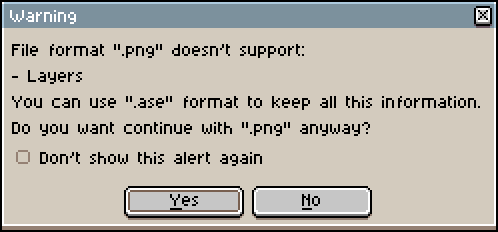
When you translated all the file, save it in a language\_name.ini file and follow the [languages extensions documentation on Aseprite’s web site](https://www.aseprite.org/docs/extensions/languages/).
Sorry if my english is not correct sometimes, and I hope I’ve helped.
---
### Author:  [@\_koder](https://community.aseprite.org/u/_koder)
#### Post date: [June 27, 2020, 12:55pm UTC](https://community.aseprite.org/t/how-to-make-language-extensions/6253/3 "2020-06-27T12:55:20Z")
okay but i cant find data folder
---
### Author:  [@Chamalow](https://community.aseprite.org/u/Chamalow)
#### Post date: [June 30, 2020, 8:17pm UTC](https://community.aseprite.org/t/how-to-make-language-extensions/6253/4 "2020-06-30T20:17:13Z")
Launch Aseprite, go to `Edit > Preferences > Extensions > PICO-8 Palette` and click the `Open Folder` button. It open your explorer, go back in the parent folder two times and your in the data folder.