# How to select multiple cels?
**URL:** https://community.aseprite.org/t/how-to-select-multiple-cels/21741
**Category:** Scripts & Extensions
**Created:** [March 21, 2024, 2:52pm UTC](https://community.aseprite.org/t/how-to-select-multiple-cels/21741 "2024-03-21T14:52:01Z")
**Posts on this page:** 4
**Page:** 1
### Author:  [@jest](https://community.aseprite.org/u/jest)
#### Post date: [March 21, 2024, 2:52pm UTC](https://community.aseprite.org/t/how-to-select-multiple-cels/21741/1 "2024-03-21T14:52:01Z")
> **[Aseprite](https://www.aseprite.org/api/range#rangecels)**
>
> Animated sprite editor & pixel art tool
returns an array of selected cels, but I want to **set** the range of these active cels because I use replace color which requires the cels are valid
---
### Author:  [@Olga\_Galvanova](https://community.aseprite.org/u/Olga_Galvanova)
#### Post date: [March 21, 2024, 3:15pm UTC](https://community.aseprite.org/t/how-to-select-multiple-cels/21741/2 "2024-03-21T15:15:54Z")
i had to look it up again: to set range of cels one needs to set range of both layers and frames: [Create New Continuous Layer - #2 by thkwznk](https://community.aseprite.org/t/create-new-continuous-layer/13502/2)
---
### Author:  [@jest](https://community.aseprite.org/u/jest)
#### Post date: [March 22, 2024, 4:10pm UTC](https://community.aseprite.org/t/how-to-select-multiple-cels/21741/3 "2024-03-22T16:10:27Z")

When I do that, it seems to select all the cels in the layer rather than 9-24 which I need for `replacecolor`
```auto
local replace_frames = {9, 10, 11, 12, 13, 14, 15, 16, 17, 18, 19, 20, 21, 22, 23, 24}
app.range.frames = replace_frames
app.range.layer = {head_layer}
```
---
### Author:  [@Olga\_Galvanova](https://community.aseprite.org/u/Olga_Galvanova)
#### Post date: [March 23, 2024, 9:45am UTC](https://community.aseprite.org/t/how-to-select-multiple-cels/21741/4 "2024-03-23T09:45:56Z")
hmm. interesting. ok, first, it should be range.layers - not just layer.
and also it appears that we can’t address layers directly by name…
however, i made some tests and i’m a bit lost too.
i tried this:
```auto
app.range:clear()
local target = "head"
local replace_frames = {9, 10, 11}
for i, layer in ipairs(app.sprite.layers) do
if layer.name == target then
app.activeLayer = layer
target = layer
end
end
app.range.layers = {target}
app.range.frames = replace_frames
for i, wut in ipairs(app.range.cels) do
print(i)
end
```
and this is the result:
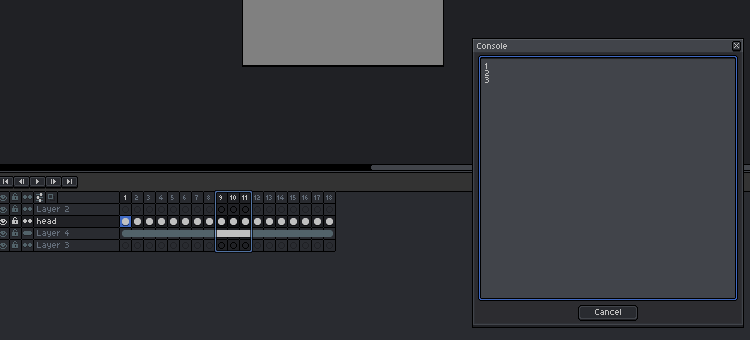
the range clearly isn’t just cels at [“head” , {9,10,11}], however, when iterating through range.cels, the result is correct: 3.
to make things worse, it seems it matters what range is called last. in above example the last is range.frames, but if it’s range.layers then the output looks like this:
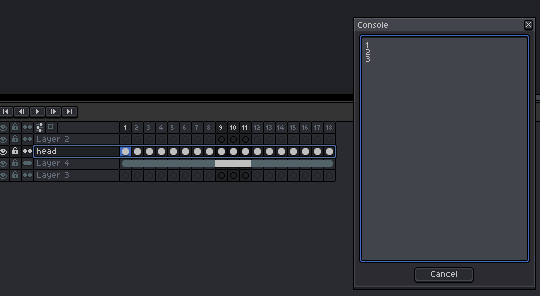
but the printout of range.cels[i] is still 3.
so… yeah, this is confusing.
sorry i can’t help more. i don’t know if this is just a bug in the way how aseprite renders the range on timeline, or if script is wrong or what is going on.