# Is there a way to export layers into the same spritesheet on top of eachother?
**URL:** https://community.aseprite.org/t/is-there-a-way-to-export-layers-into-the-same-spritesheet-on-top-of-eachother/230
**Category:** Help
**Created:** [July 21, 2017, 7:26pm UTC](https://community.aseprite.org/t/is-there-a-way-to-export-layers-into-the-same-spritesheet-on-top-of-eachother/230 "2017-07-21T19:26:19Z")
**Posts on this page:** 6
**Page:** 1
### Author:  [@notApollogising](https://community.aseprite.org/u/notApollogising)
#### Post date: [July 21, 2017, 7:26pm UTC](https://community.aseprite.org/t/is-there-a-way-to-export-layers-into-the-same-spritesheet-on-top-of-eachother/230/1 "2017-07-21T19:26:19Z")
I’m making a small game and decided I wanted to use aseprite as a level editor (RGB(255, 125, 0) == Wood block, RGB(100, 200, 65) == Stone block, etc.). I don’t want to have to spend a lot of time creating my own editor, but the problem is, it takes a few seconds to export the level because I have a layer above the main blocks for special blocks, e.g. if it’s blue, it means the block on the layer below it is slippery. The only way I could export it into one png would be to create a new frame and get rid of the main layer on that frame, and get rid of the top layer on the first frame, and then export them on top of each other. I’ll show a gif of it to help explain:
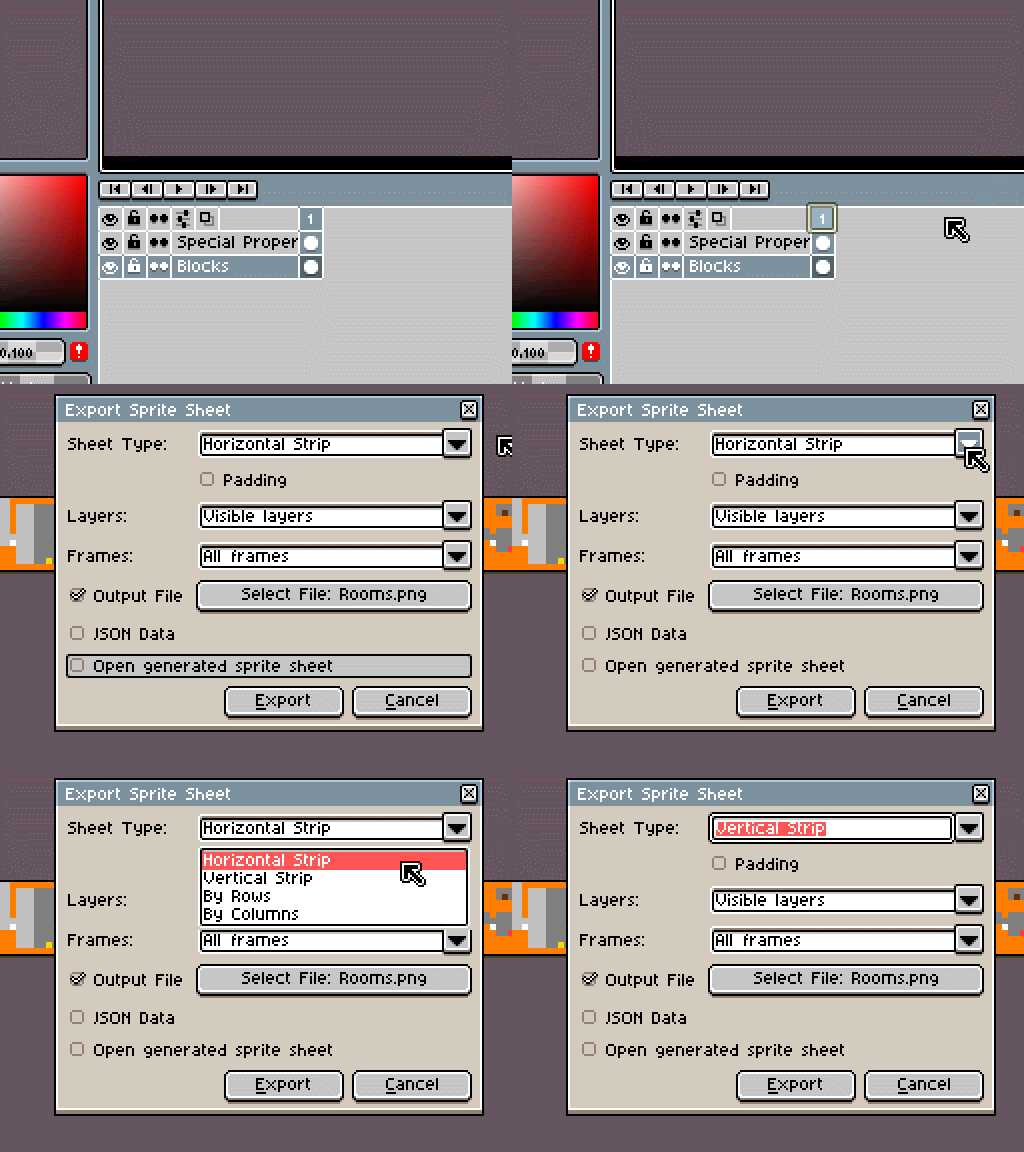
Of course it’s a bit faster because I can just hit LCtrl + Shift + X to repeat last export, but it still takes a few seconds longer to export, and when making so small tweaks to a level it becomes a pain. Is there a way around this?
---
### Author:  [@dacap](https://community.aseprite.org/u/dacap)
#### Post date: [July 21, 2017, 9:53pm UTC](https://community.aseprite.org/t/is-there-a-way-to-export-layers-into-the-same-spritesheet-on-top-of-eachother/230/2 "2017-07-21T21:53:55Z")
It looks like you want to save each layer in a different file, you can use [the CLI](https://community.aseprite.org/t/the-command-line-interface/24) for that:
```
aseprite -b map.ase --save-as map-{layer}.png
```
This works since v1.2-beta1. More details in [the docs](https://www.aseprite.org/docs/cli/) and [–save-as](https://www.aseprite.org/docs/cli/#save-as). (Or en v1.1.13 you can use [–split-layers](https://www.aseprite.org/docs/cli/#split-layers).)
---
### Author:  [@notApollogising](https://community.aseprite.org/u/notApollogising)
#### Post date: [July 21, 2017, 10:19pm UTC](https://community.aseprite.org/t/is-there-a-way-to-export-layers-into-the-same-spritesheet-on-top-of-eachother/230/3 "2017-07-21T22:19:49Z")
I’m not trying to save each layer in a different file, I’m trying to create a vertical spritesheet with the image on top being the bottom layer and the image at the bottom being the top layer
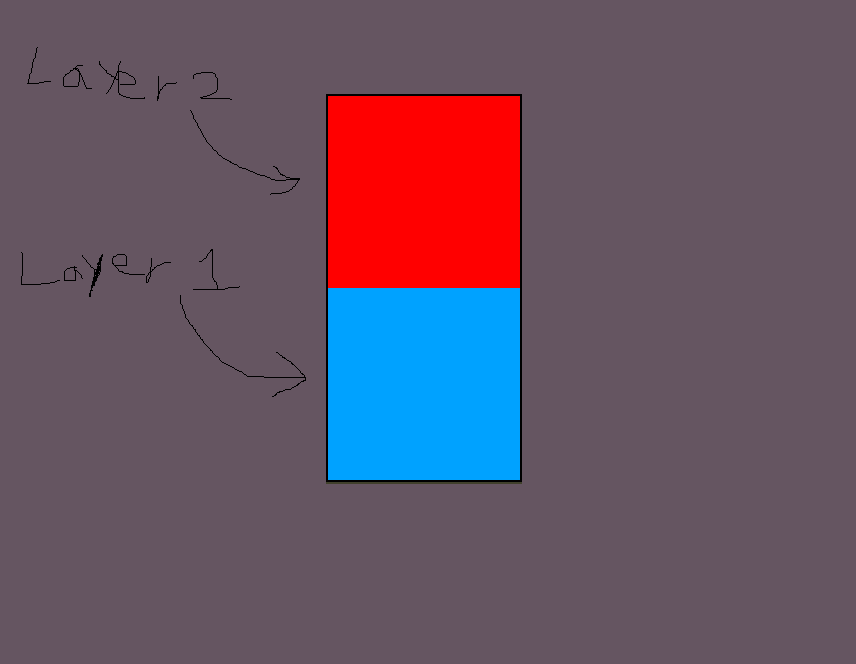
I’m assuming that you also need CLI to do that, but I’m a bit confused. How do I open it?
---
### Author:  [@dacap](https://community.aseprite.org/u/dacap)
#### Post date: [July 21, 2017, 10:39pm UTC](https://community.aseprite.org/t/is-there-a-way-to-export-layers-into-the-same-spritesheet-on-top-of-eachother/230/4 "2017-07-21T22:39:13Z")
> [@notApollogising](#):
>
> I’m trying to create a vertical spritesheet with the image on top being the bottom layer and the image at the bottom being the top layer. I’m assuming that you also need CLI to do that.
Oh ok 😅 you do some part of this with the CLI, can use the CLI for that too (the UI is not ready to do that). Use the [–split-layers](https://www.aseprite.org/docs/cli/#split-layers) and [–sheet](https://www.aseprite.org/docs/cli/#sheet) argument. Something like this:
```
aseprite -b --split-layers map.ase --sheet sheet.png
```
But the layer in the first row will be the bottom one, and the foreground one will be in the bottom.
Please check the details about your platform about how to launch the CLI interface [in this section](https://www.aseprite.org/docs/cli/#platform-specific-details), and ask me if something is missing or you don’t understand.
---
### Author:  [@notApollogising](https://community.aseprite.org/u/notApollogising)
#### Post date: [July 21, 2017, 11:54pm UTC](https://community.aseprite.org/t/is-there-a-way-to-export-layers-into-the-same-spritesheet-on-top-of-eachother/230/5 "2017-07-21T23:54:17Z")
It works! I also created a .bat file for it, which also works.
It might be a bit of a long shot, but is there a way I could create a key binding for it, or is the best scenario a .bat file?
---
### Author:  [@notApollogising](https://community.aseprite.org/u/notApollogising)
#### Post date: [July 24, 2017, 12:12am UTC](https://community.aseprite.org/t/is-there-a-way-to-export-layers-into-the-same-spritesheet-on-top-of-eachother/230/6 "2017-07-24T00:12:27Z")
Nevermind, I got the key binding to work. Thanks for your help!