# Layer exporter script
**URL:** https://community.aseprite.org/t/layer-exporter-script/20699
**Category:** Scripts & Extensions
**Created:** [November 23, 2023, 8:20pm UTC](https://community.aseprite.org/t/layer-exporter-script/20699 "2023-11-23T20:20:36Z")
**Posts on this page:** 6
**Page:** 1
### Author:  [@shanianickel](https://community.aseprite.org/u/shanianickel)
#### Post date: [November 23, 2023, 8:20pm UTC](https://community.aseprite.org/t/layer-exporter-script/20699/1 "2023-11-23T20:20:37Z")
Hello there!
I came across a situation where I have Aseprite files containing many layers that I wanted to export out as separate, new files for each layer.
My goals were to save these out as Aseprite files, not individual PNGs or spritesheets, and to preserve the tag structure in each of these new files.
I don’t really understand anything about lua, but I managed to code a solution to my problem:
**layer-exporter.bat**
```auto
@ECHO OFF
ECHO drag and drop .aseprite file to split each layer into its own file
FOR %%A IN (%*) DO (
"C:\Program Files (x86)\Steam\steamapps\common\Aseprite\Aseprite.exe" -b %%A -script layer-exporter.lua
)
pause
```
**layer-exporter.lua**
```auto
local sprite = app.activeSprite
local path, title = sprite.filename:match("^(.+[/\\])(.-).([^.]*)$")
local layers = {}
for i, layer in ipairs(sprite.layers) do
table.insert(layers, layer)
end
for i, layer in ipairs(layers) do
current_layer_name = layer.name;
print( "Current Layer Name: " .. layer.name );
for j, layer in ipairs(layers) do
compare_layer = layer
compare_layer_name = layer.name
if current_layer_name ~= compare_layer_name then
app.activeLayer = compare_layer;
app.transaction( app.command.RemoveLayer() );
end
end
app.command.SaveFileAs{
ui = false,
filename = title .. "_" .. string.lower(current_layer_name) .. ".aseprite",
print("Saved layer as: " .. title .. "_" .. string.lower(current_layer_name));
}
--lol trying to do as many undos as we have # of layers
for k, layer in ipairs(layers) do
app.command.Undo();
end
end
```
I used [this code example](https://community.aseprite.org/t/script-sprite-layers/7051/2) as a starting point.
I’m sure the batch file was initially copy/pasted from elsewhere, but the original source is long lost. 🙈
Questions:
1. When I run my lua script via Aseprite, I don’t see where the exported files end up.
Is there any way to save them out in the same spot as my original file? I’m having a lot of trouble understanding how to get/set paths and filenames.
2. Is there a more elegant way to handle undoing the original file to get back to its original state?
I figure there must be a way to wrap my `app.command.RemoveLayer()` iteration inside of a single `app.transation` that I would then easily be able to undo in one step, but I wasn’t able to hack it.
Thanks in advance!
---
### Author:  [@behreandtjeremy](https://community.aseprite.org/u/behreandtjeremy)
#### Post date: [November 23, 2023, 10:01pm UTC](https://community.aseprite.org/t/layer-exporter-script/20699/2 "2023-11-23T22:01:13Z")
Hi @shanianickel,
For question 2, the sprite [constructor](https://github.com/aseprite/api/blob/main/api/sprite.md#sprite-1) accepts another sprite as an argument, which allows you to create duplicates. You could try duplicating a sprite, making destructive changes, then [closing](https://github.com/aseprite/api/blob/main/api/sprite.md#spriteclose) the duplicate on finish. You have to be careful to track which sprite is active, though, especially if you use `Selection`s or [Range](https://github.com/aseprite/api/blob/main/api/range.md#rangesprite)s. Don’t try to access a `Layer`, `Frame`, etc. from a `Sprite` that’s already been closed. iirc, once a `Sprite` constructor is called, the newly created sprite is set as the active one.
I don’t have any direct answers for 1, but the [app.fs](https://github.com/aseprite/api/blob/main/api/app_fs.md) module has a lot of tools for helping with file paths. That’s where I’d start my search, were I in your shoes.
---
### Author:  [@shanianickel](https://community.aseprite.org/u/shanianickel)
#### Post date: [November 23, 2023, 10:13pm UTC](https://community.aseprite.org/t/layer-exporter-script/20699/3 "2023-11-23T22:13:31Z")
Thanks for the tips @behreandtjeremy!
I previously tried some of the `app.fs` functions a number of times, but I was just too confused by all this new syntax so I didn’t get anywhere with it… good to know that I was probably on the right track, though!
edit:
I’m having trouble understanding how this stuff should come together.
Here are some lines of code and my assumptions about what should be happening:
```auto
-- Create a way to reference our starting file
local source_sprite = app.activeSprite;
-- Create new sprite based on our source sprite
local working_sprite = Sprite(source_sprite);
-- Set active sprite to our new sprite, just in case
app.activeSprite = working_sprite;
-- Close working sprite
working_sprite:close();
-- Set active sprite back to our source sprite, just in case
app.activeSprite = source_sprite;
```
My script seems to be running through one loop without crashing (yay!), then I get an error message: `[string "internal"]:1: Using a nil 'Layer' object`
I’m also unsure how I can debug this stuff, ie this gives me a syntax error:
`print(app.activeSprite);`
---
### Author:  [@behreandtjeremy](https://community.aseprite.org/u/behreandtjeremy)
#### Post date: [November 24, 2023, 5:46am UTC](https://community.aseprite.org/t/layer-exporter-script/20699/4 "2023-11-24T05:46:32Z")
Designing a script that is meant to be run from the command line in [batch](https://aseprite.org/docs/cli/#batch) mode is different than designing a script for use with Aseprite’s GUI. (In an ideal world, there’d be time & energy enough to handle both.)
In this matter, you can use the boolean [app.isUIAvailable](https://github.com/aseprite/api/blob/main/api/app.md#appisuiavailable) as a pivot. For example, a GUI-based script that creates a `Dialog`, gets user input from sliders, check boxes and other widgets, etc. would check `app.isUIAvailable` asap and return early if it were false.
For CLI-friendly Lua scripts, I’d primarily read from [app.params](https://github.com/aseprite/api/blob/main/api/app.md#appparams) to get the info the user had provided to [script-param](https://aseprite.org/docs/cli/#script-param) via the CLI.
~~The active sprite would be `nil` in a batch mode script because there’s no graphic user interface through which the user would indicate which sprite is active.~~ [Edit: Unless I’m misunderstanding how the .bat file passes in a file path.]
I’m none too versed in CLI scripts and you may ultimately decide to design for GUI over batch… but below is something quick I worked up:
```lua
if app.isUIAvailable then
print("This script was designed to be called from the CLI.")
return
end
local params = app.params
local filepath = params["filepath"]
if not filepath or #filepath <= 0 then
print("Please supply an argument to the parameter \"filepath\".")
return
end
if not app.fs.isFile(filepath) then
print("The file path provided is not an existing file.")
return
end
print(string.format("filepath: \"%s\"", filepath))
local fileext = app.fs.fileExtension(filepath)
if not fileext or #fileext <= 0 then
print("Invalid file extension")
return
end
print(string.format("fileext: \"%s\"", fileext))
-- This SHOULD be nil.
print(app.activeSprite)
local sourceSprite = Sprite { fromFile = filepath }
if not sourceSprite then
print("The sprite could not be properly loaded.")
return
end
-- This should not be nil.
print(app.activeSprite)
local duplicate = Sprite(sourceSprite)
-- TODO: Do work here.
duplicate:close()
```
I know little about writing `.bat` files, so this is my command line:
```auto
aseprite -b -script-param filepath="path\\to\\file.ext" -script "path\\to\\example.lua"
```
You don’t have to supply a path to a file to a Lua script, btw. I used [app.fs.isFile](https://github.com/aseprite/api/blob/main/api/app_fs.md#appfsisfile) above, but there’s also [app.fs.isDirectory](https://github.com/aseprite/api/blob/main/api/app_fs.md#appfsisdirectory). You can supply a path to a directory or folder, and use [listFiles](https://github.com/aseprite/api/blob/main/api/app_fs.md#appfslistfiles) to find the contents of the folder. Maybe, for example, you’d want to filter all the results from `listFiles` according to [file extension](https://github.com/aseprite/api/blob/main/api/app_fs.md#appfsfileextension).
---
### Author:  [@shanianickel](https://community.aseprite.org/u/shanianickel)
#### Post date: [November 24, 2023, 5:26pm UTC](https://community.aseprite.org/t/layer-exporter-script/20699/5 "2023-11-24T17:26:51Z")
Aah thank you for writing that up, @behreandtjeremy!
I should mention my using a batch file is a remnant from an earlier, worse solution that I figured out, so it’s not necessarily that it’s my preferred method or anything like that. I do find it handy if I ever want to run a script on a bunch of files by dragging and dropping them onto a .bat file, but that’s not really relevant in this case. I’ll try to get more comfortable running scripts via CLI.
My ideal for this script is to run it via Aseprite. My main issue is that I can’t figure out how to control where my files save out to.
I’ll try some more stuff next time I get a chance, thank you for all the helpful info! I didn’t even consider that a script being run via batch might not have a notion of what the active sprite is. 😮
---
### Author:  [@behreandtjeremy](https://community.aseprite.org/u/behreandtjeremy)
#### Post date: [November 25, 2023, 6:44pm UTC](https://community.aseprite.org/t/layer-exporter-script/20699/6 "2023-11-25T18:44:37Z")
No prob. To your main issue: for a GUI script opened from within Aseprite, what I do is make a [Dialog](https://github.com/aseprite/api/blob/main/api/dialog.md) with a [file](https://github.com/aseprite/api/blob/main/api/dialog.md#dialogfile) widget or widgets. A text [entry](https://github.com/aseprite/api/blob/main/api/dialog.md#dialogentry) widget could also be used. A `file` widget can be made more like an `entry` widget with a boolean.
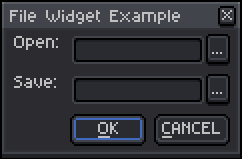
```lua
local supportedImportExts = {
"ase", "aseprite", "bmp", "flc", "fli",
"gif", "ico", "jpeg", "jpg", "pcc", "pcx",
"png", "tga", "webp"
}
local supportedExportExts = {
"ase", "aseprite", "gif", "webp"
}
local dlg = Dialog { title = "File Widget Example" }
dlg:file {
id = "openPath",
label = "Open:",
-- If you don't want the file widget to have a text entry field, don't just
-- set entry to false, remove the parameter entirely.
entry = true,
open = true,
filename = "",
filetypes = supportedImportExts,
focus = false,
}
dlg:file {
id = "savePath",
label = "Save:",
entry = true,
save = true,
filename = "",
filetypes = supportedExportExts,
focus = false,
}
dlg:button {
id = "confirmButton",
text = "&OK",
focus = true,
onclick = function()
local args = dlg.data
local openPath = args.openPath --[[@as string]]
local savePath = args.savePath --[[@as string]]
local openIsFolder = app.fs.isDirectory(openPath)
print("openIsFolder: " .. (openIsFolder and "true" or "false"))
local openIsFile = app.fs.isFile(openPath)
print("openIsFile: " .. (openIsFile and "true" or "false"))
local openFileExt = app.fs.fileExtension(openPath)
local openFileExtLc = string.lower(openFileExt)
print(string.format("openFileExtLc: \"%s\"", openFileExtLc))
-- In Aseprite 1.3, this was changed to app.sprite.
---@diagnostic disable-next-line: deprecated
local activeSprite = app.activeSprite
if activeSprite then
-- As an alternative, could use the activeSprite, if it exists.
-- It's possible that a sprite is active, but that it hasn't been
-- saved anywhere yet.
local spriteFilename = activeSprite.filename
print(string.format("spriteFilename: %s", spriteFilename))
end
-- You'd expect both of these to be false if the file has not been
-- created yet (i.e., is not being overwritten).
local saveIsFolder = app.fs.isDirectory(savePath)
print("saveIsFolder: " .. (saveIsFolder and "true" or "false"))
local saveIsFile = app.fs.isFile(savePath)
print("saveIsFile: " .. (saveIsFile and "true" or "false"))
local saveFileExt = app.fs.fileExtension(savePath)
local saveFileExtLc = string.lower(saveFileExt)
print(string.format("saveFileExtLc: \"%s\"", saveFileExtLc))
end
}
dlg:button { id = "closeButton", text = "&CANCEL", focus = false }
dlg:show { wait = false }
```
The main logic would run when the okay button is clicked. I usually give the save file path to [Sprite:saveAs](https://github.com/aseprite/api/blob/main/api/sprite.md#spritesaveas). You’d have to check if there are any differences with [app.command.SaveFileAs](https://github.com/aseprite/api/blob/main/api/command/SaveFile.md) that matter to you. I’m not sure if relative vs. absolute paths is a problem in your case.
For a task of this size, a great many other issues can crop up. If the script is just for your use, many wouldn’t matter. It does make it hard to say what else to tell you without flooding the conversion, though. If you’d rather have more info than less, see below:
> **To expand, click the arrow to the left**
>
> Below is a draft CLI script that accepts directories for both the open and save file paths. Instead of duplicating a sprite then whittling down with [deleteLayer](https://github.com/aseprite/api/blob/main/api/sprite.md#spritedeletelayer), it builds up by copying sprite elements. Not all elements of a sprite have a copy constructor, and the properties in each can change per version of Aseprite (1.2.40 vs. 1.3 release candidate).
>
> ```lua
> --[[This does not handle tile maps, slices or linked cels.]]
>
> local supportedImportExts = {
> "ase", "aseprite", "bmp", "flc", "fli",
> "gif", "ico", "jpeg", "jpg", "pcc", "pcx",
> "png", "tga", "webp"
> }
>
> local supportedExportExts = {
> "ase", "aseprite", "gif", "webp"
> }
>
> -- Defaults in case the user does not specify an argument for a parameter.
> local defaultIncludeLocked = true
> local defaultIncludeHidden = false
> local defaultIncludeBkg = true
> local defaultExportExt = "aseprite"
>
> ---@param fileExt string
> ---@param supported string[]
> ---@return boolean
> local function isExtSupported(fileExt, supported)
> local lenSupported = #supported
> local fileExtLc = string.lower(fileExt)
> local isSupported = false
> local j = 0
> while (not isSupported) and j < lenSupported do
> j = j + 1
> isSupported = fileExtLc == supported[j]
> end
> return isSupported
> end
>
> ---@param layer Layer
> ---@param array Layer[]
> ---@param includeLocked boolean
> ---@param includeHidden boolean
> ---@param includeBkg boolean
> ---@return Layer[]
> local function appendLeaves(
> layer, array,
> includeLocked, includeHidden, includeBkg)
> if (includeLocked or layer.isEditable)
> and (includeHidden or layer.isVisible) then
> if layer.isGroup then
> local childLayers = layer.layers --[=[@as Layer[]]=]
> local lenChildLayers = #childLayers
> local i = 0
> while i < lenChildLayers do
> i = i + 1
> appendLeaves(childLayers[i], array,
> includeLocked, includeHidden, includeBkg)
> end
> elseif (not layer.isReference)
> and (includeBkg or (not layer.isBackground)) then
> array[#array + 1] = layer
> end
> end
> return array
> end
>
> ---@param arg string
> ---@param defaultValue boolean
> ---@return boolean
> local function parseBool(arg, defaultValue)
> if arg then
> local argLc = string.lower(arg)
> if argLc == "t" or argLc == "true" or argLc == "1" then
> return true
> end
> if argLc == "f" or argLc == "false" or argLc == "0" then
> return false
> end
> end
> return defaultValue
> end
>
> if app.isUIAvailable then
> print("This script was designed for batch mode from CLI.")
> return
> end
>
> local params = app.params
>
> -- See https://github.com/aseprite/api/blob/main/Changes.md .
> -- Depending on whether you're targeting 1.2.40 or 1.3, certain properties
> -- will throw an error, for example cel zIndex, sprite user data, tag user data,
> -- tag repeat count.
> local apiVersion = app.apiVersion
> print(string.format("apiVersion: %d", apiVersion))
>
> local openDirPath = params["opendirpath"] or params["o"]
> if not openDirPath then
> print("Please supply an argument to the parameter \"opendirpath\".")
> return
> end
> if not app.fs.isDirectory(openDirPath) then
> print("\"openDirPath\" is not an existing directory.")
> return
> end
>
> print(string.format("openDirPath: \"%s\"", openDirPath))
>
> local saveDirPath = params["savedirpath"] or params["s"]
> if not saveDirPath then
> saveDirPath = openDirPath
> end
> if not app.fs.isDirectory(saveDirPath) then
> print("\"saveDirPath\" is not an existing directory.")
> return
> end
>
> print(string.format("saveDirPath: \"%s\"", saveDirPath))
>
> local relFilePaths = app.fs.listFiles(openDirPath)
> local lenRelFilePaths = #relFilePaths
>
> print(string.format("lenRelFilePaths: %d", lenRelFilePaths))
>
> local includeLocked = parseBool(params["includelocked"], defaultIncludeLocked)
>
> print("includeLocked: " .. (includeLocked and "true" or "false"))
>
> local includeHidden = parseBool(params["includehidden"], defaultIncludeHidden)
>
> print("includeHidden: " .. (includeHidden and "true" or "false"))
>
> local includeBkg = parseBool(params["includebkg"], defaultIncludeBkg)
>
> print("includeBkg: " .. (includeBkg and "true" or "false"))
>
> local trgExt = defaultExportExt
> if params["trgext"] then
> local trgIsSupported = isExtSupported(params["trgext"], supportedExportExts)
> if trgIsSupported then
> trgExt = params["trgext"]
> end
> end
>
> print(string.format("trgExt: \"%s\"", trgExt))
>
> local i = 0
> while i < lenRelFilePaths do
> i = i + 1
> local relFilePath = relFilePaths[i]
> local fileExt = app.fs.fileExtension(relFilePath)
> local isSupported = isExtSupported(fileExt, supportedImportExts)
>
> if isSupported then
> local absFilePath = app.fs.joinPath(openDirPath, relFilePath)
> local srcSprite = Sprite { fromFile = absFilePath }
> if srcSprite then
> print(string.format(
> "srcSprite %d: \"%s\"",
> i, relFilePath))
>
> -- Cache sprite data arrays.
> local srcFrames = srcSprite.frames
> local srcTopLayers = srcSprite.layers
> local srcTags = srcSprite.tags
>
> -- Measure length of data arrays.
> local lenSrcFrames = #srcFrames
> local lenSrcTopLayers = #srcTopLayers
> local lenSrcTags = #srcTags
>
> -- For indexed color mode sprites opened as a sequence, there is an
> -- off-chance that there may be more than one palette in the
> -- palettes array. See:
> -- https://community.aseprite.org/t/sprites-with-multiple-palettes-caveat/14327
> local srcPalette = srcSprite.palettes[1]
> local srcSpec = srcSprite.spec
> -- local srcData = srcSprite.data
>
> -- Aseprite does not validate Sizes. Extra validation may be
> -- required in the form of reducing the ratio.
> local srcPxRatio = srcSprite.pixelRatio
> local xSrcPxRatio = math.max(1, math.abs(srcPxRatio.width))
> local ySrcPxRatio = math.max(1, math.abs(srcPxRatio.height))
> local trgPxRatio = Size(xSrcPxRatio, ySrcPxRatio)
>
> ---@type Layer[]
> local srcLeaves = {}
> local k = 0
> while k < lenSrcTopLayers do
> k = k + 1
> local srcTopLayer = srcTopLayers[k]
> appendLeaves(
> srcTopLayer, srcLeaves,
> includeLocked,
> includeHidden,
> includeBkg)
> end
>
> -- Ignore files that already consist of only one layer.
> local lenSrcLeaves = #srcLeaves
> if lenSrcLeaves > 1 then
> local m = 0
> while m < lenSrcLeaves do
> m = m + 1
> local srcLeaf = srcLeaves[m]
> local srcIsBkg = srcLeaf.isBackground
>
> -- Assumes that the layer name does not include
> -- invalid characters that would compromise the save.
> local srcLeafBlendMode = srcIsBkg
> and BlendMode.NORMAL
> or srcLeaf.blendMode
> local srcLeafColor = srcLeaf.color
> local srcLeafData = srcLeaf.data
> local srcLeafName = srcLeaf.name
> local srcLeafOpacity = srcIsBkg
> and 255
> or srcLeaf.opacity
>
> local trgSpriteName = string.format(
> "%s_%s.%s",
> app.fs.fileTitle(absFilePath),
> srcLeafName,
> trgExt)
>
> local trgSprite = Sprite(srcSpec)
> trgSprite.filename = trgSpriteName
> trgSprite.pixelRatio = trgPxRatio
> trgSprite:setPalette(srcPalette)
> -- trgSprite.data = srcData
>
> -- Copy layer properties from source to target.
> local trgLayer = trgSprite.layers[1]
> trgLayer.blendMode = srcLeafBlendMode
> trgLayer.color = srcLeafColor
> trgLayer.data = srcLeafData
> trgLayer.name = srcLeafName
> trgLayer.opacity = srcLeafOpacity
>
> local n = 0
> while n < lenSrcFrames do
> n = n + 1
> local srcFrame = srcFrames[n]
> local srcDuration = srcFrame.duration
>
> -- Create new frames in target if needed.
> local trgFrame = n <= #trgSprite.frames
> and trgSprite.frames[n]
> or trgSprite:newEmptyFrame(n)
> trgFrame.duration = srcDuration
>
> local srcCel = srcLeaf:cel(n)
> if srcCel then
> -- Copy cel properties from source to target.
> local srcCelColor = srcCel.color
> local srcCelData = srcCel.data
> local srcCelImg = srcCel.image
> local srcCelOpacity = srcCel.opacity
> local srcCelPos = srcCel.position
> -- local srcCelZIndex = srcCel.zIndex
>
> local trgCel = trgSprite:newCel(
> trgLayer, n, srcCelImg, srcCelPos)
> trgCel.color = srcCelColor
> trgCel.data = srcCelData
> trgCel.opacity = srcCelOpacity
> -- trgCel.zIndex = srcCelZIndex
> end
> end
>
> local lenTrgFrames = #trgSprite.frames
> local o = 0
> while o < lenSrcTags do
> o = o + 1
> local srcTag = srcTags[o]
> local srcOrigFrame = srcTag.fromFrame
> local srcDestFrame = srcTag.toFrame
> if srcOrigFrame and srcDestFrame then
> local srcOrigFrIdx = srcOrigFrame.frameNumber
> local srcDestFrIdx = srcDestFrame.frameNumber
>
> -- Past export bugs may result in tags that extend
> -- beyond the number of frames held by the sprite.
> if srcOrigFrIdx >= 1
> and srcDestFrIdx <= lenTrgFrames then
> -- Copy tag properties from source to target.
> local srcTagAniDir = srcTag.aniDir
> local srcTagColor = srcTag.color
> -- local srcTagData = srcTag.data
> local srcTagName = srcTag.name
> -- local srcTagRepeats = srcTag.repeats
>
> local trgTag = trgSprite:newTag(
> srcOrigFrIdx, srcDestFrIdx)
> trgTag.aniDir = srcTagAniDir
> trgTag.color = srcTagColor
> -- trgTag.data = srcTagData
> trgTag.name = srcTagName
> -- trgTag.repeats = srcTagRepeats
> end
> end
> end
>
> if srcIsBkg then
> app.activeLayer = trgLayer
> app.command.BackgroundFromLayer()
> else
> -- An artifact of the sprite's initial creation is that
> -- it may contain an empty cel.
> local cel1 = trgLayer:cel(1)
> if cel1 and cel1.image:isEmpty() then
> trgSprite:deleteCel(cel1)
> end
> end
>
> local savePath = app.fs.joinPath(
> saveDirPath,
> trgSprite.filename)
> local result = trgSprite:saveAs(savePath)
> if result then
> print(string.format("Saved \"%s\".", savePath))
> end
> trgSprite:close()
> end
> else
> print(string.format(
> "\"%s\" was skipped because it only had one layer.",
> relFilePath))
> end
>
> srcSprite:close()
> end
> else
> print(string.format(
> "\"%s\" was skipped because of an unsupported extension.",
> relFilePath))
> end
> end
>
> ```
>
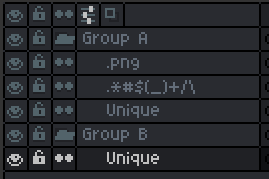
> I didn’t handle it in the code above, but beware that Aseprite does little to no string validation. A perfectly acceptable layer [name](https://github.com/aseprite/api/blob/main/api/layer.md#layername) would be “\*!..&@$”. However, these would cause a problem when joined into a file path. (The same is true of a tag [name](https://github.com/aseprite/api/blob/main/api/tag.md#tagname).)
>
> 
>
> It’s also possible for two layer (or tag) names to be the same. Names are not unique identifiers. For layers, other properties that might clarify its uniqueness would be, say, its [stack index](https://github.com/aseprite/api/blob/main/api/layer.md#layerstackindex) relative to its parent group.
>
> You also have different types of layers ([reference](https://github.com/aseprite/api/blob/main/api/layer.md#layerisreference), [group](https://github.com/aseprite/api/blob/main/api/layer.md#layerisgroup), [background](https://github.com/aseprite/api/blob/main/api/layer.md#layerisbackground)) and layers you hide (turn off [visibility](https://github.com/aseprite/api/blob/main/api/layer.md#layerisvisible)) that you might not want exported.