# Palette import settings?
**URL:** https://community.aseprite.org/t/palette-import-settings/21447
**Category:** Help
**Created:** [February 13, 2024, 12:18am UTC](https://community.aseprite.org/t/palette-import-settings/21447 "2024-02-13T00:18:16Z")
**Posts on this page:** 5
**Page:** 1
### Author:  [@twinklecrimson](https://community.aseprite.org/u/twinklecrimson)
#### Post date: [February 13, 2024, 12:18am UTC](https://community.aseprite.org/t/palette-import-settings/21447/1 "2024-02-13T00:18:16Z")
Hi,
I have a question. I am wondering if there is any way to configure the default palette import settings in aseprite.
My problem:
I want to load a palette from a .png file.
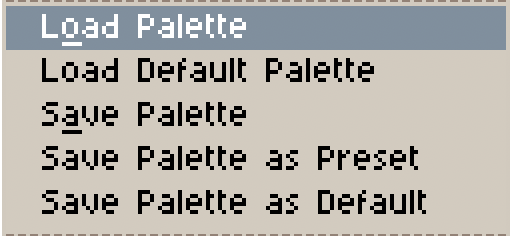
The .png file contains 5 colors. After I load the palette, what I see in the palette is not 5 colors, but 255 colors. The various tints, shades of dark and light. But what I really want are just the primary 5 colors.
Is there any option to configure how many colors are imported whenever you load a palette?
I have searched for an answer to this, and the best I found was to go the extension route, but to be honest it seems reasonable enough to me that there should be some built in ability to configure this in aseprite itself.
Thank you
---
### Author:  [@Ethan\_Buttazzi](https://community.aseprite.org/u/Ethan_Buttazzi)
#### Post date: [February 13, 2024, 2:39am UTC](https://community.aseprite.org/t/palette-import-settings/21447/2 "2024-02-13T02:39:00Z")
not currently, it will grab as many color present in the image as they have, im pretyty sure you can limit it, but it wont do well.
---
### Author:  [@twinklecrimson](https://community.aseprite.org/u/twinklecrimson)
#### Post date: [February 14, 2024, 12:37am UTC](https://community.aseprite.org/t/palette-import-settings/21447/3 "2024-02-14T00:37:58Z")
Ok, how can you limit it?
---
### Author:  [@Ethan\_Buttazzi](https://community.aseprite.org/u/Ethan_Buttazzi)
#### Post date: [February 14, 2024, 1:40am UTC](https://community.aseprite.org/t/palette-import-settings/21447/4 "2024-02-14T01:40:41Z")
right at the bottom theres “new palette from sprite”
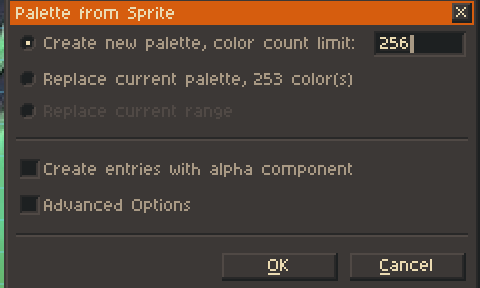
change that, but again it probably wont fo what you want.
---
### Author:  [@twinklecrimson](https://community.aseprite.org/u/twinklecrimson)
#### Post date: [February 15, 2024, 4:51pm UTC](https://community.aseprite.org/t/palette-import-settings/21447/5 "2024-02-15T16:51:38Z")
Thank you, yes, I can do it that way, from a sprite and not by loading it from an external image - yes the colors are a bit inaccurate but this is better than nothing