# Pixel Stats - Check the total amount of colored pixels you used in your art!
**URL:** https://community.aseprite.org/t/pixel-stats-check-the-total-amount-of-colored-pixels-you-used-in-your-art/1897
**Category:** Scripts & Extensions
**Created:** [August 27, 2018, 3:53am UTC](https://community.aseprite.org/t/pixel-stats-check-the-total-amount-of-colored-pixels-you-used-in-your-art/1897 "2018-08-27T03:53:23Z")
**Posts on this page:** 13
**Page:** 1
### Author:  [@haloflooder](https://community.aseprite.org/u/haloflooder)
#### Post date: [August 27, 2018, 3:53am UTC](https://community.aseprite.org/t/pixel-stats-check-the-total-amount-of-colored-pixels-you-used-in-your-art/1897/1 "2018-08-27T03:53:23Z")

#### Script created by Haloflooder. Idea thought up by CopherNeue
# Description
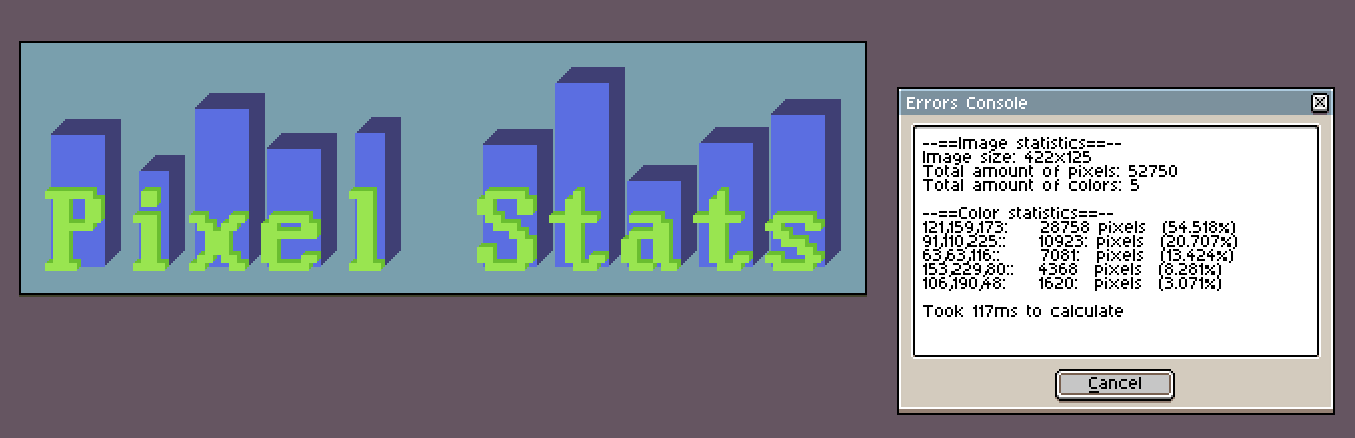
Pixel Stats is a script that tells you the total amount of pixels for each color (outputs the RGB values) along with the percentage. It could be useful for people who are curious about what colors they are using the most for their artwork.
# Features
- Analyzes the image and spits out the data about the pixels!
- Lists the colors as a color group (red, orange, blue, etc)
- You also have the ability to analyze part of an image by using the select tool! (But see the bug section first)
# Limitation
This script can only get the stats from the current layer you selected. The API isn't flexible enough for the script to get the stats from the entire image. To get the stats for the entire image, you need to flatten the layers to 1 layer.
# DISCLAIMER
**DO NOT** use this script with an image with lots and lots of colors or **LARGE** images otherwise you will run the risk of crashing Aseprite. Pixel art should be fine for the most part unless you have more than 1000 colors.
**Save your project before you use the script!**
# Bugs
Aseprite crashes if the active layer you selected is only partially full. So there needs to be a background in the layer in order for the script to not crash Aseprite. The bug is caused by Aseprite's scripting ability so this issue cannot be fixed until Aseprite fixes the bug.
The selection feature only works with a single rectangle selection. Wands, polygons, multiple selections, etc won't work since the Aseprite scripting feature is still a WIP.
# Requirements
Aseprite version v1.2.9
A text editing tool such as Notepad++, Atom, etc. Also, for the sake of your sanity. Don't use Microsoft Notepad.
And some effort
# Installation
Instructions on how to install the script is on this [wiki page on github](https://github.com/haloflooder/Aseprite-Scripts/wiki/Installing-Scripts)
# Download
Download the script from the [release page on the github repo](https://github.com/haloflooder/Aseprite-Scripts/releases)
# Updates
### [v1.0](https://github.com/haloflooder/Aseprite-Scripts/releases/tag/v1.0)
Initial release.
### [v1.1](https://github.com/haloflooder/Aseprite-Scripts/releases/tag/v1.1)
"[Space Drawing](https://twitter.com/D0genutt/status/1034591247216898049)" Pixel art by [DogeNut](https://twitter.com/D0genutt)
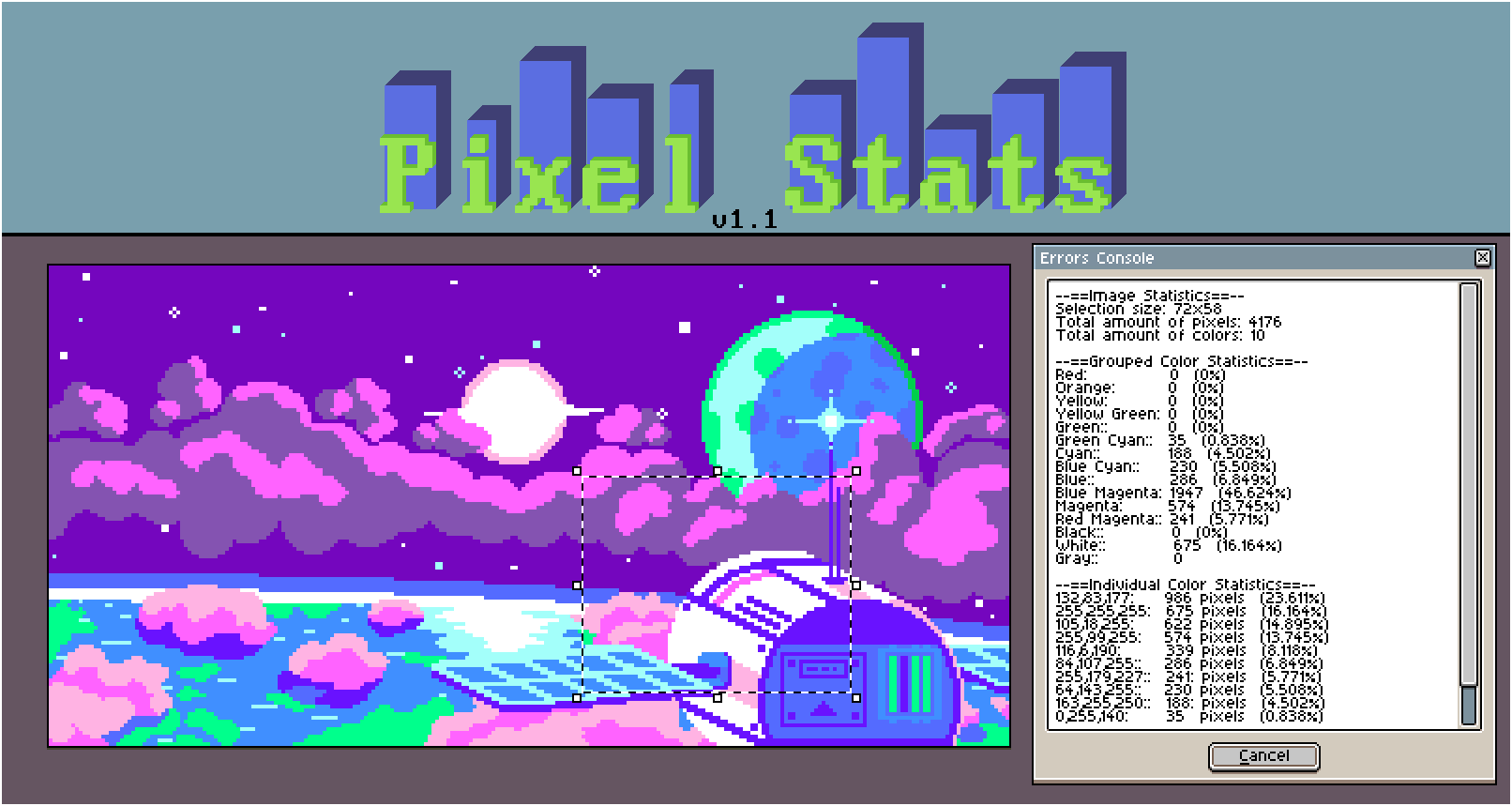 Added new selection analyzer, grouped color analyzer, and some options in the script. Also optimized some code in the script as well.
---
### Author:  [@alien](https://community.aseprite.org/u/alien)
#### Post date: [August 28, 2018, 8:11am UTC](https://community.aseprite.org/t/pixel-stats-check-the-total-amount-of-colored-pixels-you-used-in-your-art/1897/2 "2018-08-28T08:11:46Z")
Hi @haloflooder there thank you for sharing this information, I was not aware you can add your own scripts with Aseprite, do you think we can do image manipulation via scripts also?
Thanks in advance
---
### Author:  [@alien](https://community.aseprite.org/u/alien)
#### Post date: [August 28, 2018, 8:17am UTC](https://community.aseprite.org/t/pixel-stats-check-the-total-amount-of-colored-pixels-you-used-in-your-art/1897/3 "2018-08-28T08:17:36Z")
I looked deeper… now I see that a lot of things can be done with this… D:
---
### Author:  [@SynthED](https://community.aseprite.org/u/SynthED)
#### Post date: [August 28, 2018, 10:13am UTC](https://community.aseprite.org/t/pixel-stats-check-the-total-amount-of-colored-pixels-you-used-in-your-art/1897/4 "2018-08-28T10:13:24Z")
Hello, it would also be good to calculate the time spent on the work, I mean to inform you about how much time you have spent so far.
Could it be done ?.
Could they do an official function with this information?
* * *
Hola, estaría también bien que calculara el tiempo empleado en la obra, quiero decir que te informe sobre cuanto tiempo has invertido hasta ahora.
¿Podría hacerse?.
¿Podrían hacer una función oficial con esta información?.
---
### Author:  [@haloflooder](https://community.aseprite.org/u/haloflooder)
#### Post date: [August 28, 2018, 10:14am UTC](https://community.aseprite.org/t/pixel-stats-check-the-total-amount-of-colored-pixels-you-used-in-your-art/1897/5 "2018-08-28T10:14:24Z")
Hey there! I also didn’t know that you can add scripts to Aseprite until I decided to snoop around Aseprite’s github repo a couple days ago.
It is possible to do image manipulation but depending on what you do in the script, you could easily crash Aseprite. I think that might be a reason why the developers decided not to enable scripts by default. I will be making a demo script that contains lots of examples of what you can do with Aseprite. I’ll message you once I get it done 🙂
_edit_
Just found out that the scripting feature is extremely buggy. I will still release my demo script after I’m done experimenting with scripts but I suggest that no one should use it for production because it will crash Aseprite in many conditions.
_edit 2_
Here is a [demo script](https://github.com/haloflooder/Aseprite-Scripts/blob/master/Scripts%20(JS)/demo_script.js) that I made for Aseprite. I also made a [wiki page on github](https://github.com/haloflooder/Aseprite-Scripts/wiki/The-Stability-of-Aseprite's-Scripting-Feature) that talks about how unstable scripts can be and what bugs I’ve discovered with Aseprite’s scripting feature.
---
### Author:  [@haloflooder](https://community.aseprite.org/u/haloflooder)
#### Post date: [August 28, 2018, 10:20am UTC](https://community.aseprite.org/t/pixel-stats-check-the-total-amount-of-colored-pixels-you-used-in-your-art/1897/6 "2018-08-28T10:20:16Z")
Hi! Unfortunately, that’s currently not possible at the moment since scripts can’t run in the background. It would be better if the developers of Aseprite implements that feature to the software.
* * *
¡Hola! Lamentablemente, actualmente no es posible en este momento, ya que los scripts no se pueden ejecutar en segundo plano. Sería mejor si los desarrolladores de Aseprite implementan esa característica en el software.
---
### Author:  [@haloflooder](https://community.aseprite.org/u/haloflooder)
#### Post date: [August 31, 2018, 7:38am UTC](https://community.aseprite.org/t/pixel-stats-check-the-total-amount-of-colored-pixels-you-used-in-your-art/1897/7 "2018-08-31T07:38:42Z")
"[Space Drawing](https://twitter.com/D0genutt/status/1034591247216898049)" Pixel art by [DogeNut](https://twitter.com/D0genutt)

Pixel Stats v1.1 comes with a few new features and some optimized code to help it run a teensy bit faster! I have also included a minified version of a script if you want a smaller file size for some reason.
[Get your hot fresh copy here!](https://github.com/haloflooder/Aseprite-Scripts/releases/tag/v1.1)
(please read the bug section above before you go crazy with it)
## New Features
- Added the ability to only analyze a selection the user made on the image
- Added a new color analyzer that tells you what color group the pixels are in (with the option to turn it off in the script)
- Added a few options in the script to help speed up Pixel Stats (just by a little bit)
## Other boring changes
- Optimized the text spacer functions (Runs much faster now!)
- Added a debug flag to show how long each section runs
For more information about the script, go to [this wiki page](https://github.com/haloflooder/Aseprite-Scripts/wiki/Pixel-Stats)
---
### Author:  [@fluffbirb](https://community.aseprite.org/u/fluffbirb)
#### Post date: [November 1, 2018, 4:33am UTC](https://community.aseprite.org/t/pixel-stats-check-the-total-amount-of-colored-pixels-you-used-in-your-art/1897/8 "2018-11-01T04:33:39Z")
@haloflooder
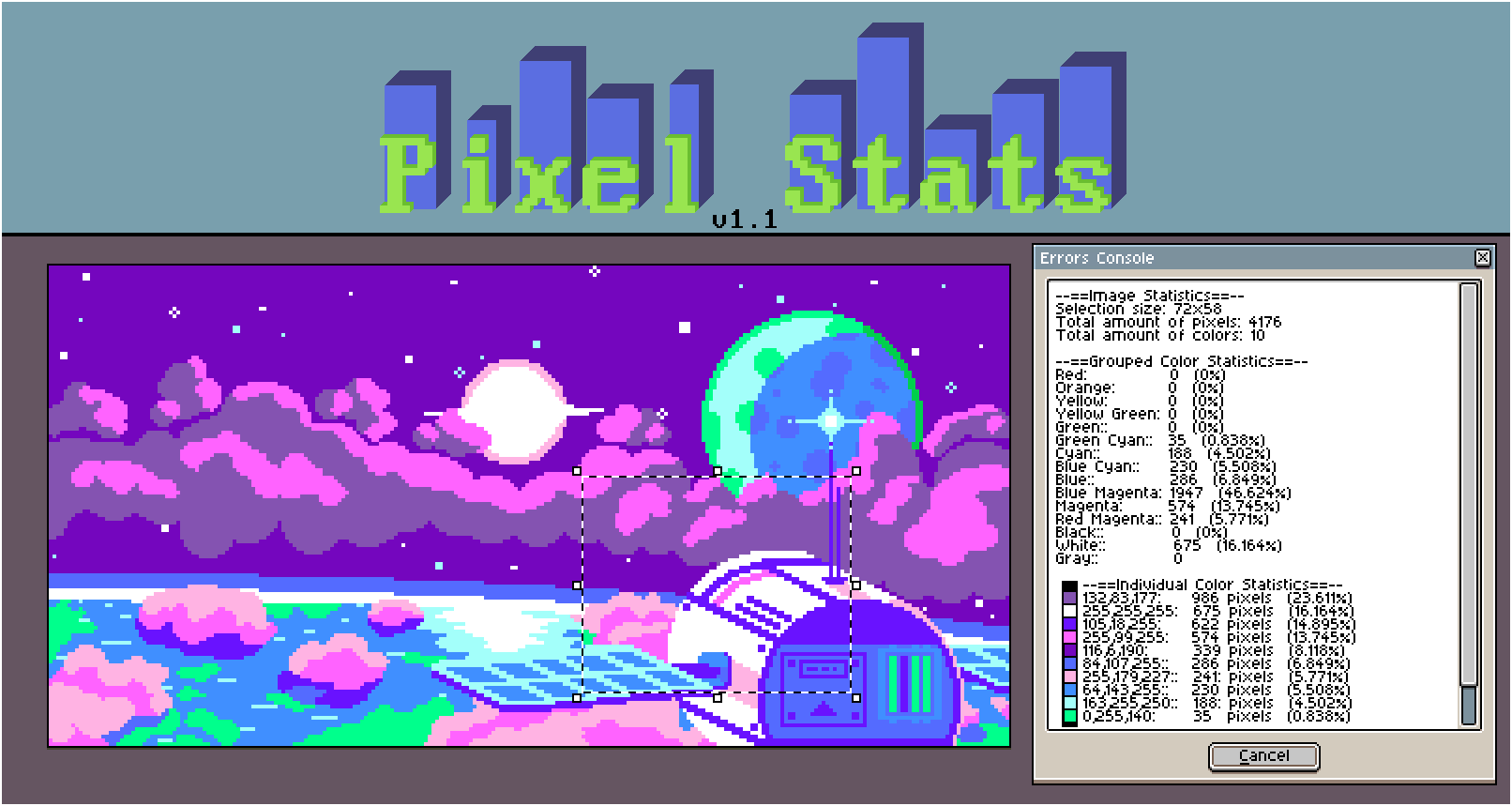
Would it be possible to display a color swatch in the output, rather than a text label describing the color?
Or to output an image with text describing the pixels/percentage?
Example:
---
### Author:  [@haloflooder](https://community.aseprite.org/u/haloflooder)
#### Post date: [November 1, 2018, 9:31pm UTC](https://community.aseprite.org/t/pixel-stats-check-the-total-amount-of-colored-pixels-you-used-in-your-art/1897/9 "2018-11-01T21:31:31Z")
Thanks for the suggestion! It’s a pretty good idea but unfortunately, that wouldn’t be possible since I can’t display colors in errors console in 1.2.9.
I can possibly put colors in the Aseprite 1.2.10 but I have to play around with the new gui api first and see what it looks like.
---
### Author:  [@dacap](https://community.aseprite.org/u/dacap)
#### Post date: [November 2, 2018, 3:32am UTC](https://community.aseprite.org/t/pixel-stats-check-the-total-amount-of-colored-pixels-you-used-in-your-art/1897/10 "2018-11-02T03:32:52Z")
I think that a possible way to report this information (+ colors) would be creating a new image/sprite, I should expose an API to draw text on the canvas and that might be a good start to create the new sprite showing the original sprite stats (or maybe adding more rich text experience to a Dialog textbox, e.g. markdown + images?)
---
### Author:  [@SynthED](https://community.aseprite.org/u/SynthED)
#### Post date: [July 28, 2019, 10:36am UTC](https://community.aseprite.org/t/pixel-stats-check-the-total-amount-of-colored-pixels-you-used-in-your-art/1897/11 "2019-07-28T10:36:13Z")
Hello, could you add information on how many maximum colors are there per cell?
I use the division of cells in 8x8 pixels.
I would like to know if any of my cells have more than 3 colors.
Then the script could provide the following information:
Maximum colors in a cell = 4
Then I would discover that there is an error in my drawing.
* * *
Hola, ¿podría añadir la información sobre cuantos colores maximos hay por celda?.
Yo uso la division de celdas en 8x8 pixeles.
Me gustaría saber si alguna de mis celdas tiene más de 3 colores.
Entonces el script podría proporcionar la información siguiente:
Maximos colores en una celda = 4
Entonces yo descubriría que hay un error en mi dibujo.
---
### Author:  [@haloflooder](https://community.aseprite.org/u/haloflooder)
#### Post date: [August 10, 2019, 7:35pm UTC](https://community.aseprite.org/t/pixel-stats-check-the-total-amount-of-colored-pixels-you-used-in-your-art/1897/12 "2019-08-10T19:35:55Z")
That’s an interesting idea and it definitely is doable. I looked into supporting multiple cels a few months ago but I didn’t implement it yet since the api was still a work in progress at the time.
* * *
Esa es una idea interesante y definitivamente es factible. Investigué el soporte de varias celdas hace unos meses, pero aún no lo implementé ya que la API todavía estaba en progreso en ese momento.
---
### Author:  [@Rhyos](https://community.aseprite.org/u/Rhyos)
#### Post date: [August 4, 2024, 5:02pm UTC](https://community.aseprite.org/t/pixel-stats-check-the-total-amount-of-colored-pixels-you-used-in-your-art/1897/13 "2024-08-04T17:02:34Z")
In case anyone else gets stuck trying to use the script: if you are on Aseprite v1.2.10 or later, you need to use the Lua script version since JS isn’t supported anymore.
You can get the Lua script from Github [here](https://github.com/haloflooder/Aseprite-Scripts/blob/master/Scripts%20(LUA)/pixel_stats.min.lua).