# Problem pasting clipboard content in new image (v1.2-beta10)
**URL:** https://community.aseprite.org/t/problem-pasting-clipboard-content-in-new-image-v1-2-beta10/108
**Category:** Bug Reports
**Created:** [June 28, 2017, 9:32am UTC](https://community.aseprite.org/t/problem-pasting-clipboard-content-in-new-image-v1-2-beta10/108 "2017-06-28T09:32:20Z")
**Posts on this page:** 5
**Page:** 1
### Author:  [@SynthED](https://community.aseprite.org/u/SynthED)
#### Post date: [June 28, 2017, 9:32am UTC](https://community.aseprite.org/t/problem-pasting-clipboard-content-in-new-image-v1-2-beta10/108/1 "2017-06-28T09:32:20Z")
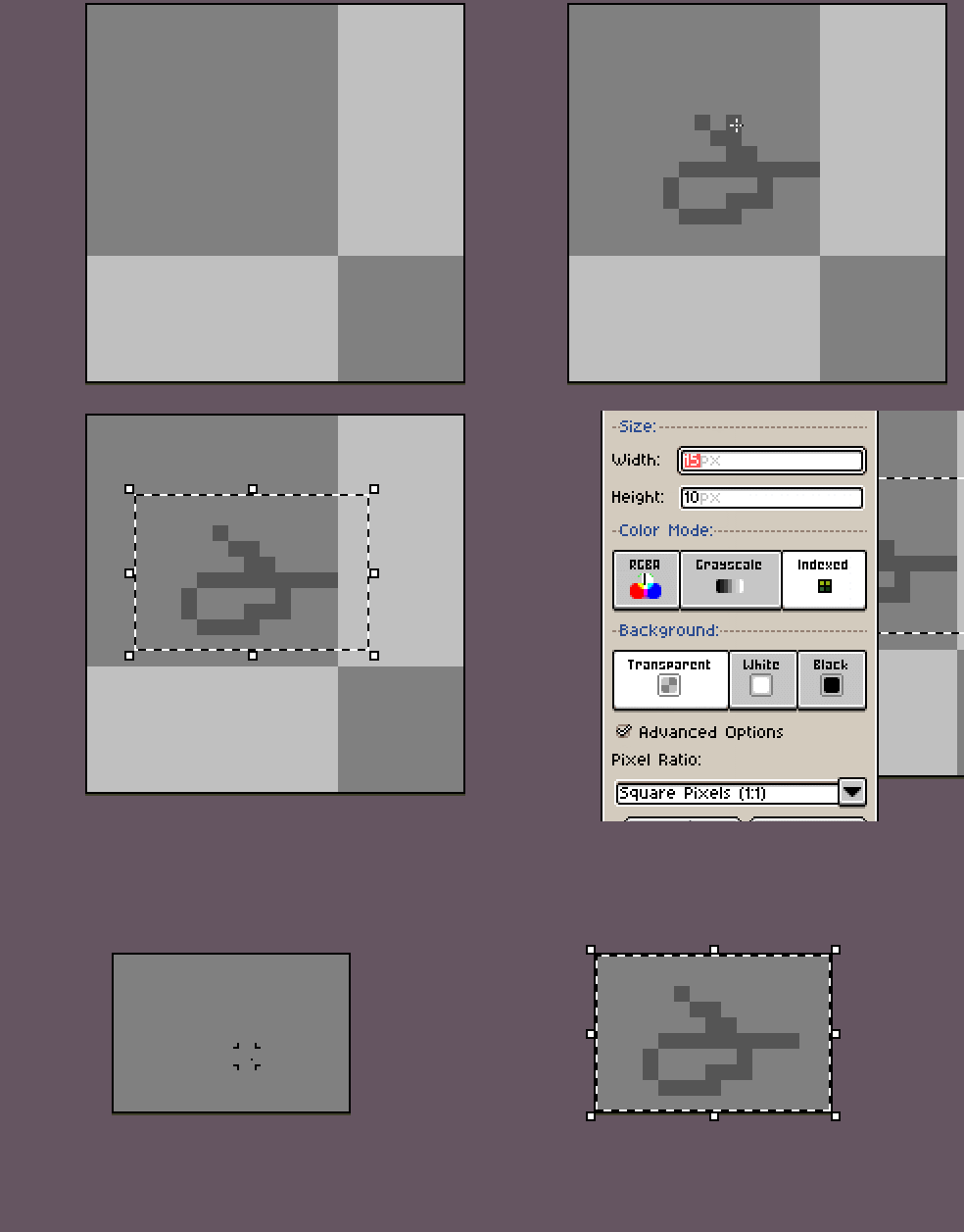
Hi, in the last beta something strange happens when doing this:
1 - create a new canvas of 64 x 64, for example
2 - select an area (16x16 for example) of that part and copy it
3 - create a new canvas, this new canvas will have the size of the copied area automatically.
4 - paste the selection on the new canvas.
The selection is sticking out of the canvas, out of place.
In the previous beta it was sticking correctly inside the canvas.
---
### Author:  [@dacap](https://community.aseprite.org/u/dacap)
#### Post date: [June 28, 2017, 2:33pm UTC](https://community.aseprite.org/t/problem-pasting-clipboard-content-in-new-image-v1-2-beta10/108/2 "2017-06-28T14:33:35Z")
Hi @SynthED, it’s a regression. This bug appeared because we’ve fixed [#1447](https://github.com/aseprite/aseprite/issues/1447). You can see in that discussion what was solved. It’s a tricky situation here (something was solved, but something else was broken).
There is no easy or straight forward way to fix this one. A possible idea: If we are pasting the clipboard into a new image (not in the source image from where the clipboard was copied), we should limit the pasted image to the canvas bounds (old behavior). If the clipboard is pasted in the source image, we use the new behavior.
---
### Author:  [@SynthED](https://community.aseprite.org/u/SynthED)
#### Post date: [June 29, 2017, 10:44am UTC](https://community.aseprite.org/t/problem-pasting-clipboard-content-in-new-image-v1-2-beta10/108/3 "2017-06-29T10:44:50Z")
Ok thanks for the info, it is not very annoying but I think it is something that should be addressed although I do not consider it an urgent error.
---
### Author:  [@dacap](https://community.aseprite.org/u/dacap)
#### Post date: [July 3, 2017, 9:09pm UTC](https://community.aseprite.org/t/problem-pasting-clipboard-content-in-new-image-v1-2-beta10/108/4 "2017-07-03T21:09:03Z")
This bug is fixed on Aseprite v1.2-beta11, I’ll close this topic (please create a new topic in case that the bug is still present or reappears).
---
### Author:  [@dacap](https://community.aseprite.org/u/dacap)
#### Post date: [July 3, 2017, 9:09pm UTC](https://community.aseprite.org/t/problem-pasting-clipboard-content-in-new-image-v1-2-beta10/108/5 "2017-07-03T21:09:10Z")