# Rotating Square Brush Script
**URL:** https://community.aseprite.org/t/rotating-square-brush-script/24890
**Category:** Scripts & Extensions
**Created:** [March 7, 2025, 9:11pm UTC](https://community.aseprite.org/t/rotating-square-brush-script/24890 "2025-03-07T21:11:45Z")
**Posts on this page:** 1
**Page:** 1
### Author:  [@behreandtjeremy](https://community.aseprite.org/u/behreandtjeremy)
#### Post date: [March 7, 2025, 9:11pm UTC](https://community.aseprite.org/t/rotating-square-brush-script/24890/1 "2025-03-07T21:11:45Z")
Below is a script that draws a rotated square on a canvas [graphics context](https://github.com/aseprite/api/blob/main/api/graphicscontext.md). When the ok button is pressed, it creates an image from the canvas and assigns it to a custom [brush](https://github.com/aseprite/api/blob/main/api/brush.md).
The beta version of Aseprite is required to assign the square to a brush. The screen cap is from 1.3.14-beta1.
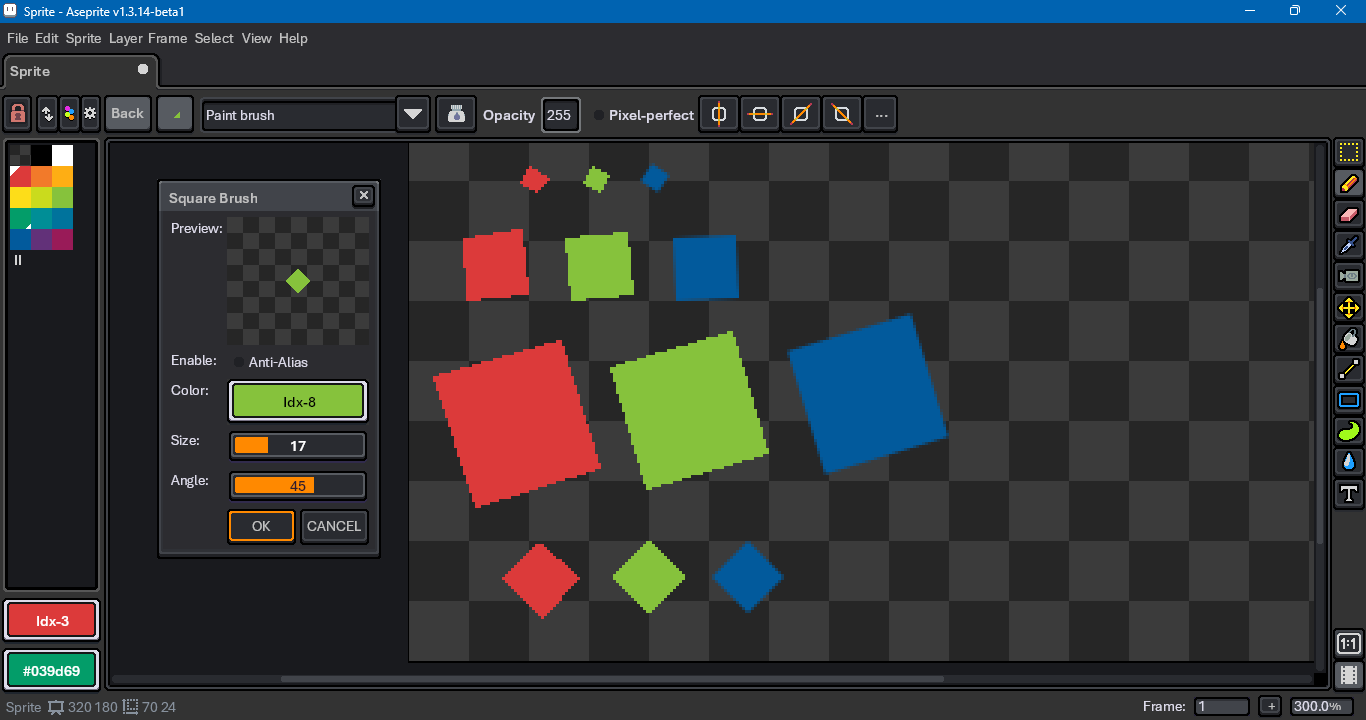
The built-in square brush is red. The script brush is in green. The anti-aliased brush is in blue.
```lua
local prevBrush = app.brush
local defaultSize = 32
local defaultAngle = 0
if prevBrush then
defaultSize = math.max(1, prevBrush.size or 1)
defaultAngle = prevBrush.angle or 0
end
local function checker(
wImg, hImg, bpp, wCheck, hCheck, aColor, bColor)
local checkered = {}
local lenTrg = wImg * hImg
local fmtStr = " 0
and app.fgColor.alpha
or 255
},
onchange = function() dlg:repaint() end
}
dlg:slider {
id = "size",
label = "Size:",
min = 1,
max = 64,
value = defaultSize,
onchange = function() dlg:repaint() end
}
dlg:slider {
id = "degrees",
label = "Angle:",
min = -180,
max = 180,
value = defaultAngle,
onchange = function() dlg:repaint() end
}
dlg:button {
id = "confirm",
text = "&OK",
focus = false,
onclick = function()
local args = dlg.data
local useAntiAlias = (args.useAntiAlias --[[@as boolean]])
or false
local brushColor = (args.brushColor --[[@as Color]])
or Color { r = 255, g = 255, b = 255, a = 255 }
local size = (args.size --[[@as integer]]) or 1
local degrees = (args.degrees --[[@as integer]]) or 0
local alphaIndex = 0
local colorMode = ColorMode.RGB
local colorSpace = ColorSpace { sRGB = false }
local activeSprite = app.sprite
if activeSprite then
local activeSpec = activeSprite.spec
alphaIndex = activeSpec.transparentColor
colorMode = activeSpec.colorMode
colorSpace = activeSpec.colorSpace
end
if size <= 1 then
local imageSpec = ImageSpec {
width = 1,
height = 1,
transparentColor = alphaIndex,
colorMode = colorMode
}
imageSpec.colorSpace = colorSpace
local image = Image(imageSpec)
image:clear(brushColor)
app.brush = Brush {
type = BrushType.IMAGE,
image = image,
center = Point(0, 0)
}
app.tool = "pencil"
return
end
local imageSpec = ImageSpec {
width = 128,
height = 128,
transparentColor = alphaIndex,
colorMode = colorMode
}
imageSpec.colorSpace = colorSpace
local image = Image(imageSpec)
local ctx = image.context
if ctx then
local useAAVerif = useAntiAlias
and colorMode ~= ColorMode.INDEXED
drawSquare(ctx, useAAVerif, brushColor, size, degrees)
local trimRect = image:shrinkBounds(alphaIndex)
local rectIsValid = trimRect.width > 0
and trimRect.height > 0
if rectIsValid then
local trimSpec = ImageSpec {
width = trimRect.width,
height = trimRect.height,
transparentColor = imageSpec.transparentColor,
colorMode = imageSpec.colorMode
}
trimSpec.colorSpace = imageSpec.colorSpace
local trimmed = Image(trimSpec)
trimmed:drawImage(
image, Point(-trimRect.x, -trimRect.y),
255, BlendMode.SRC)
app.brush = Brush {
type = BrushType.IMAGE,
image = trimmed,
center = Point(
trimRect.width // 2,
trimRect.height // 2)
}
app.tool = "pencil"
end
end
end
}
dlg:button {
id = "cancel",
text = "&CANCEL",
focus = false,
onclick = function()
dlg:close()
end
}
dlg:show {
autoscrollbars = false,
wait = false,
}
```
[Edit: Fixed missing beginPath]
For grayscale color mode, there’s an [extra wrinkle](https://community.aseprite.org/t/premultiplied-alpha-in-grayscale-images-from-graphicscontext/24889).
The idea can be generalized to any shape you can make with straight lines and cubic Bezier curves. You might be able to make updating the brush more convenient, too, so you don’t have to press the ok button.
Prior discussions that prompted me to share the code:
> [@When is a square not a square?](https://community.aseprite.org/t/when-is-a-square-not-a-square/16927/):
>
> A: when it’s rotated. I’ve never played with this stuff before, so not sure whether this happens all the time or not… When I select the square brush, resize it to 2px, and rotate 90 degrees, it’s still square shaped heavy_check_mark But when I increase the square brush size to 3px or 4px upwards, then rotate 90 degrees, the brush is no longer square. [image] Confused.
> [@Did there used to be a diamond-shaped pencil?](https://community.aseprite.org/t/did-there-used-to-be-a-diamond-shaped-pencil/22587):
>
> Hello! I’m new to Aseprite in general, but I’ve used it for a few drawings so far… and I could’ve sworn I had a diamond (rotated square) brush of some kind by default. It seems to be gone now. Rotating the square shape to 45 leaves a weird dent on the right side of it, which makes my OCD feel very pained. Maybe I’m just totally misremembering, but it really urked me, so I felt like I had to ask about this somewhere. Is there anything I can do for a diamond shaped brush that doesn’t have issues…
> [@Default Brush Changed](https://community.aseprite.org/t/default-brush-changed/17471/):
>
> This morning I woke up to find that my square brush has changed, when I increase its size it becomes this sort of skewed shape instead of, well, just a larger square and I would like it to go back to how it used to be, but I have no idea how to do this. Currently using v1.2.40-x64 on MacOS