# Rotation: Auto generated
**URL:** https://community.aseprite.org/t/rotation-auto-generated/4199
**Category:** Features
**Created:** [November 12, 2019, 2:11pm UTC](https://community.aseprite.org/t/rotation-auto-generated/4199 "2019-11-12T14:11:28Z")
**Posts on this page:** 2
**Page:** 1
### Author:  [@Flow\_TnT](https://community.aseprite.org/u/Flow_TnT)
#### Post date: [November 12, 2019, 2:11pm UTC](https://community.aseprite.org/t/rotation-auto-generated/4199/1 "2019-11-12T14:11:28Z")
Hi there. Is there a way to select a layer, and then have Aseprite automatically generate frames for the rotations of that layer?
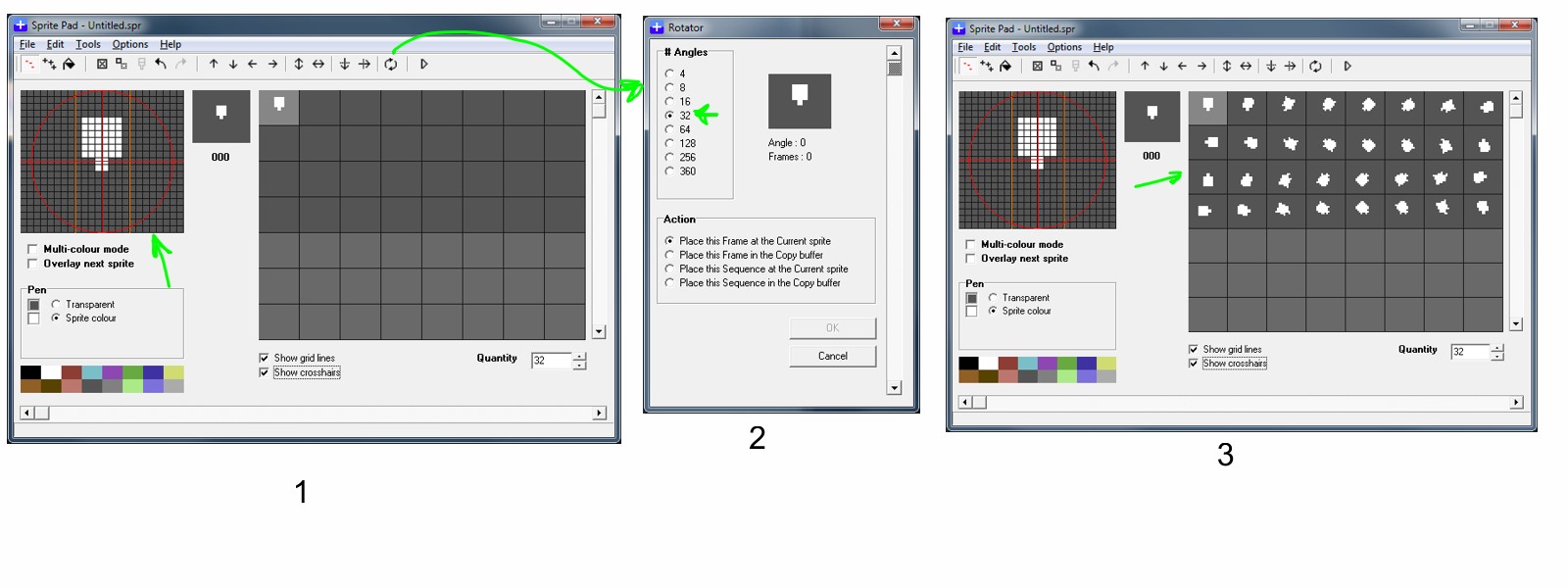
Here is an example from SpritePad, a Commodore C64 sprite designer application. In the attached image 1, the first frame is drawn. Then, there is an option to set the number of rotations you want (defaults values, but who needs anything outside of those, see attached image 2). And then - poof! - the applications generates each rotation as a separate frame.
Anything like that in Aseprite?
Regards,
Flow TnT!
---
### Author:  [@KashouC](https://community.aseprite.org/u/KashouC)
#### Post date: [November 12, 2019, 2:14pm UTC](https://community.aseprite.org/t/rotation-auto-generated/4199/2 "2019-11-12T14:14:54Z")
No sorry, there’s no such function in the base program. It’s entirely possible someone made a script to do this, but I couldn’t tell you if that’s the case.
You can check the script thread/section and see if there’s anything that does something similar.
> [@Aseprite Scripts Collection](https://community.aseprite.org/t/aseprite-scripts-collection/3599):
>
> Hi Aseprite friends! ^\_^/ I’m going to make an Aseprite Script compilation here, I’ll try to gather links and info about all the scripts the community has made into this post. If you are interested in scripts and can be of any help, please don’t hesitate and help me!! smiley HOW TO INSTALL A SCRIPT: Download the script (scripts are files with .lua extension, so if you download them as a .zip file you will need to uncompress them) Open the [user script folder](https://community.aseprite.org/t/locate-user-scripts-folder/2170) [imagen] Copy the script in tha…