# \[Script\] Export sprite's layers separately
**URL:** https://community.aseprite.org/t/script-export-sprites-layers-separately/3679
**Category:** Scripts & Extensions
**Created:** [August 6, 2019, 9:14pm UTC](https://community.aseprite.org/t/script-export-sprites-layers-separately/3679 "2019-08-06T21:14:24Z")
**Posts on this page:** 20
**Page:** 1
### Author:  [@Gaspi](https://community.aseprite.org/u/Gaspi)
#### Post date: [August 6, 2019, 9:14pm UTC](https://community.aseprite.org/t/script-export-sprites-layers-separately/3679/1 "2019-08-06T21:14:24Z")
# Export Layers
An easy and fast way of exporting every layer of a sprite into individual sprites.
## Introduction and description
Hi!
I’m working on a game where characters are drawn in layers, so you can choose their clothes and complements. As I was making these sprites I started to miss a function to export all layers on a sprite as individual png images with their own name and on a specific folder. I couldn’t find this feature, so I investigated and found that there is an api for Aseprite, so I made my own script that does just that before making sure there was no way to do it other way.
## Usage
Have your sprite with multiple layers you want to be exported individually. Execute the script and your layers will export in separate files. Hidden layers are also exported.
### Options
- _Output directory_: The folder where to export. Note that you will specify a
file, not a folder. This is because Aseprite’s API doesn’t support folder
selection.
- _File name_: The name of every exported file. The possible formatters are:
– `{spritename}`: The name of the sprite to export.
– `{layername}`: The name of the layer.
– `{layergroups}`: The groups the layer is into.
- _Group separator_: The character used to separate the group names in file name.
- _Export format_: File format of exported files.
- _Export scale_: The scale at which to export. The resolution of the file will
be multiplied by this number. Useful for media sharing.
- _Save sprite_: If checked, the full sprite will be saved in the output
directory.
### Examples
With default options:
- A layer with name `layer1` will be exported as `layer1.png`.
- A layer with name `layer2` inside a group with name `group1` will be exported
as `group1/layer2.png`.
- A layer with name `layer3` inside a group with name `group2`, which is inside
`group1`, will be exported as `group1/group2/layer3.png`.
## Download
You can download my scripts from here: [GitHub - PKGaspi/AsepriteScripts: My collection of Aseprite Scripts. Useful to make repetitive export patterns quicker.](https://github.com/PKGaspi/AsepriteScripts).
## Installation
1. Download or clone the repository.
2. In Aseprite, go to File → Scripts → Open Scripts Folder.
3. Copy the content of this repository’s script folder into the opened script
folder.
4. In Aseprite, go to File → Scripts → Re-scan Scripts Folder.
## Changelog
- v2.0 - Added name formatting, different file formats and a scale export factor.
- v1.3 - Fixed layers in groups not exporting after API v1.2.14 changes.
- v1.2 - Improved file name with sprites with multiple frames.
- v1.1 - Added Windows support and an error message if no sprite is currently active.
- v1.0 - Initial release.
* * *
I hope you find this script useful and thank you very much for using my script!
Any comment, feedback or suggestion is appreciated!
---
### Author:  [@JJHaggar](https://community.aseprite.org/u/JJHaggar)
#### Post date: [August 7, 2019, 9:30am UTC](https://community.aseprite.org/t/script-export-sprites-layers-separately/3679/2 "2019-08-07T09:30:57Z")
Hi @Gaspi, thanks for sharing and welcome to Aseprite community! 😃
I’ve added this script to the list of scripts I’m collecting [here](https://community.aseprite.org/t/aseprite-scripts-collection/3599), I hope you don’t mind 🙂
Is there any possibility that you add support for Windows to the script? (maybe asking about the OS in the code to choose one way of using paths or another? I’m a bit noob so I’m not sure if that can be done easily in lua).
---
### Author:  [@Gaspi](https://community.aseprite.org/u/Gaspi)
#### Post date: [August 7, 2019, 10:43am UTC](https://community.aseprite.org/t/script-export-sprites-layers-separately/3679/4 "2019-08-07T10:43:16Z")
Hi, @JJHaggar!
Thank you very much for the wellcome! I updated the script and it now works both on Linux and Windows. The way I did os recognition is not the best but it should be fine.
Have a nice day!
---
### Author:  [@JJHaggar](https://community.aseprite.org/u/JJHaggar)
#### Post date: [August 8, 2019, 1:05pm UTC](https://community.aseprite.org/t/script-export-sprites-layers-separately/3679/5 "2019-08-08T13:05:43Z")
That’s great, thank you very much! 😃
---
### Author:  [@creeper-keeper](https://community.aseprite.org/u/creeper-keeper)
#### Post date: [February 17, 2020, 8:57pm UTC](https://community.aseprite.org/t/script-export-sprites-layers-separately/3679/6 "2020-02-17T20:57:26Z")
you rock ❤
---
### Author:  [@david\_kay](https://community.aseprite.org/u/david_kay)
#### Post date: [April 10, 2020, 3:11pm UTC](https://community.aseprite.org/t/script-export-sprites-layers-separately/3679/7 "2020-04-10T15:11:07Z")
great tool! It’s almost exactly what I was looking for. Say would it be difficult to modify the script to save frames from each layer in a separate folder and have the folder named after the layer?
---
### Author:  [@gabrielcolmena](https://community.aseprite.org/u/gabrielcolmena)
#### Post date: [January 18, 2021, 3:40pm UTC](https://community.aseprite.org/t/script-export-sprites-layers-separately/3679/8 "2021-01-18T15:40:55Z")
this is awesome!! thank you so much
---
### Author:  [@Gecko](https://community.aseprite.org/u/Gecko)
#### Post date: [June 22, 2021, 8:32pm UTC](https://community.aseprite.org/t/script-export-sprites-layers-separately/3679/9 "2021-06-22T20:32:13Z")
> [@Gaspi](#):
>
> respective png file. If your sprite has multiple frames, all layers for all frames will be exported with their
Thank you so much!
---
### Author:  [@Nate\_Zilla](https://community.aseprite.org/u/Nate_Zilla)
#### Post date: [July 4, 2021, 5:52pm UTC](https://community.aseprite.org/t/script-export-sprites-layers-separately/3679/10 "2021-07-04T17:52:28Z")
You are my favorite person today. :3 Thank you so much!
---
### Author:  [@Gorizaaaa](https://community.aseprite.org/u/Gorizaaaa)
#### Post date: [October 8, 2021, 11:40am UTC](https://community.aseprite.org/t/script-export-sprites-layers-separately/3679/11 "2021-10-08T11:40:23Z")
This is almost exactly what I am looking for but is there anyway to change the scale of layers its exporting?
I did try to edit the script myself but I did not really know what I was doing and its keeps running out of memory.
---
### Author:  [@Gaspi](https://community.aseprite.org/u/Gaspi)
#### Post date: [October 8, 2021, 12:07pm UTC](https://community.aseprite.org/t/script-export-sprites-layers-separately/3679/12 "2021-10-08T12:07:16Z")
Hi! I’m planning to update the script to add more functionalities. For now, you can resize the sprite manually before running the script, and resize back after exporting.
---
### Author:  [@Suvin](https://community.aseprite.org/u/Suvin)
#### Post date: [October 29, 2021, 7:25pm UTC](https://community.aseprite.org/t/script-export-sprites-layers-separately/3679/13 "2021-10-29T19:25:53Z")
Thank you very much for the Script I needed this, it would be great if you added the option to resize
---
### Author:  [@Gaspi](https://community.aseprite.org/u/Gaspi)
#### Post date: [November 6, 2021, 2:05pm UTC](https://community.aseprite.org/t/script-export-sprites-layers-separately/3679/14 "2021-11-06T14:05:34Z")
Hello everyone!
Today I bring you a much awaited update to this script. You can get it along my other scripts here: [GitHub - PKGaspi/AsepriteScripts: My collection of Aseprite Scripts](https://github.com/PKGaspi/AsepriteScripts)
It includes many new options, including resize and naming formatting. I hope you all enjoy. I’m open to feedback here and in the repo’s issues.
---
### Author:  [@KingAsix](https://community.aseprite.org/u/KingAsix)
#### Post date: [February 9, 2022, 8:52pm UTC](https://community.aseprite.org/t/script-export-sprites-layers-separately/3679/15 "2022-02-09T20:52:11Z")
Hello! Thank you for making this awesome script, but would it be possible to add an option to exclude layers from the exporting. I was thinking of hiding the layers or even appending the layer name with an underscore or something.
EDIT: I’ve made changes to the script that will skip the export on layers that are prefixed with a given character. The default prefix is an asterisk (\*). I can make a pull request on the git repo when I have time and you can add it in for others if you want.
---
### Author:  [@Sumiez](https://community.aseprite.org/u/Sumiez)
#### Post date: [March 9, 2022, 2:41am UTC](https://community.aseprite.org/t/script-export-sprites-layers-separately/3679/16 "2022-03-09T02:41:42Z")
This is awesome and incredibly helpful for a project that I’m working on! I really appreciate it.
---
### Author:  [@WinhooFeng](https://community.aseprite.org/u/WinhooFeng)
#### Post date: [April 9, 2022, 3:31pm UTC](https://community.aseprite.org/t/script-export-sprites-layers-separately/3679/17 "2022-04-09T15:31:49Z")
非常感谢!我在为自己的游戏项目写一个导出图片和数据的lua脚本工具。但我对app.command.ExportSpriteSheet这个接口的使用方式不清楚,官方文档写的也不够详细。参考了你的lua脚本后,我成功的解决了我的问题。
Thank you very much! I’m writing a Lua scripting tool for exporting images and data for my game project. But I am not clear about the use of app.command.ExportSpriteSheet, the official document writing is not detailed enough. After referring to your Lua script, I successfully solved my problem.
---
### Author:  [@Ikki](https://community.aseprite.org/u/Ikki)
#### Post date: [May 13, 2022, 3:48pm UTC](https://community.aseprite.org/t/script-export-sprites-layers-separately/3679/18 "2022-05-13T15:48:22Z")
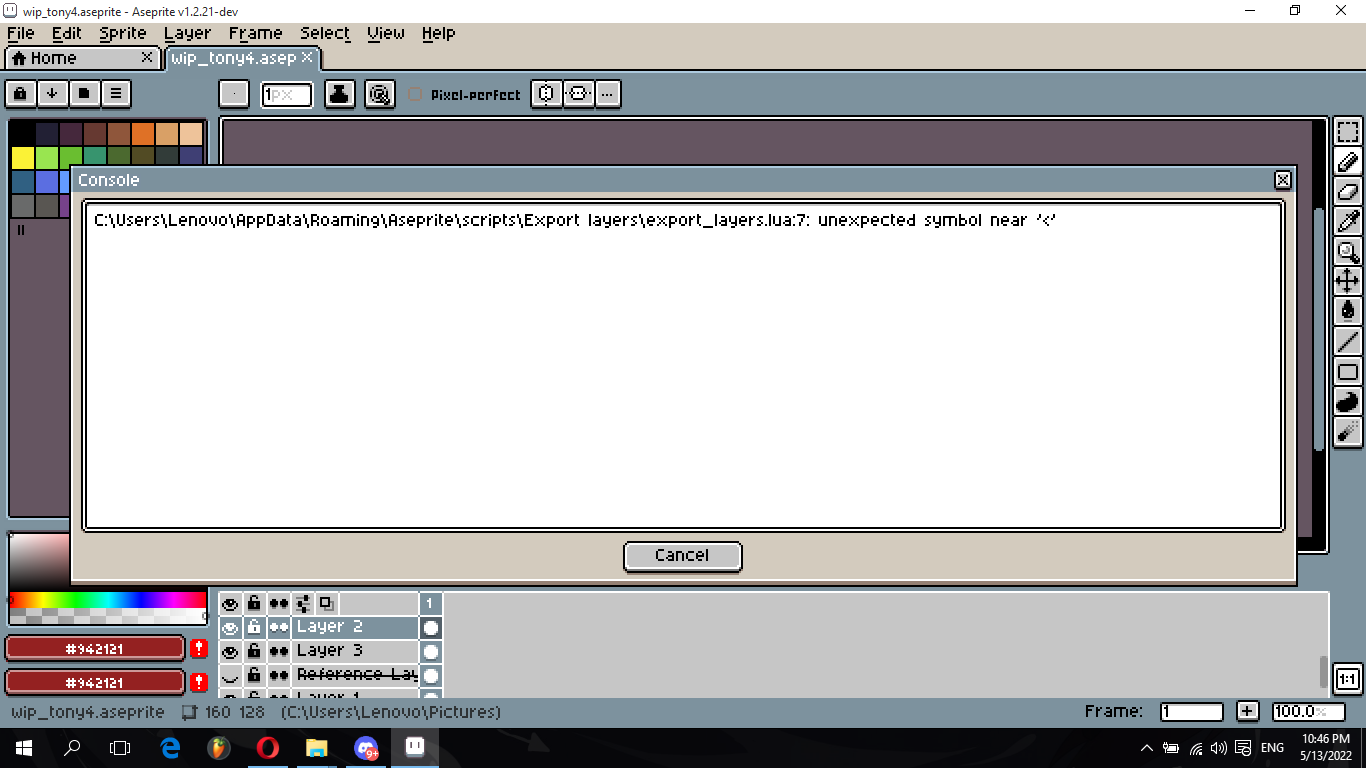
Can anyone help me? I keep getting this whenever I tried to use these scripts.
---
### Author:  [@Gaspi](https://community.aseprite.org/u/Gaspi)
#### Post date: [May 13, 2022, 5:05pm UTC](https://community.aseprite.org/t/script-export-sprites-layers-separately/3679/19 "2022-05-13T17:05:19Z")
Hi. To me it looks like the script file (export\_layers.lua) has been modified and no longer has correct lua syntax. I would sugest to reinstall using the latest version and try again.
---
### Author:  [@eishiya](https://community.aseprite.org/u/eishiya)
#### Post date: [May 13, 2022, 5:30pm UTC](https://community.aseprite.org/t/script-export-sprites-layers-separately/3679/20 "2022-05-13T17:30:51Z")
This usually happens when you incorrectly save the script file. Make sure you save the raw file, and not the web page that the file is displayed on.
---
### Author:  [@Ikki](https://community.aseprite.org/u/Ikki)
#### Post date: [May 14, 2022, 4:08am UTC](https://community.aseprite.org/t/script-export-sprites-layers-separately/3679/21 "2022-05-14T04:08:38Z")
I’m unfamiliar with Github, I’ve tried using the Raw button and save the January version from there, but it still have the same error. Can you please explain to me how to download these scripts properly? Thank you for your time and sorry to bother like this.
[Next page](https://community.aseprite.org/t/script-export-sprites-layers-separately/3679.md?page=2)