# Scripts not loading after installing
**URL:** https://community.aseprite.org/t/scripts-not-loading-after-installing/12241
**Category:** Help
**Created:** [December 23, 2021, 1:58pm UTC](https://community.aseprite.org/t/scripts-not-loading-after-installing/12241 "2021-12-23T13:58:31Z")
**Posts on this page:** 7
**Page:** 1
### Author:  [@Kalengo\_Phiri](https://community.aseprite.org/u/Kalengo_Phiri)
#### Post date: [December 23, 2021, 1:58pm UTC](https://community.aseprite.org/t/scripts-not-loading-after-installing/12241/1 "2021-12-23T13:58:31Z")
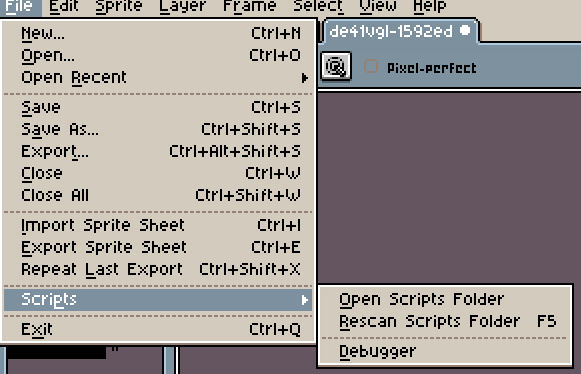
I recently downloaded a script and managed to install it but after restarting my aseprite as instructed. I can not see it in the drop down menu
---
### Author:  [@dogboydog](https://community.aseprite.org/u/dogboydog)
#### Post date: [December 23, 2021, 2:01pm UTC](https://community.aseprite.org/t/scripts-not-loading-after-installing/12241/2 "2021-12-23T14:01:42Z")
If you click “Open Scripts Folder”, do you see your script? Can you show it in the folder?
---
### Author:  [@Kalengo\_Phiri](https://community.aseprite.org/u/Kalengo_Phiri)
#### Post date: [December 23, 2021, 2:26pm UTC](https://community.aseprite.org/t/scripts-not-loading-after-installing/12241/3 "2021-12-23T14:26:39Z")
Yes I can, and I clicked and installed it
---
### Author:  [@dogboydog](https://community.aseprite.org/u/dogboydog)
#### Post date: [December 23, 2021, 2:38pm UTC](https://community.aseprite.org/t/scripts-not-loading-after-installing/12241/4 "2021-12-23T14:38:19Z")
What do you mean exactly clicked and installed it? Aseprite scripts don’t need to be clicked to install. They just need to be in the right directory. Can you show a screenshot of your script in the scripts directory?
---
### Author:  [@Kalengo\_Phiri](https://community.aseprite.org/u/Kalengo_Phiri)
#### Post date: [December 23, 2021, 2:53pm UTC](https://community.aseprite.org/t/scripts-not-loading-after-installing/12241/5 "2021-12-23T14:53:40Z")
It wasn’t appearing in the Aseprite drop down when I added it to the folder so I double clicked it and it brought options for installing. Then it still didn’t appear after installing 
---
### Author:  [@dogboydog](https://community.aseprite.org/u/dogboydog)
#### Post date: [December 23, 2021, 2:56pm UTC](https://community.aseprite.org/t/scripts-not-loading-after-installing/12241/6 "2021-12-23T14:56:16Z")
Oh, that is an extension. It’s not a script. You might have to check the usage instructions of that particular extension. Try going to Edit \> Preferences \> Extensions and see if you can enable it there.
---
### Author:  [@Kalengo\_Phiri](https://community.aseprite.org/u/Kalengo_Phiri)
#### Post date: [December 23, 2021, 8:40pm UTC](https://community.aseprite.org/t/scripts-not-loading-after-installing/12241/7 "2021-12-23T20:40:14Z")
I rechecked the instructions. Yes it’s an extension whose functions fall under the sprite tab. Thanks 😄