# \[SOLVED\] Animation file sequence loading error
**URL:** https://community.aseprite.org/t/solved-animation-file-sequence-loading-error/14786
**Category:** Bug Reports
**Created:** [June 25, 2022, 11:22am UTC](https://community.aseprite.org/t/solved-animation-file-sequence-loading-error/14786 "2022-06-25T11:22:25Z")
**Posts on this page:** 6
**Page:** 1
### Author:  [@El\_Gringo](https://community.aseprite.org/u/El_Gringo)
#### Post date: [June 25, 2022, 11:22am UTC](https://community.aseprite.org/t/solved-animation-file-sequence-loading-error/14786/1 "2022-06-25T11:22:25Z")
Animation file sequence loading error:
file\_sequence\_image 128x72
Error loading frame 2 from file “C:\Users\HAL9000\Downloads\xtest\Bridge\_01.png”
How to recreate:
1. have sequence of pics in a folder named from %name%\_00 to %name%\_min+3
(mine were all in .png format)
2. load them from sequence number 01 to xx = working
3. load them from sequence number 00 to xx = error
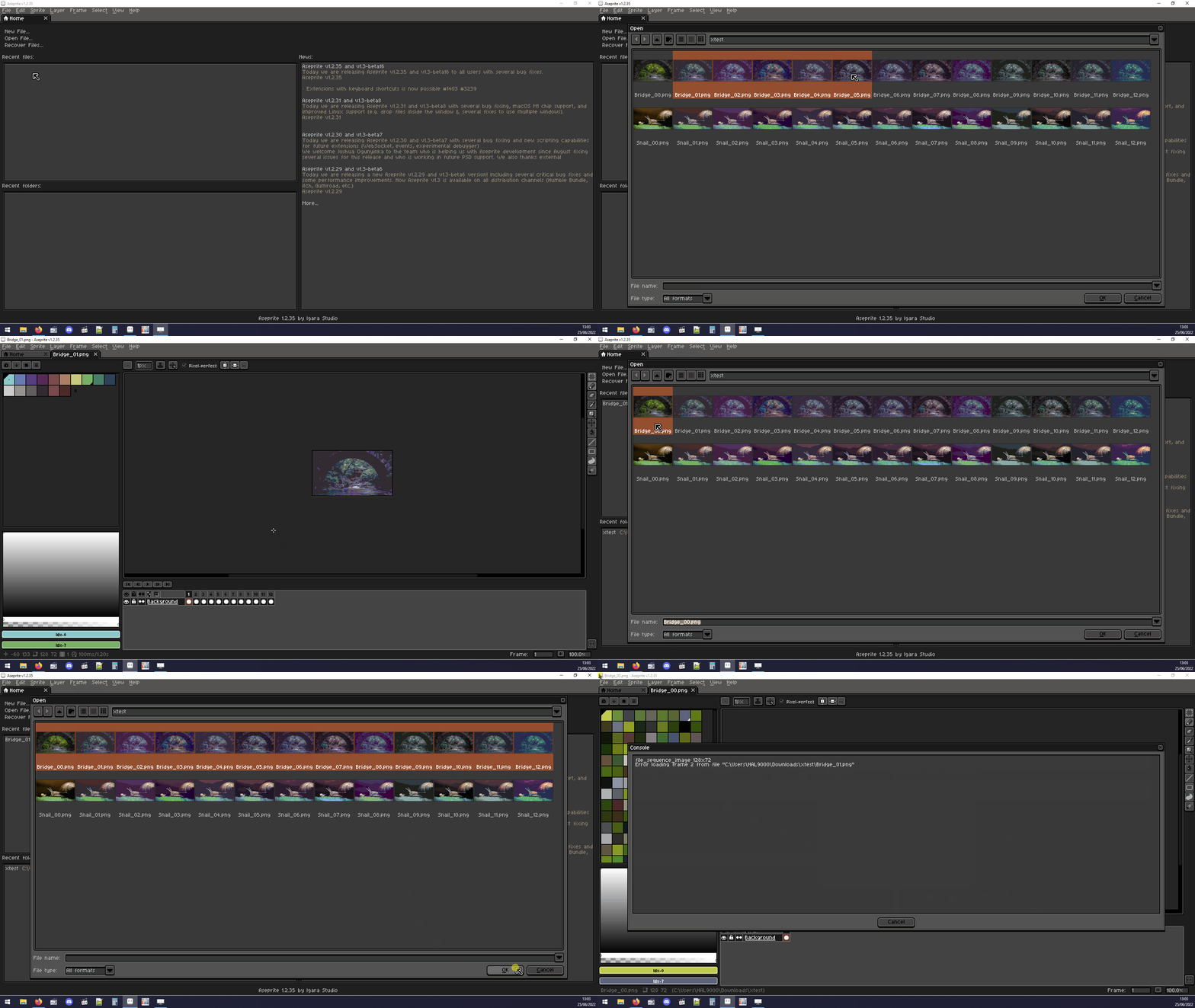
Aseprite 1.2.35 x64
Windows 10 (x64, latest updates)
---
### Author:  [@Olga\_Galvanova](https://community.aseprite.org/u/Olga_Galvanova)
#### Post date: [June 26, 2022, 8:20pm UTC](https://community.aseprite.org/t/solved-animation-file-sequence-loading-error/14786/2 "2022-06-26T20:20:27Z")
hi there! i made some tests and i think the issue here is that the file\_00 is in rgb mode, while the rest is in indexed mode, am i right?
at least that’s how i managed to recreate the error.
imho the error message should be more clear stating what is the problem or - ideally - the pop up window should offer to either convert rgb images to indexed or convert indexed images to rgb.
PS. to load the sequence as animation you don’t have to select all the images - just select the first one and aseprite will offer you to import the rest
---
### Author:  [@El\_Gringo](https://community.aseprite.org/u/El_Gringo)
#### Post date: [June 28, 2022, 7:29am UTC](https://community.aseprite.org/t/solved-animation-file-sequence-loading-error/14786/3 "2022-06-28T07:29:05Z")
[SOLVED]
Wow you’re right - I did not notice. Thanks for clearing that up. Thanks for the tip!
---
### Author:  [@Unknow0059](https://community.aseprite.org/u/Unknow0059)
#### Post date: [April 1, 2024, 11:19pm UTC](https://community.aseprite.org/t/solved-animation-file-sequence-loading-error/14786/4 "2024-04-01T23:19:42Z")
So what? How do I resolve that problem??
I changed my erroring file into the RGB mode and it made no difference.
---
### Author:  [@Olga\_Galvanova](https://community.aseprite.org/u/Olga_Galvanova)
#### Post date: [April 3, 2024, 9:36am UTC](https://community.aseprite.org/t/solved-animation-file-sequence-loading-error/14786/5 "2024-04-03T09:36:52Z")
the files in the sequence you’re importing must be all of same color mode. so if you just changed the destination file, that won’t do help.
---
### Author:  [@Unknow0059](https://community.aseprite.org/u/Unknow0059)
#### Post date: [April 5, 2024, 7:32am UTC](https://community.aseprite.org/t/solved-animation-file-sequence-loading-error/14786/6 "2024-04-05T07:32:05Z")
Ok. I’ve solved it. Previously, I tried using ImageMagick to batch convert the images, but it failed to convert the colorspace, I have corrected this now [as per here](https://stackoverflow.com/questions/14696728/imagemagick-convert-keeps-changing-the-colorspace-to-gray-how-to-preserve-srgb).
Command used:
(one file)
```auto
magick convert filename.png -colorspace sRGB -type truecolor PNG24:filename.png
```
(multiple)
```auto
magick mogrify *.png -colorspace sRGB -type truecolor PNG24:*.png
```
to check if it worked:
```auto
magick identify filename.png
```
(or asterisk for everything)