# Straight line with line tool or pencil tool is a bit off
**URL:** https://community.aseprite.org/t/straight-line-with-line-tool-or-pencil-tool-is-a-bit-off/1045
**Category:** Bug Reports
**Created:** [February 22, 2018, 7:40am UTC](https://community.aseprite.org/t/straight-line-with-line-tool-or-pencil-tool-is-a-bit-off/1045 "2018-02-22T07:40:44Z")
**Posts on this page:** 5
**Page:** 1
### Author:  [@sierra\_asher](https://community.aseprite.org/u/sierra_asher)
#### Post date: [February 22, 2018, 7:40am UTC](https://community.aseprite.org/t/straight-line-with-line-tool-or-pencil-tool-is-a-bit-off/1045/1 "2018-02-22T07:40:44Z")
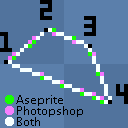
I’ve notice a difference between Aseprites and Photoshops results when drawing straight lines with both the line tool and holding shift and clicking with the pencil tool.
I often draw lines by holding shift and clicking in Aseprite and Photoshop. I love how Aseprite previews the line before committing yet I think photoshops is more accurate and closer to the result I desire.
I’ve done a simple example image showing the difference between Aseprite and Photoshop when holding shift and clicking with the pencil tool.
---
### Author:  [@dacap](https://community.aseprite.org/u/dacap)
#### Post date: [July 3, 2018, 7:24pm UTC](https://community.aseprite.org/t/straight-line-with-line-tool-or-pencil-tool-is-a-bit-off/1045/2 "2018-07-03T19:24:55Z")
@sierra_asher actually the line behavior was changed to be more (let’s say) “predictable” for pixel-art. So the first break is done at the very beginning of the line, then and at the middle, then each 1/3:
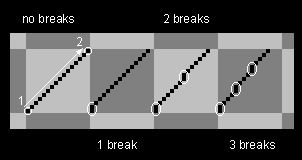
The previous algorithm was more unpredictable, i.e. the first break is done at the middle of the line, which is hard to calculate in the drawing. Probably I should offer a way to customize this behavior.
---
### Author:  [@sierra\_asher](https://community.aseprite.org/u/sierra_asher)
#### Post date: [July 4, 2018, 2:13pm UTC](https://community.aseprite.org/t/straight-line-with-line-tool-or-pencil-tool-is-a-bit-off/1045/3 "2018-07-04T14:13:53Z")
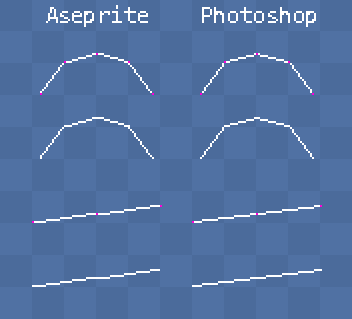
In the lower example the points are at the same distance and angle yet the resulting line is not straight.
---
### Author:  [@dacap](https://community.aseprite.org/u/dacap)
#### Post date: [December 11, 2018, 1:31pm UTC](https://community.aseprite.org/t/straight-line-with-line-tool-or-pencil-tool-is-a-bit-off/1045/4 "2018-12-11T13:31:58Z")
This should be fixed in [Aseprite v1.2.10-beta4](https://community.aseprite.org/t/aseprite-v1-2-10-beta4/2409).
---
### Author:  [@dacap](https://community.aseprite.org/u/dacap)
#### Post date: [December 11, 2018, 1:32pm UTC](https://community.aseprite.org/t/straight-line-with-line-tool-or-pencil-tool-is-a-bit-off/1045/5 "2018-12-11T13:32:02Z")