# Timeline Layer Name Right Click Menu 1.3-beta8
**URL:** https://community.aseprite.org/t/timeline-layer-name-right-click-menu-1-3-beta8/12497
**Category:** Bug Reports
**Created:** [January 13, 2022, 12:55am UTC](https://community.aseprite.org/t/timeline-layer-name-right-click-menu-1-3-beta8/12497 "2022-01-13T00:55:04Z")
**Posts on this page:** 7
**Page:** 1
### Author:  [@behreandtjeremy](https://community.aseprite.org/u/behreandtjeremy)
#### Post date: [January 13, 2022, 12:55am UTC](https://community.aseprite.org/t/timeline-layer-name-right-click-menu-1-3-beta8/12497/1 "2022-01-13T00:55:04Z")
Hi all,
I think this is relevant to the [recent release](https://community.aseprite.org/t/aseprite-v1-2-31-and-v1-3-beta8/12488/8), so I’m posting it here instead of on Github issues.
In 1.3-beta8-x64 on Windows 10, the context menu that should appear on right-click over a layer name in the timeline is a very small box:
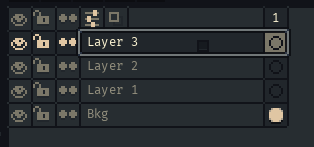
The result is the same if you click on a frame header or on a specific cel.
This is the expected:
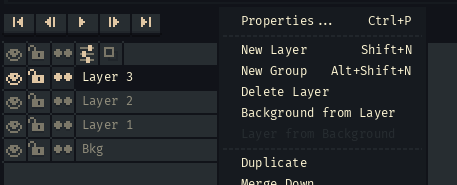
Version 1.2.31-x64 does not have this issue.
(I’m using a laptop with a trackpad. There is only one display. Switching to default theme, default font, playing around with screen and UI scaling does not resolve the issue.)
Thanks,
Jeremy
---
### Author:  [@dacap](https://community.aseprite.org/u/dacap)
#### Post date: [January 13, 2022, 1:05am UTC](https://community.aseprite.org/t/timeline-layer-name-right-click-menu-1-3-beta8/12497/2 "2022-01-13T01:05:09Z")
Thanks @behreandtjeremy, I’ve just seem this issue reported on Twitter too. If you re-enable the multiple windows UI, it should be work as expected (_Edit \> Preferences \> Experimental \> UI with multiple windows_)
---
### Author:  [@behreandtjeremy](https://community.aseprite.org/u/behreandtjeremy)
#### Post date: [January 13, 2022, 1:08am UTC](https://community.aseprite.org/t/timeline-layer-name-right-click-menu-1-3-beta8/12497/3 "2022-01-13T01:08:27Z")
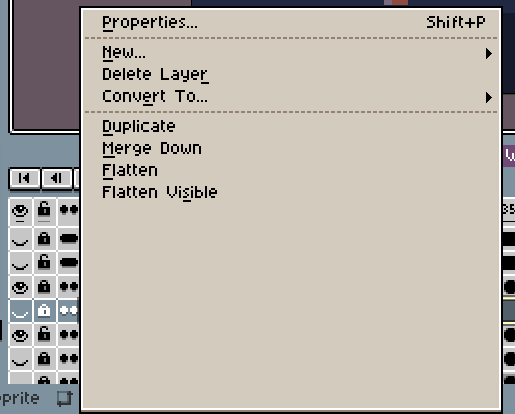
Oh, ok. Thank you. The menu dimensions are a bit larger than they need to be after I re-enable, but I can work with that.
---
### Author:  [@eishiya](https://community.aseprite.org/u/eishiya)
#### Post date: [January 13, 2022, 1:31am UTC](https://community.aseprite.org/t/timeline-layer-name-right-click-menu-1-3-beta8/12497/4 "2022-01-13T01:31:35Z")
“a bit larger” is one way to put it
---
### Author:  [@dacap](https://community.aseprite.org/u/dacap)
#### Post date: [January 13, 2022, 1:47am UTC](https://community.aseprite.org/t/timeline-layer-name-right-click-menu-1-3-beta8/12497/5 "2022-01-13T01:47:10Z")
👀 Did you try restarting Aseprite? What Screen Scaling/UI Scaling options are you using?
---
### Author:  [@eishiya](https://community.aseprite.org/u/eishiya)
#### Post date: [January 13, 2022, 1:48am UTC](https://community.aseprite.org/t/timeline-layer-name-right-click-menu-1-3-beta8/12497/6 "2022-01-13T01:48:29Z")
This Aseprite was freshly started after being updated, with no changes to the settings.
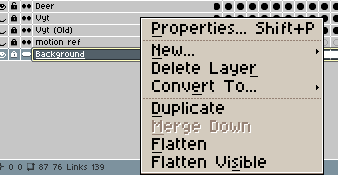
The settings are 100% screen scaling, 200% UI scaling.
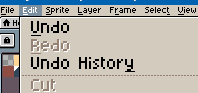
If I set it to 100% in both, then I get this, which is also wrong:
---
### Author:  [@dacap](https://community.aseprite.org/u/dacap)
#### Post date: [January 13, 2022, 1:50am UTC](https://community.aseprite.org/t/timeline-layer-name-right-click-menu-1-3-beta8/12497/7 "2022-01-13T01:50:19Z")
🙈 I was able to reproduce it, I’m going to fix it too.