# When I copy from Krita and paste in Aseprite, the resulting image is displaced to the left
**URL:** https://community.aseprite.org/t/when-i-copy-from-krita-and-paste-in-aseprite-the-resulting-image-is-displaced-to-the-left/12998
**Category:** Bug Reports
**Created:** [February 9, 2022, 11:44am UTC](https://community.aseprite.org/t/when-i-copy-from-krita-and-paste-in-aseprite-the-resulting-image-is-displaced-to-the-left/12998 "2022-02-09T11:44:02Z")
**Posts on this page:** 2
**Page:** 1
### Author:  [@JJHaggar](https://community.aseprite.org/u/JJHaggar)
#### Post date: [February 9, 2022, 11:44am UTC](https://community.aseprite.org/t/when-i-copy-from-krita-and-paste-in-aseprite-the-resulting-image-is-displaced-to-the-left/12998/1 "2022-02-09T11:44:02Z")
I tried copying an 1080x1920 image from Krita to Aseprite (with the same canvas size), and the pasted image in Aseprite was always displaced 3 pixels to the left.
If I make an intermediate pass, copying from Krita and pasting it to Photoshop (it works fine) and copying from Photoshop to Aseprite, it works fine, but it’s quite bothersome ☹
I am using Windows 10, Aseprite 1.2.32-x64 ans Krita 4.3.0.
---
### Author:  [@behreandtjeremy](https://community.aseprite.org/u/behreandtjeremy)
#### Post date: [February 9, 2022, 2:32pm UTC](https://community.aseprite.org/t/when-i-copy-from-krita-and-paste-in-aseprite-the-resulting-image-is-displaced-to-the-left/12998/2 "2022-02-09T14:32:52Z")
The issue showed up for me as well, when I tried it.
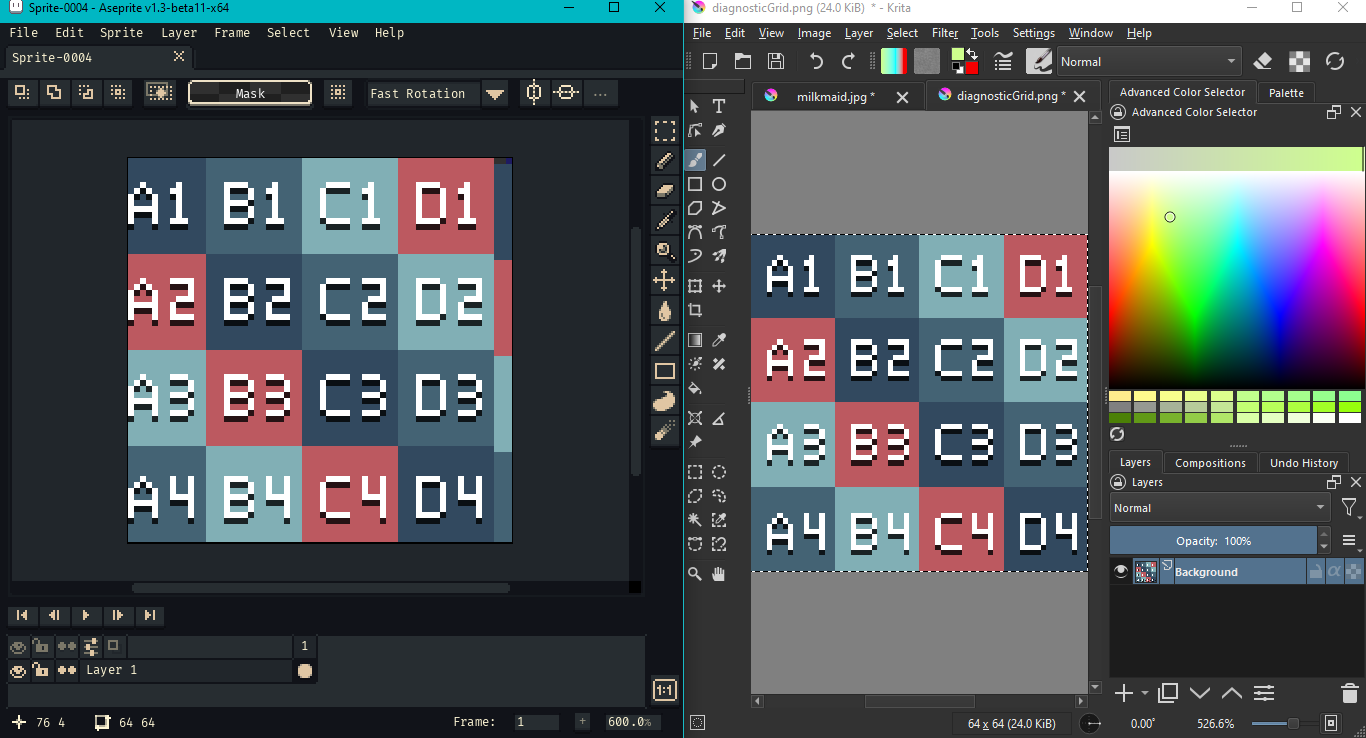
I saw a wrap around x by three pixels, but also a 1 pixel gap in the top right corner. I tried a regular paste and pasting to a new sprite under `Edit > Paste Special`.
Krita v5.0.2, Aseprite v1.3-beta11-x64, Windows 10
Edit: There have been issues with copy and paste from Krita in the past,
> **[Krita Clipboard can't correctly copy & paste to other applications](https://krita-artists.org/t/krita-clipboard-cant-correctly-copy-paste-to-other-applications/8580/)**
>
> HI, I have been trying to use Krita for many versions and I have downloaded the latest 4.3 but still, when I draw something in KRITA and select and copy-paste it in other Softwares such as PAINT or Photoshop, I don’t get clean artwork with...
but they related to alpha channel. (The issue is blamed on Windows.)
Best,
Jeremy