Hello!
I came across your post when searching for similar functionality. This was the best solution I could find, so a big thank you for the initial work and inspiration, although it still had quite a few issues when I tried it.
- It doesn’t support groups and runs on all layers, even invisible ones
- It can’t be paused/resumed, and can only be stopped by quitting Aseprite
- It copes the entire contents of each layer, so it is not a stand-alone outline
- Because of this, erasing is awkwardly delayed
- Undoing causes console print messages
- Cannot change settings (outline colour, outline settings etc) without editing the script
- Runs on all layers at once, including invisible layers
- Editing layers can crash it!
I’ve used the ideas in your script as a good jumping off point and I’ve expanded on it a bunch:
- It now has a Dialogue box to select the colour and outline settings
- Can activate/deactivate it with a toggle
- Can set it to run on a Group, only caring about visible layers within that group
- The Outline layer is only the outline, not the contents, so it’s easier to preview erasing
- Bug fixes!
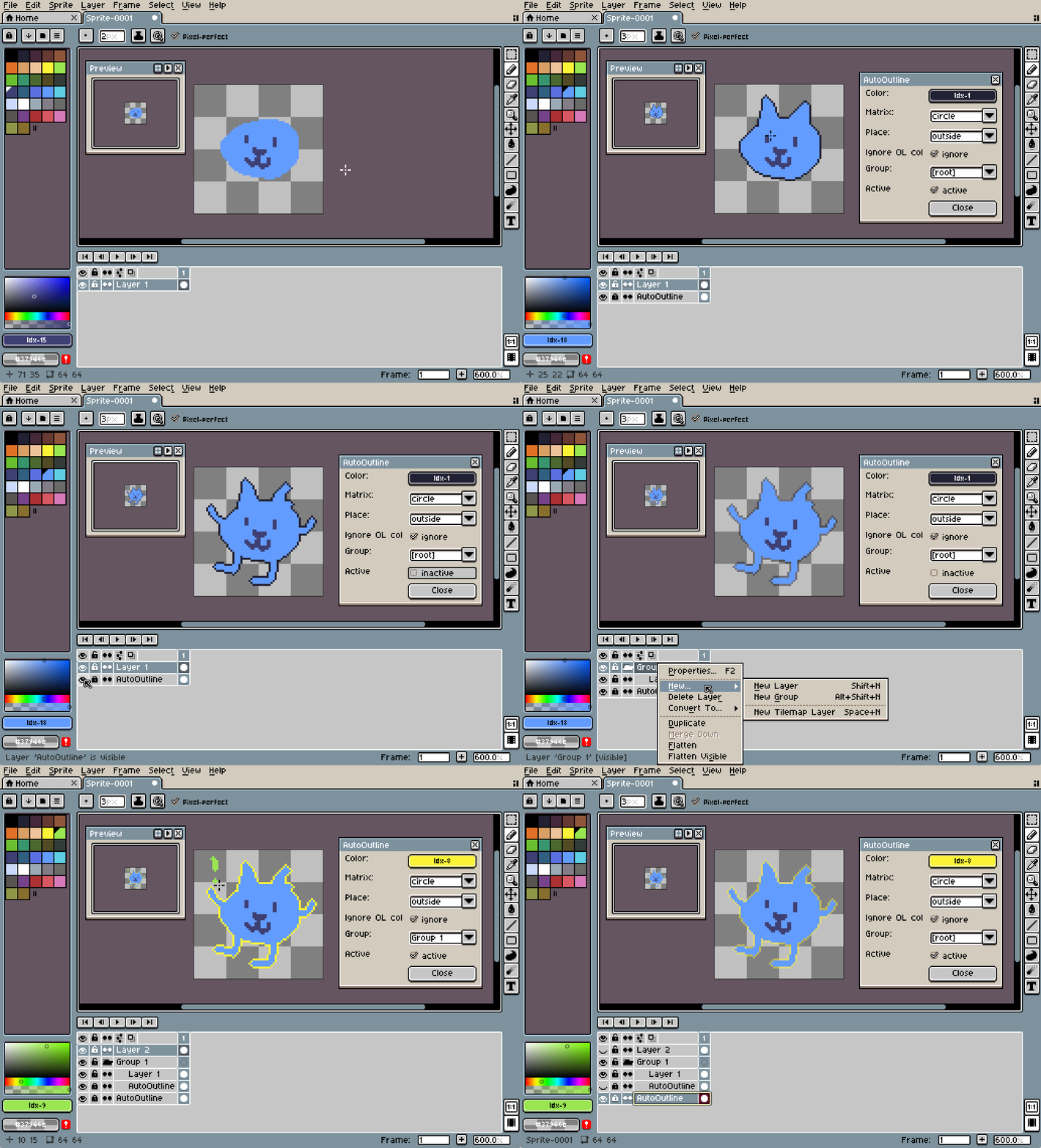
Here’s the code:
-- Auto Outline script for Aseprite
-- Copies each layer into a new Outline layer, draws an outline around it, then deletes the original pixels
-- Maintains the outline in a separate layer
-- v1.01
-- See https://github.com/Radnom-g/AutoOutline for updates
-- TO USE: Save as 'AutoOutline.lua' in your Aseprite Scripts folder
-- (Tip: From Aseprite, open 'File -> Scripts -> Open Scripts Folder')
-- Then hit 'File -> Scripts -> Rescan Scripts Folder'
-- Then run by running 'File -> Scripts -> AutoOutline'
-- (Tip: assign it a shortcut! I use Alt+O)
-- Based on a script by Aseprite user 'psychicteeth' found here https://community.aseprite.org/t/automatic-outline-generation/24423
-- and then updated by Sean Flannigan (seanflannigan.com) to add:
---- A dialog to start/stop the service and pick outline color
---- the outline layer is ONLY outlines so that they can be independently hidden, set transparent, etc
---- Removed console printing on undo
---- Move the outline layer to the bottom (if set to 'outside') and make it locked
---- Able to ignore manually-placed outline-colored pixels (to manually place outline pixels to define sharp edges for example)
---- allows AutoOutline to run on a group, creating outlines for every visible layer within that Group
---- v1.01 bugfix: clear 'app.range' so that it doesn't break when selecting multiple cels/layers
local spr = app.sprite
local outline_active = false
local outline_is_drawing = false -- prevent 'on change' from being called recursively
local outline_color = Color(0, 0, 0, 255)
local outline_matrix = 'circle'
local outline_place = 'outside'
local outline_ignore_existing_col = true -- ignore the user's drawn outline colour from being additionally outlined
local outline_try_auto_detected_col = false -- when first opened, try and determine outline color if the AutoOutline layer exists already
local outline_found_auto_detected_col = false
local outline_group_name = nil
local dlg_locked = false -- Lock the dialog buttons (except for close) when another Sprite is selected to make it more clear
local dlg = nil
local site_change_listener = nil
-- Cannot run the script without a Sprite
if not spr then
return
end
-- keep the id value separate so we can compare later
local spr_id = spr.id
-- Global lua variables to ensure we don't run multiple outline instances
if not AutoOutline_params then
AutoOutline_params = {}
AutoOutline_params.spr_id = -1
end
-- Make sure we're not already running this script.
if AutoOutline_params.spr_id == -1 then
-- We're good.
AutoOutline_params.spr_id = spr_id
else
if AutoOutline_params.spr_id ~= spr_id then
app.alert("AutoOutline script is already running on another Sprite. Please close it first.")
return
else
app.alert("AutoOutline script is already running. Please use that window.")
return
end
end
-- The main Outliner.
function MakeOutlines(spr)
local self = {}
self.spr = spr
self.change_listener = nil
self.layervisibility_listener = nil
-- Finds the layer that the 'AutoOutline' layer should belong in
-- or just the sprite if it is in the root
self.find_outline_layer_group = function(within_layer)
-- 'AutoOutline' layer should be at root level, so return the sprite
if outline_group_name == nil then
return spr
end
assert(within_layer ~= nil, "find_outline_layer_group w. nil arg")
if within_layer.layers then -- it may not be a group and thus have sub layers
for i,layer in ipairs(within_layer.layers) do
-- This is the right group for the outline
if layer.name == outline_group_name then
return layer
end
-- check within itself in case it's a group
local recursive_layer = self.find_outline_layer_group(layer)
if recursive_layer ~= nil then
return recursive_layer
end
end
end
-- Check if we've found the target group, then return it
if within_layer ~= nil then
if within_layer.name == outline_group_name then
return within_layer
end
end
return nil
end
-- Finds the 'AutoOutline' layer by checking within the group layer it sits in
-- (or directly under the sprite if at root level)
self.find_layer = function()
local group_layer = self.find_outline_layer_group(spr)
local outline_layer = nil
if group_layer ~= nil then
assert(group_layer.layers ~= nil , "group_layer.layers is nil" )
for i,layer in ipairs(group_layer.layers) do
if layer.name == "AutoOutline" then
outline_layer = layer
break
end
end
end
return outline_layer
end
-- Creates (or finds) the layer named 'AutoOutline' in the correct Group layer
self.create_layer = function()
-- Ensure we can return to the user's current layer.
local prev_layer = app.layer
local prev_range = app.range
-- Clear the range so that we aren't drawing outlines to multiple layers!
app.range:clear()
-- does the outline layer exist?
local outline_layer = self.find_layer()
-- If we can't find one, create one.
if not outline_layer then
local group_layer = self.find_outline_layer_group(spr)
outline_layer = spr:newLayer()
outline_layer.name = "AutoOutline"
-- add it to the group (if not in root sprite)
if outline_group_name ~= nil then
outline_layer.parent = group_layer
else
outline_layer.parent = spr
end
if outline_layer ~= nil then
-- IF the outline is intended to go outside the color, then find and move the outline layer to the bottom,
-- so that it's easier to see what you're drawing
if outline_place == 'outside' then
outline_layer.stackIndex = 0
end
else
print("made new layer but can't find it")
end
end
-- May need to relocate the AutoOutline layer as it has possibly moved.
local outline_layer = self.find_layer()
-- If we've previously had an outline, this is a good time to set the Color to the current outline color.
-- Detect the color from the first non-transparent pixel in the layer.
if outline_layer ~= nil then
if not outline_try_auto_detected_col then
local cel = outline_layer:cel(spr.frames[app.frame.frameNumber])
if (cel) then
for y = 0, cel.image.height - 1 do
for x = 0, cel.image.width - 1 do
local check_col_int = cel.image:getPixel(x, y)
local check_col = Color(check_col_int)
if check_col.alpha ~= 0 then
--print ("found existing color in AutoOutline layer")
outline_color = check_col
outline_found_auto_detected_col = true
break
end
end
if outline_found_auto_detected_col then
-- Update the outline color selection in the color picker in the dialog window.
if dlg ~= nil then
dlg:modify{ id="dialog_outline_col", color=outline_color.rgbaPixel }
end
break
end
end
end
outline_try_auto_detected_col = true
end
end
-- Select the layer you were drawing on again
app.layer = prev_layer
app.range = prev_range
app.refresh()
return outline_layer
end
-- Copy the sprites from the layers within the outline's group (recursively),
-- but ignore any other AutoOutline layers and invisible layers
self.copy_layers = function(sprite_or_layer, outline_layer, cel)
local curr_frame = app.frame.frameNumber
-- if it's not the base sprite then copy it (or its sub layers if a group)
if sprite_or_layer ~= nil then
-- Recursively copy each sub-layer into the outline layer
if sprite_or_layer.layers ~= nil then
for i,layer in ipairs(sprite_or_layer.layers) do
-- check group visibility before copying layers
if layer.isVisible then
-- Recursively copy!
self.copy_layers(layer, outline_layer, cel)
end
end
return nil
else
-- check that it's not an empty group
if not sprite_or_layer.isGroup then
-- Copy the layer into the outline_layer's cel
if sprite_or_layer.name ~= "AutoOutline" then
if sprite_or_layer.isVisible then
app.layer = outline_layer
local src_cel = sprite_or_layer:cel(curr_frame)
if src_cel ~= nil then
local origin = src_cel.bounds.origin
local img = src_cel.image
-- Copy the source cel into the outliner layer.
if cel ~= nil then
cel.image:drawImage(img, origin)
end
end
end
end
end
return nil
end
else
-- this is the base sprite, copy all layers
for i,layer in ipairs(spr.layers) do
self.copy_layers(layer, outline_layer, cel)
end
end
return nil
end
-- This draws the outline on the AutoOutline layer.
self.draw_outline = function()
-- Make sure we've set the AutoOutline dialog to actively draw the outline.
if not outline_active then
return nil
end
-- Don't update if we're on a different Sprite than the one we opened the Dialog for.
if spr_id ~= app.sprite.id then
print ("can't update outline, wrong sprite selected")
end
-- Check to prevent this from calling recursively (due to modifying the sprite as part of the outline function).
if (outline_is_drawing) then
-- already drawing
return nil
end
outline_is_drawing = true
-- Save off previously selected layer so that we can return to it
local prev_layer = app.layer
local curr_frame = app.frame.frameNumber
-- the 'range' of selected cels/frames/etc
local prev_range = app.range
-- Clear the range so that we aren't drawing outlines to multiple layers!
app.range:clear()
-- Find the outline layer
local outline_layer = self.find_layer()
-- If we can't find the outline layer, then create it
if not outline_layer then
outline_layer = self.create_layer()
end
-- If we still can't find the outline layer, something has gone wrong creating it
if not outline_layer then
print("Something went wrong - no outline layer could be created")
outline_is_drawing = false
return nil
end
-- Unlock the layer
outline_layer.isEditable = true
-- Create a new working cel for the outline layer
local cel = spr:newCel(outline_layer, curr_frame)
-- Get the layers in the outline layer's group
-- OR NIL if we're working on the base sprite
local layer_group = outline_layer.parent
-- Copy each layer within this group recursively into the outline layer
self.copy_layers(layer_group, outline_layer, cel)
local outline_col = outline_color
local outline_col_int = outline_col.rgbaPixel
app.layer = outline_layer
assert(app.layer.name == "AutoOutline", "error: selecting wrong layer for drawing")
-- delete colors that are outline if we are set to do this
-- (this lets us manually draw outlines in areas where the auto outline doesn't make an angle sharp enough etc without affecting the auto outline output)
if outline_ignore_existing_col then
for y = 0, cel.image.height - 1 do
for x = 0, cel.image.width - 1 do
local check_col_int = cel.image:getPixel(x, y)
if check_col_int == outline_col_int then
cel.image:drawPixel(x, y, Color{r=0,g=0,b=0,a=0})
end
end
end
end
app.layer = outline_layer
assert(app.layer.name == "AutoOutline", "error: selecting wrong layer for drawing outline")
-- Now, draw the outline
app.command.Outline{ui=false,color=outline_col, matrix=outline_matrix, place=outline_place, bgColor=Color{r=255,g=0,b=255,a=255}}
local outline_cel = outline_layer:cel(curr_frame)
local outline_img = outline_cel.image
-- delete colours that aren't outline
for y = 0, outline_img.height - 1 do
for x = 0, outline_img.width - 1 do
local check_col_int = outline_img:getPixel(x, y)
if check_col_int ~= outline_col_int then
outline_img:drawPixel(x, y, Color{r=0,g=0,b=0,a=0})
end
end
end
-- replace the image of the outline layer
outline_cel.image = outline_img
-- now put us back on the layer the user was editing
app.layer = prev_layer
app.range = prev_range
outline_layer.isEditable = false
app.refresh()
-- this allows the function to be called again
outline_is_drawing = false
return nil
end
-- This is called when the sprite is edited
self.on_change = function(ev)
if ev == nil then
print ("debug: nil ev")
return nil
end
-- has to match the sprite we care about
if spr_id ~= app.sprite.id then
return nil
end
-- Find out if we are in an undo - if we are, then ignore this change.
if outline_active and not ev.fromUndo then
self.draw_outline()
end
return nil
end
self.start = function()
-- Create the outline layer in the selected group
self.outline_layer = self.create_layer()
-- Register for events to listen to when things change to update the outline
self.change_listener = spr.events:on('change', self.on_change)
self.layervisibility_listener = spr.events:on('layervisibility', self.on_change)
return true
end
self.stop = function()
-- Unregister from events
if self.change_listener then
spr.events:off(self.change_listener)
self.change_listener = nil
end
if self.layervisibility_listener then
spr.events:off(self.layervisibility_listener)
self.layervisibility_listener = nil
end
end
return self
end
-- make an instance of it
local outliner = MakeOutlines(spr)
-- Enable the dialog's buttons (when selecting the Sprite that the dialog was opened for)
function unlock_dlg()
dlg:modify{ id="dialog_active_check", enabled=true }
dlg:modify{ id="dialog_ignore_outline_col_check", enabled=true }
dlg:modify{ id="dialog_place_combobox", enabled=true }
dlg:modify{ id="dialog_matrix_combobox", enabled=true }
dlg:modify{ id="dialog_group_combobox", enabled=true }
dlg:modify{ id="dialog_outline_col", enabled=true }
--update_label()
dlg_locked = false
end
-- Disable the dialog's buttons (when selecting a different Sprite than the one the dialog was opened for)
function lock_dlg()
dlg:modify{ id="dialog_active_check", enabled=false }
dlg:modify{ id="dialog_ignore_outline_col_check", enabled=false }
dlg:modify{ id="dialog_place_combobox", enabled=false }
dlg:modify{ id="dialog_matrix_combobox", enabled=false }
dlg:modify{ id="dialog_group_combobox", enabled=false }
dlg:modify{ id="dialog_outline_col", enabled=false }
dlg_locked = true
end
-- Called when the 'site' changes (different sprite/layer selected etc)
function on_site_change()
-- If the user closes all sprites then shut down the AutoOutline tool too
if app.sprite == nil then
outliner.stop()
AutoOutline_params.spr_id = -1
if site_change_listener ~= nil then
app.events:off(site_change_listener)
end
if dlg ~= nil then
dlg:close()
end
-- Double-check that we are still on the same Sprite that we opened this tool for
elseif app.sprite.id == spr_id then
if not outline_active then
update_group_names()
end
if dlg_locked then
-- set spr again as we may have lost it
spr = app.sprite
unlock_dlg()
end
else
if not dlg_locked then
lock_dlg()
end
end
end
-- Create the Auto Outline dialogue
dlg = Dialog {
title = "AutoOutline",
onclose=function()
outliner.stop()
AutoOutline_params.spr_id = -1
if site_change_listener ~= nil then
app.events:off(site_change_listener)
end
end
}
-- Called when a new color is picked from the picker
on_color_change = function()
outline_color = dlg.data.dialog_outline_col
-- force the outline to update
outliner.draw_outline()
end
-- The Color Picker
dlg:color {
id = "dialog_outline_col",
label = "Color: ",
color = outline_color,
-- Force the outline to update when a new color is picked
onchange=on_color_change
}
-- the Matrix type picker
-- (determines how the outline is drawn)
on_matrix_change = function()
outline_matrix = dlg.data.dialog_matrix_combobox
-- force the outline to update
outliner.draw_outline()
end
dlg:combobox {
id = "dialog_matrix_combobox",
label = "Matrix: ",
option = "circle",
options = {
"circle",
"square",
"horizontal",
"vertical"
},
onchange=on_matrix_change
}
-- the inside/outside picker
-- (whether the outline is drawn inside or outside the boundaries)
on_place_change = function()
outline_place = dlg.data.dialog_place_combobox
-- force the outline to update
outliner.draw_outline()
end
dlg:combobox {
id = "dialog_place_combobox",
label = "Place: ",
option = "outside",
options = {
"inside",
"outside"
},
onchange=on_place_change
}
-- The toggle to ignore or outline the outline color in non-AutoOutline layers
function toggle_ignore_outline_col()
if outline_ignore_existing_col == true then
outline_ignore_existing_col = false
dlg:modify{ id="dialog_ignore_outline_col_check", text="add" }
else
outline_ignore_existing_col = true
dlg:modify{ id="dialog_ignore_outline_col_check", text="ignore" }
end
end
-- Check box that sets if manually placed outline color should be additionally outlined
dlg:check{ id="dialog_ignore_outline_col_check",
label="Ignore OL col",
text="ignore",
selected=true,
onclick=toggle_ignore_outline_col }
-- Check in the sprite's tree recursively to make a list of all 'group' type layers
function find_group_names(check_layer)
local ret_list = {}
if check_layer == nil then
for i,layer in ipairs(spr.layers) do
local new_layers = find_group_names(layer)
if new_layers ~= nil then
for j,layer_name in ipairs(new_layers) do
ret_list[#ret_list + 1] = layer_name
end
end
end
else
--add group
if check_layer.isGroup then
ret_list[#ret_list + 1] = check_layer.name
-- check in children (recursively)
if check_layer.layers then
for i,layer in ipairs(check_layer.layers) do
if layer.isGroup then
local new_layers = find_group_names(layer)
if new_layers ~= nil then
for j,layer_name in ipairs(new_layers) do
ret_list[#ret_list + 1] = layer_name
end
end
end
end
end
end
end
return ret_list
end
-- Populate the list of group names in the group drop-down picker
function update_group_names()
local old_group_name = outline_group_name
local has_old_group = false
local options = {
"[root]"
}
local new_layers = find_group_names(nil)
if new_layers ~= nil then
for j,layer_name in ipairs(new_layers) do
options[#options + 1] = layer_name
if layer_name == old_group_name then
has_old_group = true
end
end
end
dlg:modify{ id="dialog_group_combobox", options=options }
-- make sure we put the old group back
if has_old_group then
outline_group_name = old_group_name
end
end
-- Called when a group is selected
on_group_change = function()
outline_group_name = dlg.data.dialog_group_combobox
if outline_group_name == "[root]" then
outline_group_name = nil
end
end
-- The group drop-down selector UI
dlg:combobox {
id = "dialog_group_combobox",
label = "Group: ",
option = "[root]",
options = {
"[root]"
},
onchange=on_group_change
}
-- Turn the outliner on/off
function toggle_active()
if outline_active == true then
-- Deactivate the outliner
outline_active = false
outliner.stop()
dlg:modify{ id="dialog_active_check", text="inactive" }
dlg:modify{ id="dialog_outline_col", onchange=on_color_change }
else
-- Activate the outliner
outline_active = true
outliner.start()
outliner.draw_outline()
dlg:modify{ id="dialog_active_check", text="active" }
end
end
-- Check box that sets the auto outliner to update or disables it
dlg:check{ id="dialog_active_check",
label="Active",
text="",
selected=boolean,
onclick=toggle_active }
-- register to events when the 'site' changes (different sprite selected, new layer made etc)
app.events:on('sitechange',on_site_change)
-- Closes the dialog box and stops the outliner from running
-- and clears up the global 'AutoOutline_params.spr_id' variable so that the script can be run again
dlg:button{ text="Close",
onclick=function()
if site_change_listener ~= nil then
app.events:off(site_change_listener)
end
dlg:close()
end }
-- Display the dialog box immediately
dlg:show{ wait=false }
-- Also update the group name list immediately
update_group_names()
I’m not sure if you were still using the script but if you are then hopefully this is helpful/interesting for you and anyone else that might come across this post looking for an auto-outline solution  at least until adjustment layers get added officially (that would be awesome)!
EDIT: I’ve fixed a bug where it can draw outlines on the wrong layers if multiple layers/cels are selected at once then toggling the outline layer visibility - and set up a github page for it in case of any other updates to the script: GitHub - Radnom-g/AutoOutline: Aseprite Auto-Outline script that maintains an outline in a new Layer
