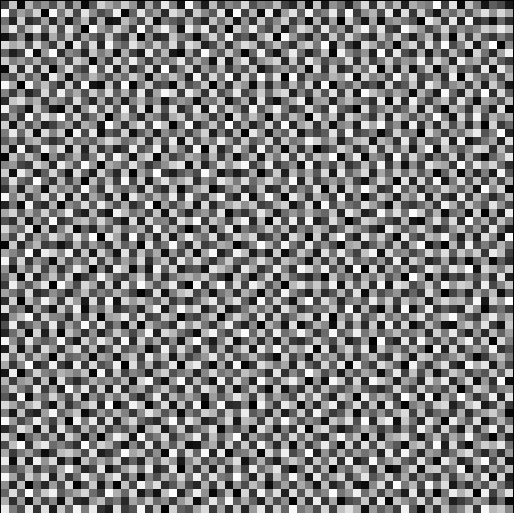
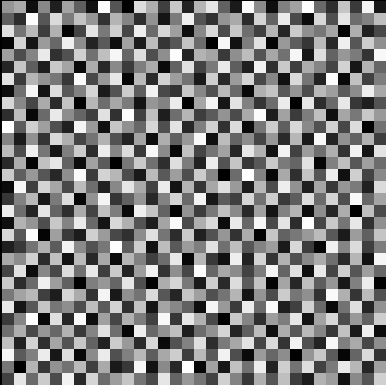
Hi. I have been trying to teach myself how to use the Aseprite API by creating a variety of dithering algorithms. One of these algorithms is a blue noise algorithm, which uses a sheet of blue noise (evenly distributed white noise) as a threshold texture for dithering an image. I try to generate blue noise using the void and cluster algorithm described here:
- Randomly place white pixels over a black grid
- Evenly distribute those white pixels by repeatedly moving a pixel from the densest cluster to the largest void until they both become the same thing.
- Assign each pixel in the grid a rank from “void-iest” to “cluster-iest”, and use that to generate an rgb value for the blue noise texture.
Below is my implementation of this algorithm.
local dlg = Dialog{title = "Blue Noise Tester"}

local function GetImageFromLayer (layer)
    local img = Image(app.activeSprite.width, app.activeSprite.height)
    local cel = layer:cel(app.activeFrame)
    if cel then
        img:drawImage(cel.image, cel.position)
    end
    return img
end

dlg:newrow()
dlg:button
{
    id = "BlueNoiseButton",
    text = "Blue Noise",
    label = "Blue Noise - Organic and Natural",
    onclick = function ()
        GenerateBlueNoise()
        app.refresh()
    end
}

dlg:entry
{
    id="BNSeed",
    label = "Blue Noise Seed",
    text = "0"
}

--Torodial (wrapping) distance implementation.
local function GetDistance (x1, y1, x2, y2)

    local dx = math.abs(x2 - x1)
    local dy = math.abs(y2 - y1)

    if dx >= app.activeSprite.width / 2 then
        dx = app.activeSprite.width - dx
    end

    if dy >= app.activeSprite.height / 2 then
        dy = app.activeSprite.height - dy
    end

    return math.sqrt(dx ^ 2 + dy ^ 2)
end

--Calculates how much energy two pixels exert on each other.
local function GetPixelEnergy(x1, y1, x2, y2)
    return 2.71828 ^ (-GetDistance(x1, y1, x2, y2) / 7.22)
end

--Recalculating an entire lookup table worth of energy values is expensive.
--So I generate a lookup table containing all of the energy values at the start and adjust it as pixels get added and removed.
local function InitializeLookupTable(bl, wpl)
    local lookupTable = {}
    for y = 1, #bl do
        lookupTable[y] = {}
        for x = 1, #bl[y] do
            local totalBrightness = 0.0
            for k = 1, #wpl do
                totalBrightness = totalBrightness + GetPixelEnergy(x, y, wpl[k][1], wpl[k][2])
            end
            lookupTable[y][x] = totalBrightness
        end
    end
    return lookupTable
end

--Adds a pixel to the binary layout and adjusts all energy values in the lookup table accordingly.
function AddPixelToTable (lt, bl, x, y)
    if bl[y][x] == true then
        return app.alert("ERROR - ATTEMPTED TO ADD PIXEL TO A LOCATION THAT ALREADY HAS ONE.")
    end

    bl[y][x] = true

    for i = 1, #lt do
        for j = 1, #lt[i] do
            lt[i][j] = lt[i][j] + GetPixelEnergy(j, i, x, y)
        end
    end
end

--Removes a pixel from the binary layout and adjusts all energy values accordingly.
function RemovePixelFromTable (lt, bl, x, y)
    if bl[y][x] == false then
        return app.alert("ERROR - ATTEMPTED TO REMOVE PIXEL FROM AN ALREADY EMPTY SPACE.")
    end

    bl[y][x] = false

    local brightness = lt[y][x]

    for i = 1, #lt do
        for j = 1, #lt[i] do
            lt[i][j] = lt[i][j] - GetPixelEnergy(j, i, x, y)
        end
    end
end

--Checks if a value at a specific coordinate in a binary layout is valid given the circumstances (searchmode)
local function isValidWithSearchMode(bl, x, y, searchMode) --Searchmode indicates what pixels the algorithm will search. 0 = Search both dark and light, 1 = Search only light, 2 (or anything else) = Search only dark.
    if searchMode == 0 then
       return true
    elseif searchMode == 1 then
        return bl[y][x]
    end
return bl[y][x] == false
end

--Gets the coordinates of the pixel with the lowest energy value.
local function GetDensestVoid(lt, bl, searchmode)
    local densestVoidLocation = Point(0,0)
    local densestVoidValue = math.huge
    for i = 1, #lt do
        for j = 1, #lt[i] do
            local valid = isValidWithSearchMode(bl, j, i, searchmode)
            if(lt[i][j] < densestVoidValue and valid)then
                densestVoidValue = lt[i][j]
                densestVoidLocation.x = j
                densestVoidLocation.y = i
            end
        end
    end

    return densestVoidLocation
end

--Gets the coordinates of the pixel with the highest energy value.
local function GetDensestCluster(lt, bl, searchmode)
    local densestClusterLocation = Point(0,0)
    local densestClusterValue = -1.0
    for i = 1, #lt do
        for j = 1, #lt[i] do
            local valid = isValidWithSearchMode(bl, j, i, searchmode)
            if(lt[i][j] > densestClusterValue and valid)then
                densestClusterValue = lt[i][j]
                densestClusterLocation.x = j
                densestClusterLocation.y = i
            end
        end
    end

    return densestClusterLocation
end

--Gets the number of pixels of a given type.
local function getPixelCount(bl, searchMode)
    local returner = 0
    for i = 1, #bl do
        for j = 1, #bl[i] do
            if isValidWithSearchMode(bl, j, i, searchMode) then
                returner = returner + 1
            end
        end
    end
    return returner
end

--(Attempts to) generate and display a blue noise texture.
function GenerateBlueNoise()
    --Store the location of white and black pixels in a bool matrix (true = white, false = black)
    local binaryLayout = {}

    --Use this to initialize the lookup table
    local allWhitePixelLocations = {}

    --Initialize the seed.
    math.randomseed(tonumber(dlg.data.BNSeed))

    --1 - Generate a white noise pattern where (about) 10% of pixels are white (true), and the rest are black (false)
    for i = 1, app.activeSprite.height do
        binaryLayout[i] = {}
        for j = 1, app.activeSprite.width do
            local rand = math.random()
            if rand > 0.1 then
                binaryLayout[i][j] = false
            else
                allWhitePixelLocations[#allWhitePixelLocations + 1] = {j, i}
                binaryLayout[i][j] = true
            end
        end
    end

    --Debugging function used to print initial white noise
    --PrintBinaryLayout(binaryLayout, "Before")

    --1.5 - Generate a lookup table containing all energy values so we don't have to redraw it every single time.
    local lookupTable = InitializeLookupTable(binaryLayout, allWhitePixelLocations)

    --2 - Keep swapping the largest cluster and the largest void until they both become the same thing.
    while true do
        local densestCluster = GetDensestCluster(lookupTable, binaryLayout, 1)
        RemovePixelFromTable(lookupTable, binaryLayout, densestCluster.x, densestCluster.y)
        local densestVoid = GetDensestVoid(lookupTable, binaryLayout, 2)
        AddPixelToTable(lookupTable, binaryLayout, densestVoid.x, densestVoid.y)

        if densestCluster.x == densestVoid.x and densestCluster.y == densestVoid.y then
            break
        end
    end

    --3 - Rank each pixel from voidiest to clusteriest, and use that rank to generate an RGB value.

    --Make copies of the distributed grid so we can remove/add extra ones without effect.
    --The ones we remove pixels from
    local removalBinaryLayout = {}
    local removalLookupTable = {}

    --The one we add pixels to.
    local additiveBinaryLayout = {}
    local additiveLookupTable = {}

    for i = 1, #binaryLayout do
        removalBinaryLayout[i] = {}
        removalLookupTable[i] = {}
        additiveBinaryLayout[i] = {}
        additiveLookupTable[i] = {}

        for j = 1, #binaryLayout[i] do
            removalBinaryLayout[i][j] = binaryLayout[i][j]
            removalLookupTable[i][j] = lookupTable[i][j]
            additiveBinaryLayout[i][j] = binaryLayout[i][j]
            additiveLookupTable[i][j] = lookupTable[i][j]
        end
    end

    --Create new layer for the blue noise.
    local newLayer = app.activeSprite:newLayer()
    newLayer.name = "Blue Noise"
    local bnImage = GetImageFromLayer(newLayer)


    --Cycle through every white pixel in the distributed grid.
    for i = 1, getPixelCount(removalBinaryLayout, 1) do
        --Get the densest white pixel
        local densestCluster = GetDensestCluster(removalLookupTable, removalBinaryLayout, 1)

        --Get the ranking of the pixel, convert it into a normalized value where 0 = clusteriest and 1 = voidiest, and convert it into an rgb value by multiplying it by 255.
        local pixelRanking = getPixelCount(removalBinaryLayout, 1) - 1
        local pixelValue = ((pixelRanking - 0.0) / (app.activeSprite.width * app.activeSprite.height)) * 255.0
        local pixelCol = Color{r = pixelValue, g = pixelValue, b = pixelValue}
        bnImage:drawPixel(densestCluster.x - 1, densestCluster.y - 1, pixelCol);

        --Remove that pixel from the table for the next cycle.
        RemovePixelFromTable(removalLookupTable, removalBinaryLayout, densestCluster.x, densestCluster.y)
    end

    --Do the same thing with the void pixels, except get the densest void and add a pixel every time.
    for i = 1, getPixelCount(additiveBinaryLayout, 2) do
        local densestVoid = GetDensestVoid(additiveLookupTable, additiveBinaryLayout, 2)

        local pixelRanking = getPixelCount(additiveBinaryLayout, 1)
        local pixelValue = ((pixelRanking - 0.0) / (app.activeSprite.width * app.activeSprite.height)) * 255.0
        local pixelCol = Color{r = pixelValue, g = pixelValue, b = pixelValue}
        bnImage:drawPixel(densestVoid.x - 1, densestVoid.y - 1, pixelCol);

        AddPixelToTable(additiveLookupTable, additiveBinaryLayout, densestVoid.x, densestVoid.y)
    end

    --Print the final image to the new layer.
    app.activeSprite:newCel(newLayer, 1, bnImage)
end


--Debugging function used to print a binary layout.
function PrintBinaryLayout (bl, n)
    local newLayer = app.activeSprite:newLayer()
    newLayer.name = n
    local blImage = GetImageFromLayer(newLayer)


    for i = 1, #bl do
        for j = 1, #bl[i] do
            if(bl[j][i]) then
                blImage:drawPixel(j - 1, i - 1, Color{r = 255, b = 255, g = 255})
            else
                blImage:drawPixel(j - 1, i - 1, Color{r = 0, b = 0, g = 0})
            end
        end
    end

    app.activeSprite:newCel(newLayer, 1, blImage)
end


dlg:show { wait = false }
*Note - This algorithm gets slower with larger canvases. I recommend testing it in a 32x32 area.
This script is OK, but I have noticed that it results in these strange vertical line artifacts in the final image. (Comparison noise from here)
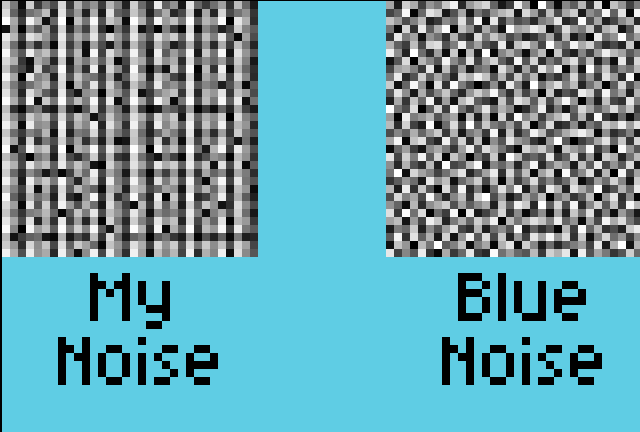
Does anybody know why this might be the case and how can I fix my code to get something like the image on the right?
(P.S. - I’m kinda new to this. Sorry if this is the wrong place to ask this.)