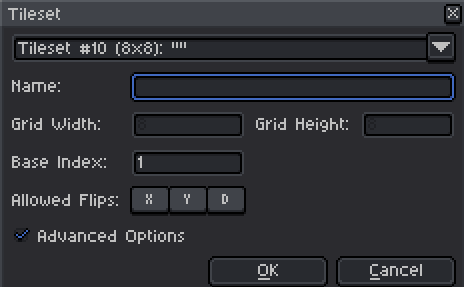
I don’t know about older versions, but if it persists then it usually means you have some other software running that relies on those shortcuts intercepting it. For example; radeon software uses CTRL+SHIFT+C which prevents merged copying.
You could also be misunderstanding it, Space+X/Y flips the brush, and the flipped tiles are considered to be a variant of the original tile but flagged as flipped or rotated so that instead of changing all derivative tiles you only need to change one. They don’t show up in the tile selection since they’re considered the same tile. This is a method used in actual hardware to optimize the sprite count.
If you do need them to be separate for whatever reason, make sure these buttons are disabled in your tileset layer properties (they’re darker than this when disabled), set the stack mode to “Don’t modify existent tiles” (SPACE+3), paint the tiles you want to rotate, click anywhere on the color palette to exit tile painting mode, and rotate/flip them as needed. They will be added to the tile palette automatically.
Thanks for the info. 99% sure nothing is affecting shortcuts. While i have space down i cant paint anything, because the cursor is now the canvas moving hand.
And yeah, i want “virtual” tiles. I’m doing the same later in godot, but i want a preview in my sprite file so i can see what they look like.
Given i sont even have the allowed flips in my properties, id say thats my problem.