Converting alpha to white / luminosity

Hey, there - thanks for reading in advance. I’m attempting to downsize some monster sprites I purchased for use in a mod I’m creating for Crystal Project - an indie platformer / turn-based RPG.

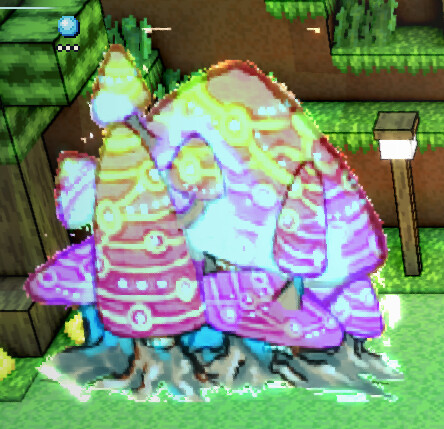
Problem is, the engine itself doesn’t support rendering semi-transparent pixels for monster sprites - they’re forcefully rendered to be fully opaque, resulting in this:

The first image is the unedited sprite as it came in the zip on purchase - and it has a multitude of pixels that are functionally invisible. I know how to render all transparent pixels forcibly opaque, but that’s not what I’m after here - is there an easy way to convert the opacity of all pixels into brightness / white instead, similar to anti-aliasing in other programs?

I’m not terribly versed in image-editing terminology on the whole, so feel free to ELI5, haha.

Thanks again!

(Edit: Can’t actually embed the original file - still a new user, so I only get one. Oops.)

Not sure, but premultiplied alpha might be the term you’re after.

:up_arrow: Before

:up_arrow: After

There are a few variants for what you would do with the target alpha. It could be left at 164 (same as the source), set to 255, or you could make a binary alpha image (transparency and opacity, but no translucency):

As a math formula:

R = 164
G = 185
B = 199
A = 164

becomes

R’ = 164 * 164 / 255 = 105
G’ = 185 * 164 / 255 = 118
B’ = 199 * 164 / 255 = 127
A’ = 255

You can search Google, Youtube, etc. if you want more of an explainer.

If the game engine has any documentation, I’d reread it to see if it explains how it handles image alpha. You might even be able to adjust image import flags.


An RGB color’s luminosity could be set to its alpha using the formula described at https://www.w3.org/TR/compositing-1/#blendingnonseparable. I’d kinda expect that would make the opaque pixels white, though.

It might be that you want a separate black and white alpha mask to import to into the engine along with the color image?


If you need to, I think it’d be easier to make something with Aseprite’s Lua scripting API than it’d be to stitch together built-in filters.

local sprite = app.sprite
if not sprite then return end
if sprite.colorMode ~= ColorMode.RGB then
    print("Only RGB color mode is supported.")
    return
end

local frame = app.frame
if not frame then return end

local layer = app.layer
if not layer then return end
if not layer.isVisible then return end
if not layer.isEditable then return end
if layer.isReference then return end
if layer.isGroup then return end
if layer.isTilemap then return end

local cel = layer:cel(frame)
if not cel then return end

local sourceImage = cel.image

local sourceSpec = sourceImage.spec
local width = sourceSpec.width
local height = sourceSpec.height

local targetImage = Image(sourceSpec)

for y = 0, height - 1, 1 do
    for x = 0, width - 1, 1 do
        local pxSource = sourceImage:getPixel(x, y)

        local r8Source = app.pixelColor.rgbaR(pxSource)
        local g8Source = app.pixelColor.rgbaG(pxSource)
        local b8Source = app.pixelColor.rgbaB(pxSource)
        local a8Source = app.pixelColor.rgbaA(pxSource)

        local r8Target = r8Source * a8Source // 255
        local g8Target = g8Source * a8Source // 255
        local b8Target = b8Source * a8Source // 255
        -- local a8Target = 255
        -- local a8Target = a8Source
        local a8Target = a8Source == 0 and 0 or 255

        local pxTarget = app.pixelColor.rgba(
            r8Target,
            g8Target,
            b8Target,
            a8Target)
        targetImage:drawPixel(x, y, pxTarget)
    end
end

cel.image = targetImage
app.refresh()
local sprite = app.sprite
if not sprite then return end
if sprite.colorMode ~= ColorMode.RGB then
    print("Only RGB color mode is supported.")
    return
end

local frame = app.frame
if not frame then return end

local layer = app.layer
if not layer then return end
if not layer.isVisible then return end
if not layer.isEditable then return end
if layer.isReference then return end
if layer.isGroup then return end
if layer.isTilemap then return end

local cel = layer:cel(frame)
if not cel then return end

local sourceImage = cel.image
local sourceSpec = sourceImage.spec
local width = sourceSpec.width
local height = sourceSpec.height

local targetImage = Image(sourceSpec)

-- Use midpoint gray (128, 128, 128) as the blending background
local bgR, bgG, bgB = 128, 128, 128

for y = 0, height - 1, 1 do
    for x = 0, width - 1, 1 do
        local pxSource = sourceImage:getPixel(x, y)
        
        local r8Source = app.pixelColor.rgbaR(pxSource)
        local g8Source = app.pixelColor.rgbaG(pxSource)
        local b8Source = app.pixelColor.rgbaB(pxSource)
        local a8Source = app.pixelColor.rgbaA(pxSource)
        
        -- Skip nearly invisible pixels (alpha < 50)
        if a8Source < 50 then
            targetImage:clear(Rectangle(x, y, 1, 1), Color{r=0, g=0, b=0, a=0})
        else
            -- Calculate the blended color on midpoint gray background
            local alphaNormalized = a8Source / 255
            local rBlended = math.floor(r8Source * alphaNormalized + bgR * (1 - alphaNormalized))
            local gBlended = math.floor(g8Source * alphaNormalized + bgG * (1 - alphaNormalized))
            local bBlended = math.floor(b8Source * alphaNormalized + bgB * (1 - alphaNormalized))
            
            local pxTarget = app.pixelColor.rgba(rBlended, gBlended, bBlended, 255)
            targetImage:drawPixel(x, y, pxTarget)
        end
    end
end

cel.image = targetImage
app.refresh()
Figuring out Ase had a lua-based API was a godsend - was quickly able to figure out the class structure and cobble this together based on what you sent.

Thanks a ton!