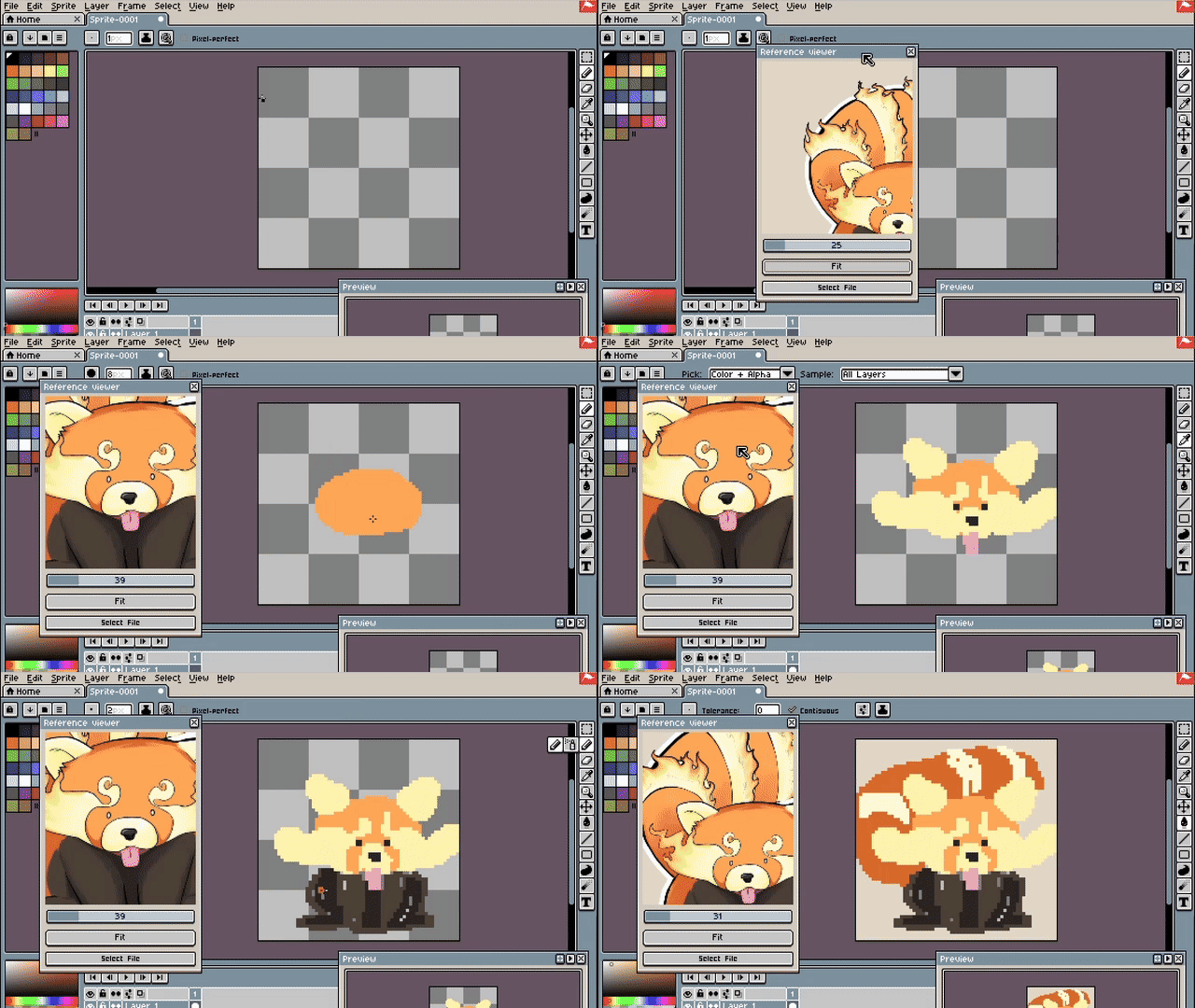
Reference Viewer is an extension that opens a window with a reference image.
Download: Reference Viewer by enmarimo
Source code: GitHub - enmarimo/aseprite_reference_viewer: Aseprite extension to open a reference image
Features
-
Zoom in and out using the slider or the mouse wheel.
-
Click on the Fit button to fit the image into the dialog window.
-
Move the image by dragging it.
-
Pick the color using the eyedropper tool.
Usage
To open the Reference Viewer click on the View>Reference Viewer menu.
A dialog window will open. The dialog window can be resized and moved. Click Select File to open an image (Aseprite will give you a warning about the script accessing an external image).
It is also possible to paste an image using Ctrl-V (it requires Aseprite v1.3.13+).
Changelog
-
v0.5: Using local functions to avoid possible conflicts with other extensions/plugins. Fixed bug when canvas size was 0. Show version number in window title.
-
v0.4: Fix performance issues when zooming out the reference image.
-
v0.3: Added support for eyedropper (color-picker) and pasting from the clipboard (ctrl-v).
-
v0.2: Improved image scaling.
-
v0.1: Initial version.
License / Disclaimer
Reference Viewer is provided “AS IS” and distributed under the MIT license.