Hello everyone,
Apologies, I am a giant newbie and do not really know what I am doing. I understand that oft times forums like these are for more experienced people, but I have tried to find a solution online and couldn’t. So here is the context:
I am creating a game that has a map similar to the one in inscryption in that there will be stages / levels connected by a dotted line. However, unlike inscryption - I would like to add some curvature to my lines to make them pop a bit more - aesthetically speaking.
I have been reading up and have managed to create a custom brush with ctrl B, but am struggling to figure out how to let the brush rotate and work as I desire with the curved line tool.
Here is the image I am using for my custom brush: I put it on a 64 by 64 canvas.
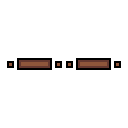
Apologies again for my newbiness. I promise I am trying my best, I simply have no idea where to look to find this information. I have been looking at videos on custom brushes but haven’t found one that answers how to do this. Is this even possible?
Best wishes,
yjzhou