When a dialog has a lot of widgets to fit into a limited space, one option is to enable autoscrollbars through the show method. Another option is to hide widgets that depend on the state of other parameters, then modify their visibility.
For example, you might have a stroke which is set to zero by default, but when the stroke is greater than zero, then the user can change the stroke color with a color widget that becomes visible.
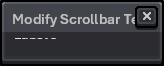
When these two space-management options are combined, there’s a problem. Modifying a dialog widget’s visibility collapses the dialog’s bounds if scrollbars are present.
Version: 1.3.15.2
API version: 35
local dlg = Dialog { title = "Modify Scrollbar Test" }

dlg:slider {
    id = "foo",
    label = "Foo:",
    min = 0,
    max = 100,
    value = 50,
    visible = true,
}

dlg:newrow { always = false }

-- Generate enough widgets to necessitate scroll bar.
local i = 0
while i < 32 do
    i = i + 1
    dlg:label {
        id = string.format("label %d", i),
        text = string.format("Label %d", i),
        vexpand = false,
    }
    dlg:newrow { always = false }
end

dlg:button {
    id = "modButton",
    text = "&OK",
    onclick = function()
        dlg:modify { id = "foo", visible = false }
    end
}

dlg:show {
    autoscrollbars = true,
    wait = false,
}
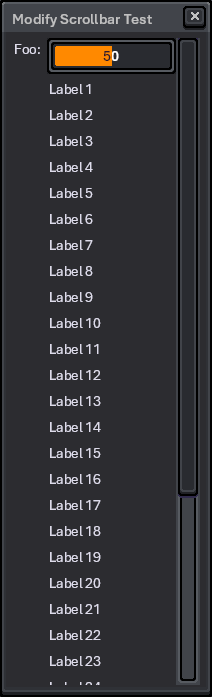
Before:
After:
Actual case:
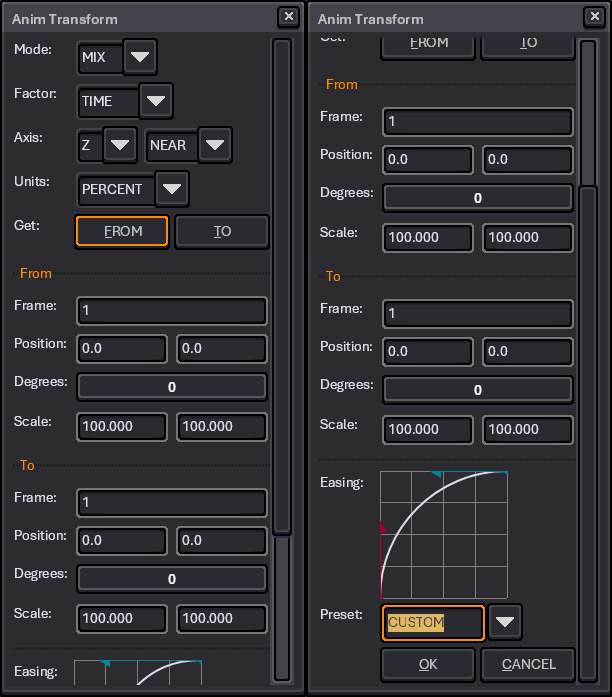
The present workaround is to get the dialog bounds, copy the rectangle’s components by value, modify the widget, set the dialog bounds. There are likely other workarounds to reorganize the UI, such child dialogs or maybe tabs. (This bug report is not a solicitation for UI/UX advice.)
 I’m going to track this on GitHub.