I have used this [bash script]( A Bit Awake - News ) as a baseline and modified it somewhat to better work for me.
It generally does what it is meant to, however an unfortunate and seemingly unavoidable side-effect is that after each reboot, KDE sends this confirm screen if the script reaches line-20 (or rather any xdotool key command).
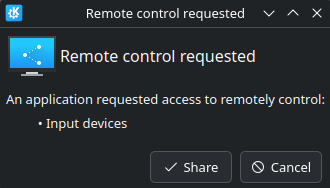
Is there any existing Aseprite script for this purpose that would work without simulated key strokes?
I would make one myself, but I don’t want to teach myself Lua only to realise it cannot be done.
 1 #!/bin/bash
 2 ### Original script at:
 3 ###   https://abitawake.com/news/articles/make-aseprite-always-open-files-in-the-same-window-on-linux
 4
 5 # try to find the aseprite window by name
 6 window_id=$(xdotool search --name "Aseprite v1" | head -n 1)
 7
 8 # aseprite already open
 9 if [ -n "$window_id" ]; then
10     # focus aseprite
11     xdotool windowactivate "$window_id"
12
13     # and file can be read
14     if [ -r "$1" ]; then
15
16         # copy the file path to clipboard
17         echo -n "$1" | xclip -selection clipboard
18
19         # simulate opening file in aseprite
20         xdotool key ctrl+o  # simulate "open" (ctrl+o)
21         xdotool key ctrl+v  # paste file path
22         xdotool key Return  # simulate press enter
23     fi
24     # if file can't be read: nothing to do
25 else
26     # aseprite not running, launch it
27
28     # if trying to open file (and file can be read), then pass it to aseprite to open
29     if [ -r "$1" ]; then
30         aseprite "$1" &
31
32     # else just open aseprite
33     else
34         aseprite &
35     fi
36 fi