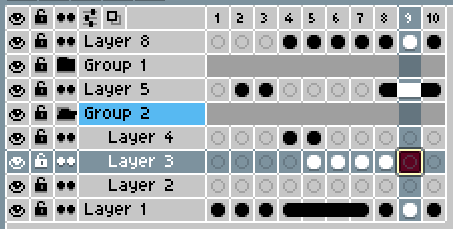
When working with complex animations that use many layers, groups are essential for keeping the timeline readable. However, groups currently behave like regular layers in the timeline: they display frames and accept dragged cells.
This causes two problems:
-
Groups showing frames makes it harder to visually distinguish structural layers (containers) from actual drawable/animated layers, especially in large timelines with nested groups.
-
Dragging a cell onto a group in the timeline causes the graphic content to disappear, which feels unsafe and unintuitive. It’s easy to do this by accident, and there is no visual feedback indicating that the operation is invalid.
Make groups behave as non-frame layers in the timeline, or at least prevent unsafe interactions with them.
Possible solutions:
-
Do not display frames for group layers in the timeline or/and tint 20% darker the group layer.
-
Prevent dragging cells onto groups + show a “not allowed” cursor or/and if a cell is dropped onto a group, automatically cancel the operation and maintain the cell on its original layer.
The goal is to make groups clearly behave as containers and avoid accidental data loss or confusion.
It could look similar to the image attached.