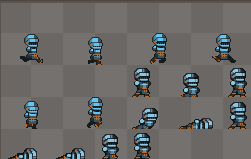
I have two sets of aseprite files. They are actually a few small files I am using a script to pack together. One set is uniformly set apart, the other seems to be mixing the files into different sizes?
I bought the sprites off of itch and this is not my area of expertise. The list of files is from a file called path that just lists directories I want to look for files in.
export output_dir=$(pwd)

paths_to_process=()
for dir in $(cat paths_equip); do
    paths_to_process+=(“$dir”)
done

ase_file=()
for dir in ${paths_to_process[@]}; do
    ase_file+=($(ls $dir | grep aseprite | sed “s|^|$dir/|”))
done

aseprite -b “${ase_file[@]}”
    -–sheet-pack \
    -–sheet $output_dir/character_knight_atlas.png \
    -–data $output_dir/character_knight_atlas.json \
    -–list-tags \
    -–filename-format “{title}_{frame}” \
echo “Sprites combined to $output_dir/character_knight_atlas.png”
One set is uniformly set apart, the other seems to be mixing the files into different sizes
Do you want the images to be equally spaced, or do you want your sprite sheet area optimized?
I’m assuming you want your sheet optimized, so I’m guessing you want to minimize the empty spaces between images. The problem you’re describing sounds like the sprite images that are resulting in equally spaced images are detecting a background color different from the mask.
I’ll be able to give you a better diagnosis if you can share the images with us via support@aseprite.org.
Mostly I am looking to take a bunch of aseprite files that are spread across directories and then put them on one Atlas. I guess it doesn’t have to be an atlas but I am using AnimationTree and that seemed to work.
I don’t know about sharing them as I am using assets from twitch called pixel crawler. They are all broken up into tiny pngs coming from aseprite files. This was my attempt to combine them.