So many times when I try to replace a colour using Ctrl+R, I forget which the “from” color is and which the “to” color is. I don’t use it enough to have the memory locked down, but if I usually guess wrong. It’s Definitely a skill issue, but having primary be the from seems wrong and unintuitive to me.
Adding a button right under the color selectors to switch the currently provided “to” and “from” colors would be a major convenience. Then I would just have to get the two colors as primary and secondary, then correct the toggle - not have to have it on the first try and pray that I got it right.
Seems like a super easy to add feature.
Example - i want to switch all #ffffff to #ff0000. I will mistakenly place white in the “to” instead of the “from”. Thus, I then must exit the Replace Color tool and reselect the colors manually to get them in the correct “bucket”. A button to do the switch for me would be greatly appreciated.
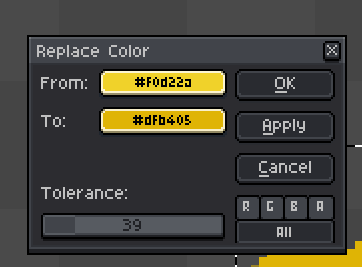
i.e, in this case, a button to make #f0d22a the “to” and #dfb405 the “from”.